
Microsoft AZ-140 Configuring and Operating Microsoft Azure Virtual Desktop Exam Practice Test
Configuring and Operating Microsoft Azure Virtual Desktop Questions and Answers
Which role should you assign to Operator2 to meet the technical requirements?
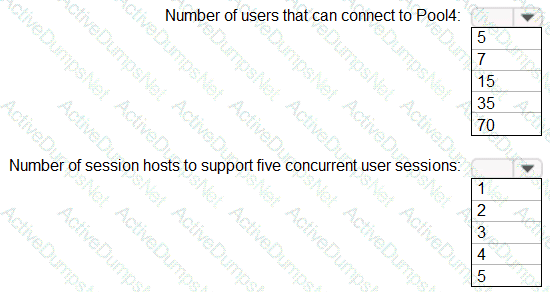
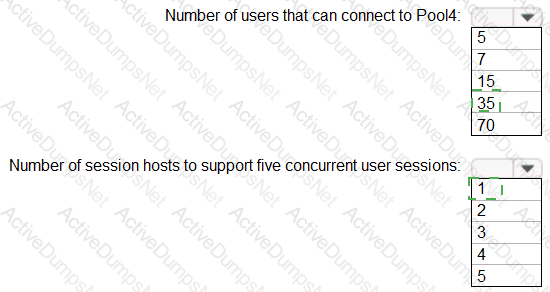
You are planning the deployment of Pool4.
What will be the maximum number of users that can connect to Pool4, and how many session hosts are needed to support five concurrent user sessions? To answer, select the appropriate options in the answer area.
NOTE: Each correct selection is worth one point.
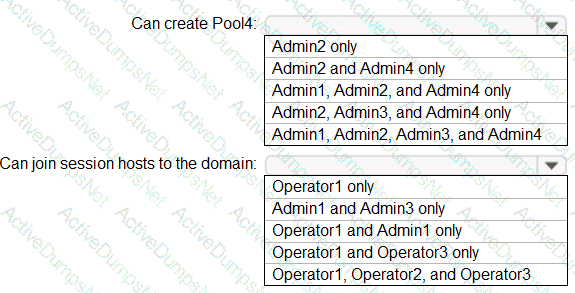
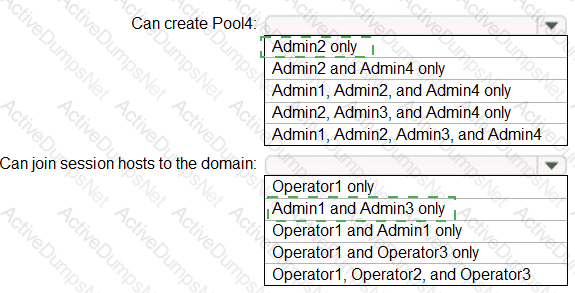
Which users can create Pool4, and which users can join session hosts to the domain? To answer, select the appropriate options in the answer area.
NOTE: Each correct selection is worth one point.
You need to configure the virtual machines that have the Pool1 prefix. The solution must meet the technical requirements.
What should you use?
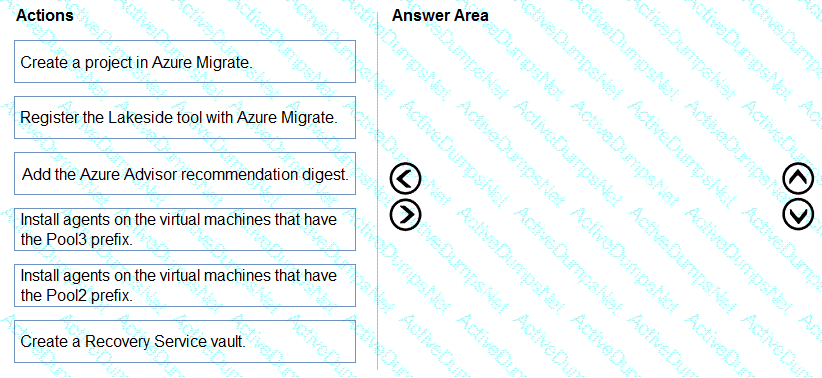
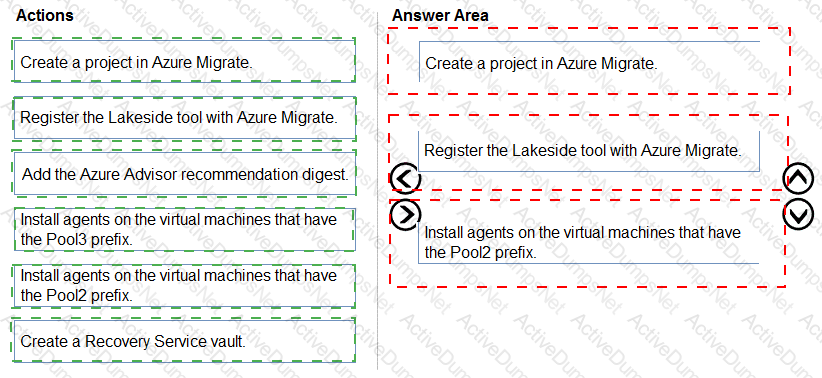
You need to evaluate the RDS deployment in the Seattle office. The solution must meet the technical requirements.
Which three actions should you perform in sequence? To answer, move the appropriate actions from the list of actions to the answer area and arrange them in the correct order.
You need to configure the device redirection settings. The solution must meet the technical requirements.
Where should you configure the settings?
You plan to implement the FSLogix profile containers for the Seattle office.
Which storage account should you use?
Which setting should you modify for VNET4 before you can deploy Pool4?
Which three PowerShell modules should you install on Server1 to meet the technical requirements? Each correct answer presents part of the solution.
NOTE: Each correct selection is worth one point.
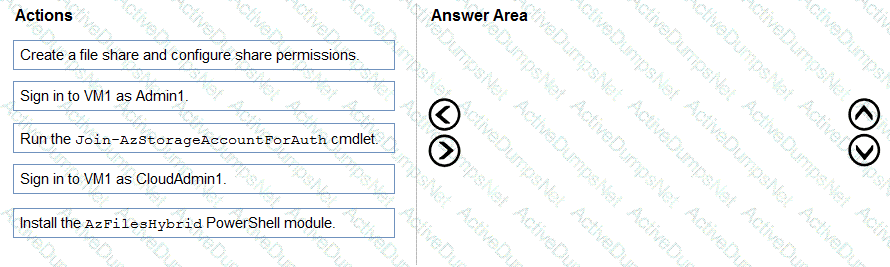
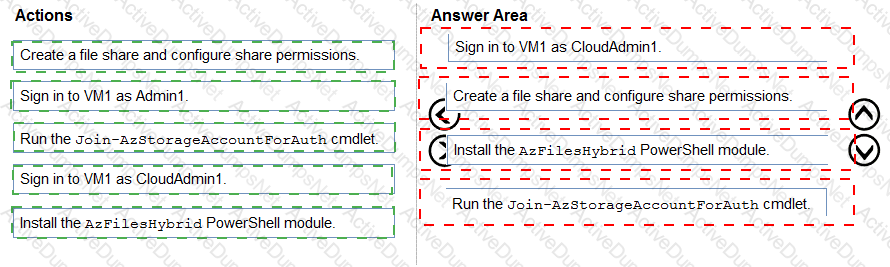
You need to ensure that you can implement user profile shares for the Boston office users. The solution must meet the user profile requirements.
Which four actions should you perform in sequence? To answer, move the appropriate actions from the list of actions to the answer area and arrange them in the correct order.
You need to deploy the session hosts to meet the deployment requirements Which PowerShell cmdlel should you run first?
You need to configure the user settings of Admin1 to meet the user profile requirements.
What should you do?
You need to ensure the resiliency of the user profiles for the Boston office users. The solution must meet the user performance requirements.
What should you do?
You need to recommend an authentication solution that meets the performance requirements.
Which two actions should you include in the recommendation? Each correct answer presents part of the solution.
NOTE: Each correct selection is worth one point.
You need to implement network security to meet the security requirements and the performance requirements.
Which two actions should you perform? Each correct answer presents a complete solution.
NOTE: Each correct selection is worth one point.
You need to recommend a DNS infrastructure that meet the performance requirements. What should you recommend? To answer, select the appropriate options in the answer area. NOTE: Each correct selection is worth one point.


Which two roles should you assign to Admin2 to meet the security requirements? Each correct answer presents part of the solution.
NOTE: Each correct selection is worth one point.
You need to modify the custom virtual machine images to meet the deployment requirements.
What should you install?
You need to configure a conditional access policy to meet the authentication requirements.
What should you include in the policy configuration? To answer, select the appropriate options in the answer area.
NOTE Each correct selection is worth one point.


What should you configure to meet the networking requirements?
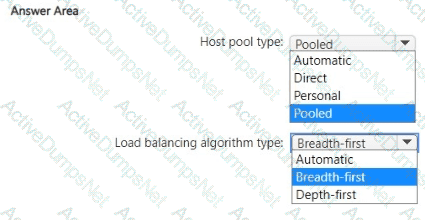
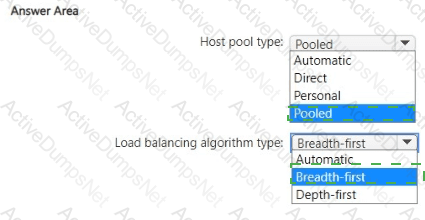
Which type of host pool and load balancing algorithm should you configure to meet the performance requirements? To answer, select the appropriate options in The answer area.
NOTE: Each correct selection is worth one point.
Which two actions should you perform to meet the security requirements for Defender for Endpoint? Each correct answer presents a complete solution.
NOTE: Each correct selection is worth one point.
What should you do to meet the user profile requirements?
You have an Azure Virtual Desktop session host named Host1.
You need to check the status of Microsoft Defender Antivirus on Host1.
Which PowerShell cmdlet should you run?
Note: This question is part of a series of questions that present the same scenario. Each question in
the series contains a unique solution that might meet the stated goals. Some question sets might have more than one correct solution, while others might not have a correct solution.
After you answer a question in this section, you will NOT be able to return to it. As a result, these
questions will not appear in the review screen.
You have a Windows Virtual Desktop host pool that contains five session hosts. The session hosts run
Windows 10 Enterprise multi-session.
You need to prevent users from accessing the internet from Windows Virtual Desktop sessions. The session hosts must be allowed to access all the required Microsoft services.
Solution: You modify the IP configuration of each session host.
Does that meet the goal?
You have an Azure Virtual Desktop host pool named Pool1. Pool1 contains session hosts that run Windows 11 Enterprise multi-session.
You need to use Performance Monitor to troubleshoot a poor frame quality issue that is affecting a current user session to Pool1.
Which performance counter should you use?
You have an Azure subscription. The subscription contains a virtual machine named Server1 that runs Windows Server and is deployed to the West US Azure region.
You deploy a new Azure Virtual Desktop host pool named HostPool1 to the East US Azure region.
You need to ensure that all the traffic between HostPool1 and Server1 is routed via the Microsoft backbone network.
What should you use?
You have the devices shown in the following table.
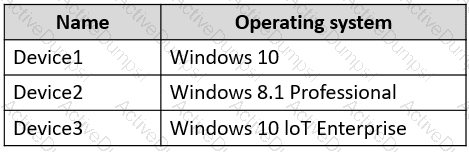
You plan to deploy Azure Virtual Desktop for client access to remote virtualized apps.
Which devices support the Remote Desktop client?
You have an Azure Virtual Desktop personal host pool named Pool1 that contains 20 Azure AD-joined session hosts.
You need to ensure that only approved virtual machine extensions are installed on the Pool 1 session hosts. The solution must minimize administrative effort.
What should you use?
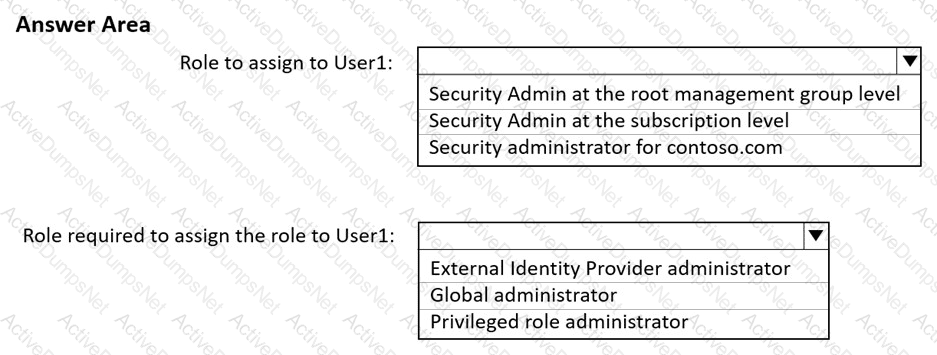
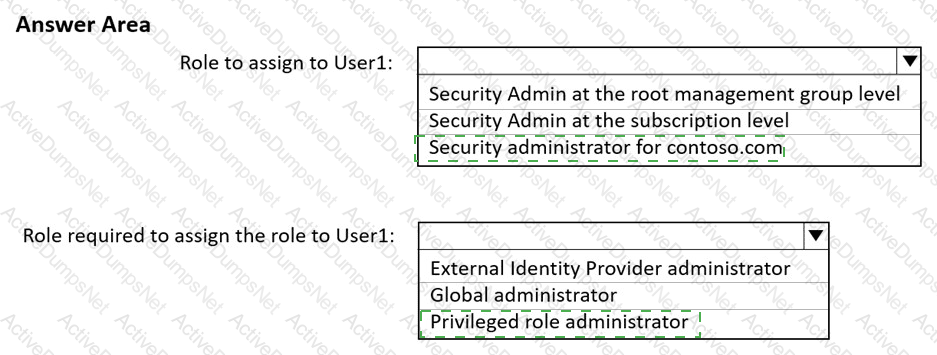
You have two Azure subscriptions that are linked to an Azure Active Directory (Azure AD) tenant named contoso.com and contain an Azure Virtual Desktop deployment. The tenant contains a user named User1.
When User1 signs in to Azure Security Center, the user receives the message shown in the following exhibit.
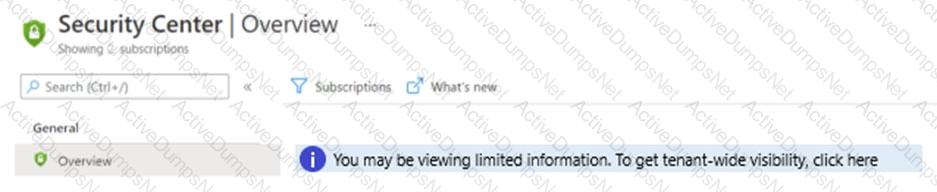
You need to ensure that User1 can manage security information for the tenant. The solution must use the principle of least privilege.
What should you do? To answer, select the appropriate options in the answer area.
NOTE: Each correct selection is worth one point.
Hot Area:
You have an Azure subscription that contains an Azure Virtual Desktop host pool named Pool1 All the session hosts in Pool! are Microsoft Entra joined.
Users connect to Pool1 by using macOS devices.
You need to ensure that remote users can authenticate to RemoteApp sessions by using their Microsoft Entra credentials.
Which RDP property should you configure?
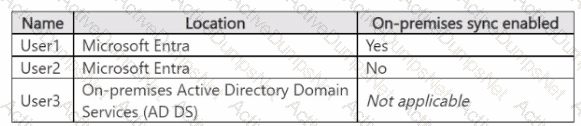
You have an Azure subscription that is linked to a hybrid Microsoft Entra tenant. You have the user accounts shown in the following table.
You have an Azure Virtual Desktop deployment that uses FSLogix profiles and contains the host pools shown in the following table.

The host pools contain the session hosts shown in the following table.
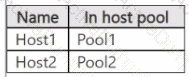
For each of the following statements, select Yes if the statement is true. Otherwise, select No.
NOTE: Each correct selection is worth one point.
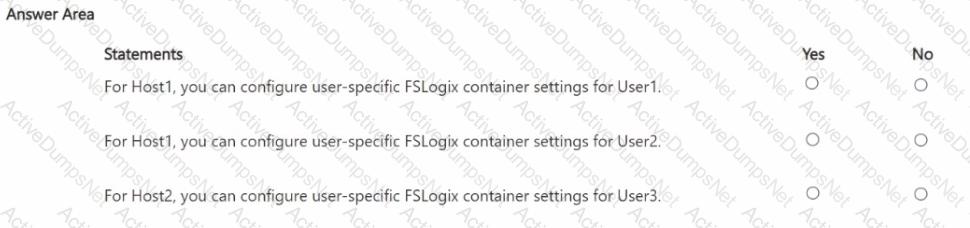
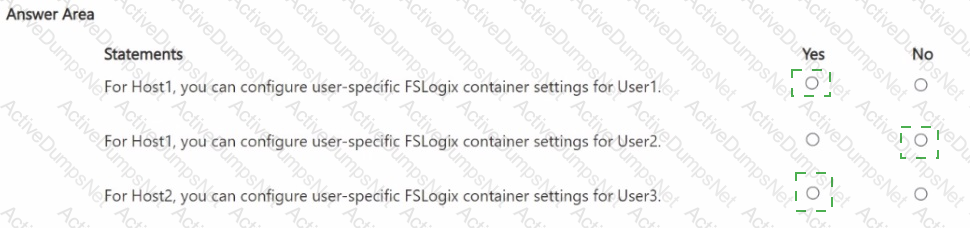
You have an Azure Virtual Desktop deployment
You need to implement FSLogix to host user profiles in an Azure Storage account by using Azure file shares. The solution must meet the following requirements:
• Access to a session host must be allowed only if the user profile is available from the storage account
• Local profiles must NOT be created on the session hosts.
Which FSLogix registry setting should you use?
You have a Windows Virtual Desktop host pool that runs Windows 10 Enterprise multi-session.
You need to configure automatic scaling of the host pool to meet the following requirements:
Distribute new user sessions across all running session hosts.
Automatically start a new session host when concurrent user sessions exceed 30 users per host.
What should you include in the solution?
You have an Azure subscription.
You need to deploy an Azure Virtual Desktop host pool that will contain 20 Windows 11 session hosts. The solution must meet the following requirements:
• Each session host must have a Windows client license applied.
• Administrative effort must be minimized.
What should you use to deploy the session hosts?
You have an Azure subscription that contains a virtual network named VNet1. a storage account named storage1, and five Azure Virtual Desktop session hosts. VNet1 and storage1 ate in the East US Azure region. The session hosts are connected to VNet1.
In storage1. you create an Azure File share named share1.
You need to ensure that the session hosts connect to share1 by using the Microsoft backbone network.
Solution: You configure network peering for VNet1.
Does this meet the goal?
You have an Azure Virtual Desktop deployment.
The session hosts are joined to an on-premises Active Directory domain named contoso.com.
You need to limit user sessions to three hours.
What should you configure?
You have an Azure Virtual Desktop deployment that contains an Azure compute gallery. The Azure compute gallery contains an image definition named
Definitions Definitionl contains the following image versions:
* 1.0.0
* 1.1.0
* 1.2.0
You need to ensure that when a virtual machine is created from the Azure compute gallery, the 1.1.0 image version is used by default.
What should you do?
You have a Azure Virtual Desktop deployment that uses Microsoft 355 cloud services including Microsoft Teams.
Users use the Remote Desktop client to connect to the deployment from computers that run Windows 10
You need to support audio and video in Azure Virtual Desktop and provide the users with access to Microsoft Teams calling and meeting features.
Which three actions should you perform? Each correct answer presents part of the solution.
NOTE: Each correct selection is worth one point.
You have a Windows Virtual Desktop host pool that contains two session hosts. The Microsoft Teams client is installed on each session host.
You discover that only the Microsoft Teams chat and collaboration features work. The calling and meeting features are disabled.
You need to ensure that users can set the calling and meeting features from within Microsoft Teams.
What should you do?
You have an Azure subscription that contains the virtual machines shown in the following table.
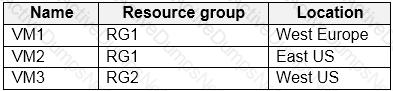
You create a shared image gallery as shown in the SharedGallery1 exhibit. (Click the SharedGallery1 tab.)
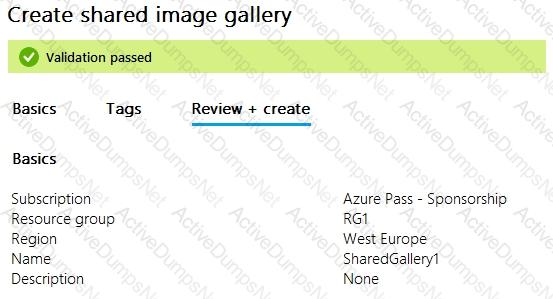
You create an image definition as shown in the Image1 exhibit. (Click the Image1 tab.)
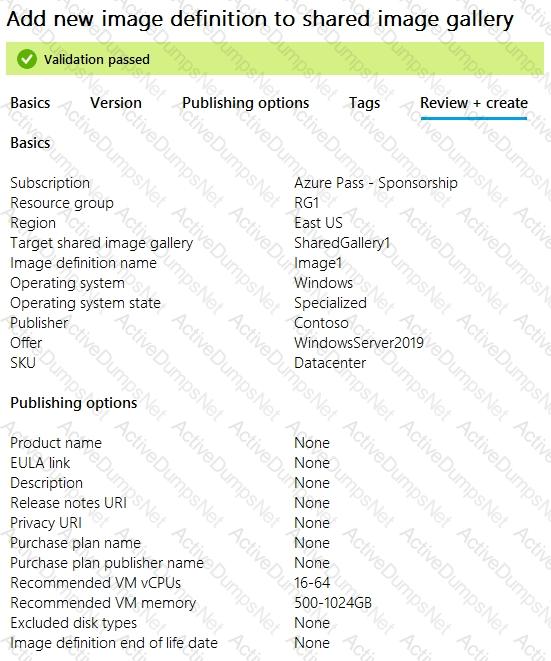
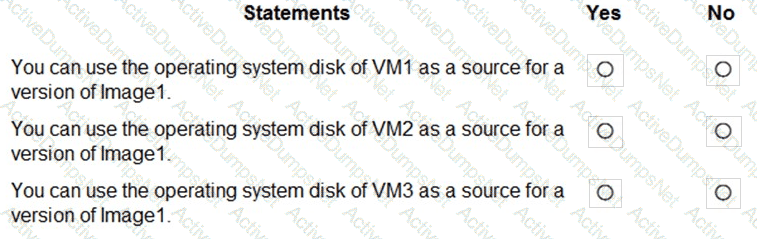
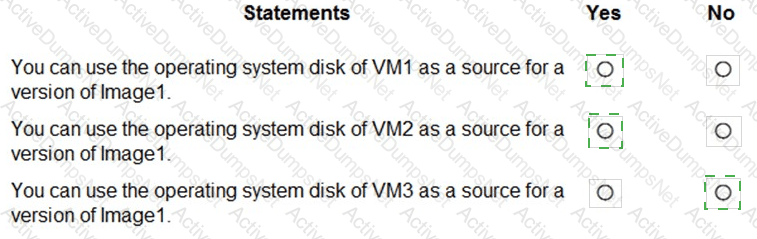
For each of the following statements, select Yes if the statement is true. Otherwise, select No.
NOTE: Each correct selection is worth one point.
You have an on-premises Windows device named Device1.
You have an Azure Virtual Desktop host pool named Pool1 that contains Windows 11 session hosts.
You create an application group named AppGrp1. You have an app named App1. App1 is added to AppGrp1 and published as a RemoteApp.
You need to ensure that when a user on Device1 connects to Appl. Microsoft OneDrive launches.
Which two actions should you perform? Each correct answer presents part of the solution.
NOTE: Each correct selection is worth one point.
You have an Azure Virtual Desktop deployment.
You plan to create a new host pool named Pool1 that will contain five Windows 11 session hosts.
You need to enable secure boot and vTPM on the session hosts.
How should you configure the Virtual Machines settings?
Your network contains an on-premises Active Directory domain that syncs to a Microsoft Entra tenant. The domain contains the users shown in the following table.

You have a Azure Virtual Desktop deployment that contains the application groups shown in the following table.
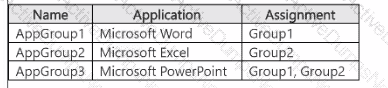
You have the workspaces shown in the following table.
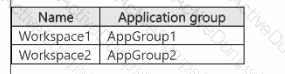
For each of the following statements, select Yes if the statement is true. Otherwise, select No.
NOTE: Each correct selection is worth one point.
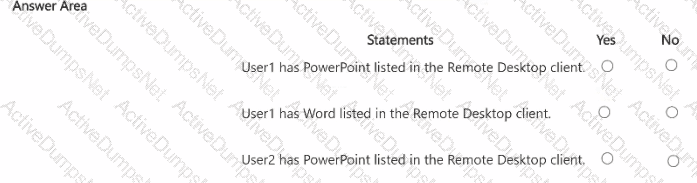
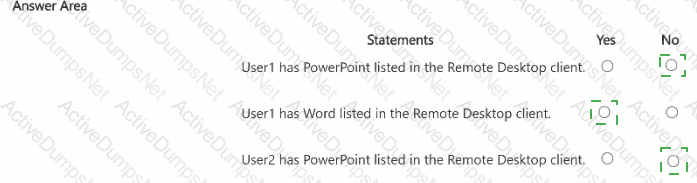
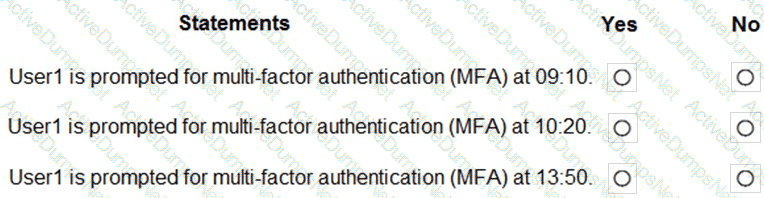
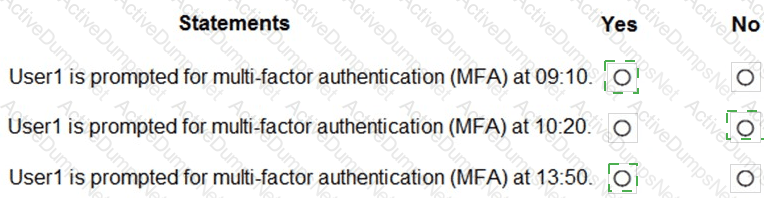
You have an Azure Virtual Desktop Deployment that contains a workspace named Workspace1 and a user named User1. Workspace1 contains a Desktop application group named Pool1Desktop.
At 09:00, you create a conditional access policy that has the following settings:
Assignments:
- Users and groups: User1
- Cloud apps or actions: Azure Virtual Desktop
- Conditions: 0 conditions selected
Access controls
- Grant: Grant access, Require multi-factor authentication
- Sessions: Sign-in frequency 1 hour
User1 performs the actions shown in the following table.
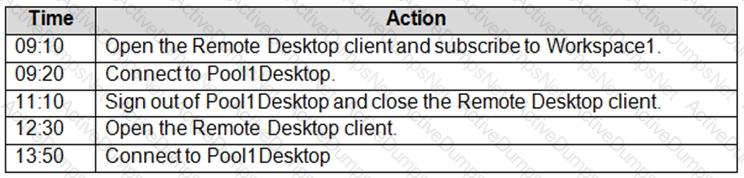
For each of the following statements, select Yes if the statement is true. Otherwise, select No.
NOTE: Each correct selection is worth one point.
Your network contains an on-premises Active Directory domain named contoso.com that syncs to an Azure Active Directory (Azure AD) tenant You have an Azure Virtual Desktop host pool named Pool1 that has the following settings:
• Host pool name- Pool 1
• Host pool type: Personal
• Number of VMs: 3
The session hosts have the following configurations:
• Image used to create the virtual machines: Windows 10 Enterprise
• Virtual machines domain-Joined to: On-premises conroso.com domain
You need to ensure that you can use Microsoft EndPoint Manager to manage security updates on the session hosts. What should you do?