
- Home
- Microsoft
- Microsoft Certified: Azure AI Fundamentals
- AI-900
- AI-900 - Microsoft Azure AI Fundamentals
Microsoft AI-900 Microsoft Azure AI Fundamentals Exam Practice Test
Microsoft Azure AI Fundamentals Questions and Answers
You are developing a solution that uses the Text Analytics service.
You need to identify the main talking points in a collection of documents.
Which type of natural language processing should you use?
Options:
entity recognition
key phrase extraction
sentiment analysis
language detection
Answer:
BExplanation:
According to the Microsoft Azure AI Fundamentals (AI-900) learning path and Azure Text Analytics service documentation, key phrase extraction is a natural language processing (NLP) technique used to automatically identify the main topics or talking points within a text document or a collection of documents. This feature is designed to summarize textual data by detecting the most relevant words or short phrases that capture the essence of the content.
For example, if a document discusses “renewable energy sources such as solar and wind power,” the key phrases extracted might include “renewable energy,” “solar power,” and “wind power.” This helps users quickly understand the primary focus areas of large volumes of text without manual review.
In Azure, the Text Analytics service provides several core NLP capabilities, including:
Key phrase extraction – identifies main concepts or topics.
Entity recognition – detects and categorizes proper names like people, locations, or organizations.
Sentiment analysis – determines the emotional tone (positive, neutral, or negative).
Language detection – identifies the language used in the text.
Since the question specifies identifying main talking points, the correct feature is key phrase extraction, as it focuses on summarizing themes rather than identifying entities or emotions.
Therefore, the verified answer is B. key phrase extraction.
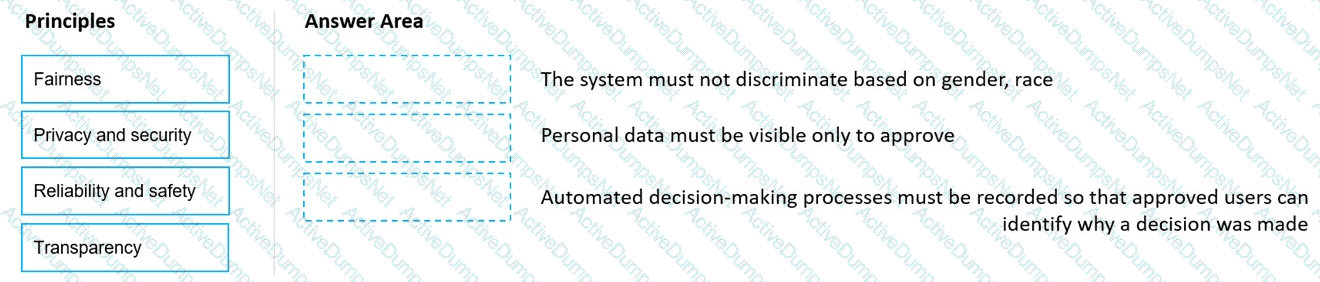
Match the principles of responsible AI to appropriate requirements.
To answer, drag the appropriate principles from the column on the left to its requirement on the right. Each principle may be used once, more than once, or not at all. You may need to drag the split bar between panes or scroll to view content.
NOTE: Each correct selection is worth one point.
Options:
Answer:
Explanation:
According to the Microsoft Azure AI Fundamentals (AI-900) official study guide and the Microsoft Learn module “Identify guiding principles for responsible AI”, responsible AI is built upon six foundational principles: Fairness, Reliability and Safety, Privacy and Security, Inclusiveness, Transparency, and Accountability. Each principle serves to guide the ethical design, deployment, and management of artificial intelligence systems.
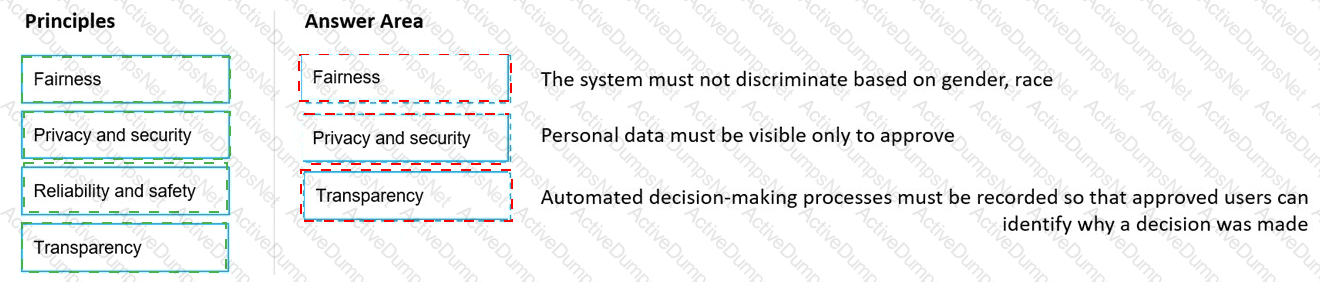
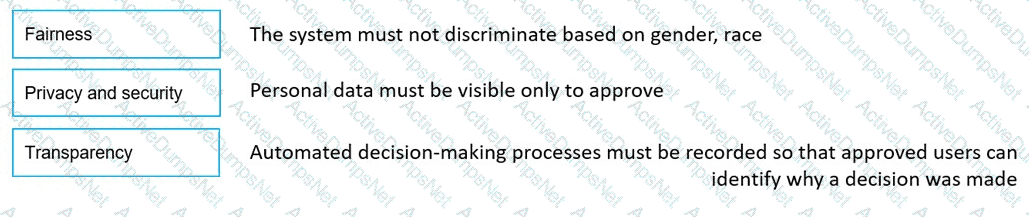
Fairness – This principle ensures that AI systems treat all people fairly and do not discriminate based on personal attributes such as gender, race, or age. The Microsoft Learn content emphasizes that “AI systems should treat everyone fairly” and that organizations must evaluate datasets and model outputs for bias. In this scenario, “The system must not discriminate based on gender, race” clearly aligns with Fairness because it directly addresses equitable treatment and unbiased decision-making.
Privacy and Security – Microsoft’s responsible AI framework stresses that “AI systems must be secure and respect privacy.” This means personal data should be safeguarded, processed lawfully, and visible only to authorized users. The statement “Personal data must be visible only to approved users” reflects the importance of protecting sensitive information and controlling access—precisely the intent of the Privacy and Security principle.
Transparency – Transparency refers to ensuring that users understand how AI systems operate and make decisions. Microsoft notes that “AI systems should be understandable and users should be able to know why decisions are made.” The requirement “Automated decision-making processes must be recorded so that approved users can identify why a decision was made” directly supports this principle. Transparency promotes trust and accountability by documenting the reasoning behind AI outputs.
Reliability and Safety, though another core principle, does not directly relate to any of the provided statements in this question.
What is a use case for classification?
Options:
predicting how many cups of coffee a person will drink based on how many hours the person slept the previous night.
analyzing the contents of images and grouping images that have similar colors
predicting whether someone uses a bicycle to travel to work based on the distance from home to work
predicting how many minutes it will take someone to run a race based on past race times
Answer:
CExplanation:
According to the Microsoft Azure AI Fundamentals (AI-900) official study guide and Microsoft Learn module “Identify features of classification machine learning”, classification is a type of supervised machine learning used when the goal is to predict a categorical outcome. That means the output variable represents discrete labels such as Yes/No, True/False, or Category A/B/C.
In this example, the model is predicting whether a person uses a bicycle (Yes or No) — a binary categorical outcome. The input (distance from home to work) is numeric, but the prediction is a class or category, which makes it a classification problem.
To compare:
A and D (predicting how many cups of coffee or race minutes) involve numeric predictions, which are regression tasks.
B (grouping images by similar colors) involves clustering, an unsupervised learning method used to find natural groupings in data.
Thus, the use case that fits classification is predicting whether someone uses a bicycle, since the answer is categorical.
Select the answer that correctly completes the sentence.

Options:
Answer:

Explanation:

In Microsoft’s Responsible AI framework, the Reliability and Safety principle ensures that AI systems perform consistently, safely, and as intended across diverse conditions — even when faced with incomplete, unusual, or unexpected data. Correctly handling unusual or missing values in a dataset directly demonstrates this principle, as it helps prevent faulty predictions, biased results, or unsafe system behaviors.
According to the Microsoft Learn Responsible AI module (from the AI-900 and AI-102 study paths), a reliable AI model should maintain its performance when encountering data anomalies. This includes validating inputs, managing missing or extreme values, and testing models to ensure they behave as expected in real-world scenarios. Such practices make AI systems robust and trustworthy, which aligns exactly with the Reliability and Safety principle.
The other Responsible AI principles address different concerns:
Inclusiveness: Ensures AI empowers and serves all users equitably.
Privacy and Security: Focuses on safeguarding personal data and preventing unauthorized access.
Transparency: Ensures that AI decisions are understandable and explainable to users.
While all principles are essential, managing data integrity and system stability—including how a model responds to missing or anomalous values—is primarily a matter of reliability and safety. It ensures the AI behaves predictably and minimizes risks of errors or unintended harm.
Therefore, the correct completion of the sentence is:
“Correctly handling unusual or missing values is an example of the application of the Reliability and Safety principle for Responsible AI.”
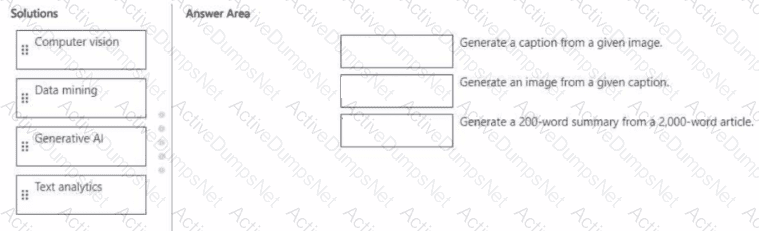
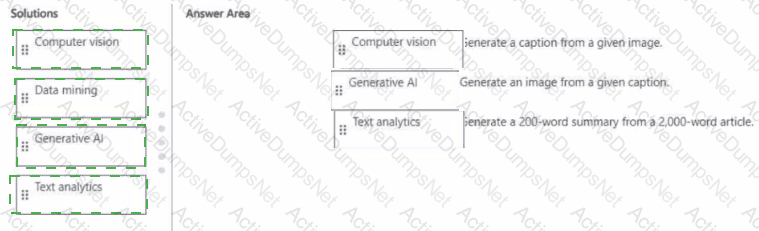
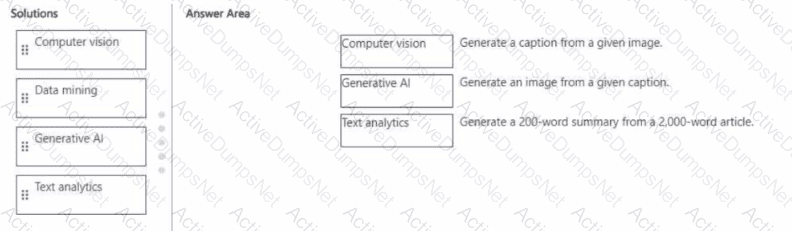
Match the Al solution to the appropriate task.
To answer, drag the appropriate solution from the column on the left to its task on the right. Each solution may be used once, more than once, or not at all.
NOTE: Each correct match is worth one point.
Options:
Answer:
Explanation:
This question evaluates your understanding of how different Azure AI workloads correspond to specific tasks in image, text, and content generation scenarios, as explained in the Microsoft Azure AI Fundamentals (AI-900) study guide and Microsoft Learn modules covering common AI workloads and Azure services.
Generate a caption from a given image → Computer VisionThis is a computer vision task because it involves analyzing the visual elements of an image and producing descriptive text (a caption). Azure AI Vision provides image analysis and captioning capabilities through its Describe Image API, which uses deep learning models to recognize objects, scenes, and actions in an image and automatically generate natural-language descriptions (e.g., “A cat sitting on a sofa”).
Generate an image from a given caption → Generative AIThis task belongs to Generative AI, which focuses on creating new content such as text, code, or images based on prompts. Tools like Azure OpenAI Service with DALL-E can interpret text descriptions and generate realistic images that match the given caption. Generative AI is capable of creative synthesis, not just analysis, making it the appropriate category.
Generate a 200-word summary from a 2,000-word article → Text AnalyticsText analytics (a subset of natural language processing) allows summarization, sentiment analysis, and entity recognition from large text corpora. Azure AI Language includes text summarization capabilities that condense long documents into concise summaries while preserving meaning and key information.
Which service should you use to extract text, key/value pairs, and table data automatically from scanned documents?
Options:
Azure Al Custom Vision
Azure Al Document Intelligence
Azure Al Language
Azure Al face
Answer:
BExplanation:
Accelerate your business processes by automating information extraction. Form Recognizer applies advanced machine learning to accurately extract text, key/value pairs, and tables from documents. With just a few samples, Form Recognizer tailors its understanding to your documents, both on-premises and in the cloud. Turn forms into usable data at a fraction of the time and cost, so you can focus more time acting on the information rather than compiling it.
Select the answer that correctly completes the sentence.

Options:
Answer:

Explanation:

According to the Microsoft Azure AI Fundamentals (AI-900) official study guide and the Microsoft Learn module “Identify features of common machine learning types”, the classification technique is a type of supervised machine learning used to predict which category or class a new observation belongs to, based on patterns learned from labeled training data.
In this scenario, a banking system that predicts whether a loan will be repaid is dealing with a binary outcome—either the loan will be repaid or will not be repaid. These two possible results represent distinct classes, making this problem a classic example of binary classification. During training, the model learns from historical data containing features such as customer income, credit score, loan amount, and repayment history, along with labeled outcomes (repaid or defaulted). After training, it can classify new applications into one of these two categories.
The AI-900 curriculum distinguishes between three key supervised and unsupervised learning approaches:
Classification: Predicts discrete categories (e.g., spam/not spam, fraud/not fraud, will repay/won’t repay).
Regression: Predicts continuous numerical values (e.g., house prices, sales forecast, temperature).
Clustering: Groups data based on similarity without predefined labels (e.g., customer segmentation).
Since the banking problem focuses on predicting a categorical outcome rather than a continuous numeric value, it fits squarely into the classification domain. In Azure Machine Learning, such tasks can be performed using algorithms like Logistic Regression, Decision Trees, or Support Vector Machines (SVMs), all configured for categorical prediction.
Therefore, per Microsoft’s official AI-900 learning objectives, a banking system predicting whether a loan will be repaid represents a classification type of machine learning problem.
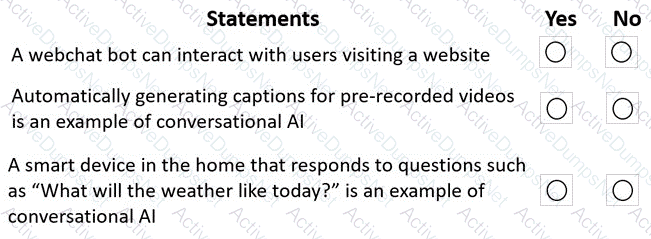
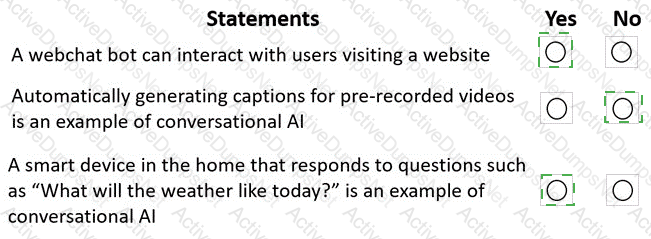
For each of the following statements, select Yes if the statement is true. Otherwise, select No.
NOTE: Each correct selection is worth one point.
Options:
Answer:
Explanation:
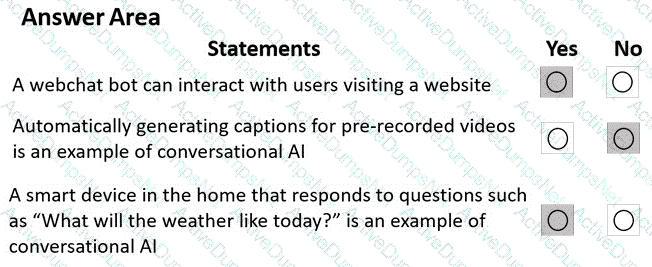
These answers align with the Microsoft Azure AI Fundamentals (AI-900) Official Study Guide and the Microsoft Learn module “Explore conversational AI in Microsoft Azure.”
1. A webchat bot can interact with users visiting a website → Yes
This statement is true. The Azure Bot Service allows developers to create intelligent chatbots that can be integrated into a webchat interface. This enables visitors to interact with the bot directly from a website, asking questions and receiving automated responses. This is a typical use case of conversational AI, where natural language processing (NLP) is used to interpret and respond to user input conversationally.
2. Automatically generating captions for pre-recorded videos is an example of conversational AI → No
This statement is false. Automatically generating captions from video content is an example of speech-to-text (speech recognition) technology, not conversational AI. While it uses AI to convert spoken words into text, it lacks the two-way interactive communication characteristic of conversational AI. This task is typically handled by the Azure AI Speech service, which transcribes spoken content.
3. A smart device in the home that responds to questions such as “What will the weather be like today?” is an example of conversational AI → Yes
This statement is true. Smart home assistants that engage in dialogue with users are powered by conversational AI. These devices use speech recognition to understand spoken input, natural language understanding (NLU) to determine intent, and speech synthesis (text-to-speech) to respond audibly. This represents the full conversational AI loop, where machines communicate naturally with humans.
To complete the sentence, select the appropriate option in the answer area.
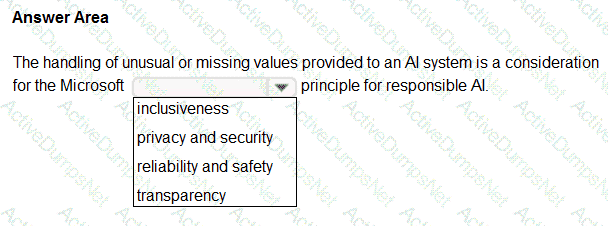
Options:
Answer:
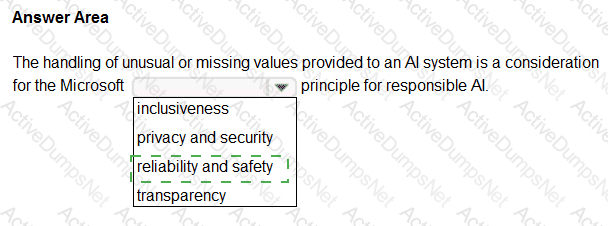
Explanation:
Reliability & Safety
https://en.wikipedia.org/wiki/Tay_(bot)
“To build trust, it ' s critical that AI systems operate reliably, safely, and consistently under normal circumstances and in unexpected conditions. These systems should be able to operate as they were originally designed, respond safely to unanticipated conditions, and resist harmful manipulation. It ' s also important to be able to verify that these systems are behaving as intended under actual operating conditions. How they behave and the variety of conditions they can handle reliably and safely largely reflects the range of situations and circumstances that developers anticipate during design and testing. We believe that rigorous testing is essential during system development and deployment to ensure AI systems can respond safely in unanticipated situations and edge cases, don ' t have unexpected performance failures, and don ' t evolve in ways that are inconsistent with original expectations”
You plan to apply Text Analytics API features to a technical support ticketing system.
Match the Text Analytics API features to the appropriate natural language processing scenarios.
To answer, drag the appropriate feature from the column on the left to its scenario on the right. Each feature may be used once, more than once, or not at all.
NOTE: Each correct selection is worth one point.
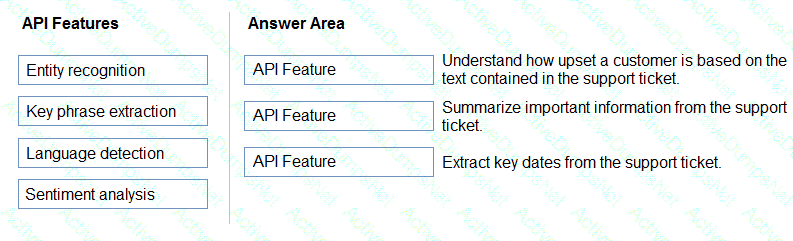
Options:
Answer:
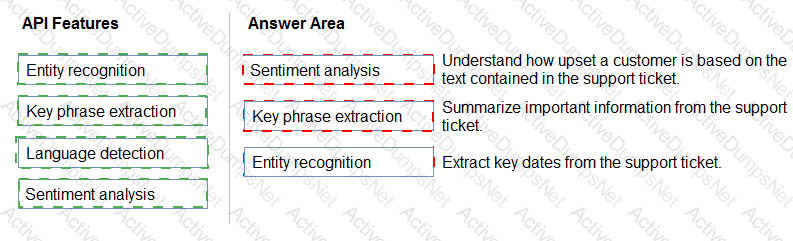
Explanation:
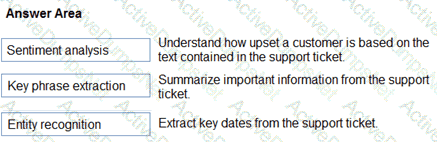
Box1: Sentiment analysis
Sentiment Analysis is the process of determining whether a piece of writing is positive, negative or neutral.
Box 2: Broad entity extraction
Broad entity extraction: Identify important concepts in text, including key
Key phrase extraction/ Broad entity extraction: Identify important concepts in text, including key phrases and named entities such as people, places, and organizations.
Box 3: Entity Recognition
Named Entity Recognition: Identify and categorize entities in your text as people, places, organizations, date/time, quantities, percentages, currencies, and more. Well-known entities are also recognized and linked to more information on the web.
Match the types of AI workloads to the appropriate scenarios.
To answer, drag the appropriate workload type from the column on the left to its scenario on the right. Each workload type may be used once, more than once, or not at all.
NOTE: Each correct selection is worth one point.
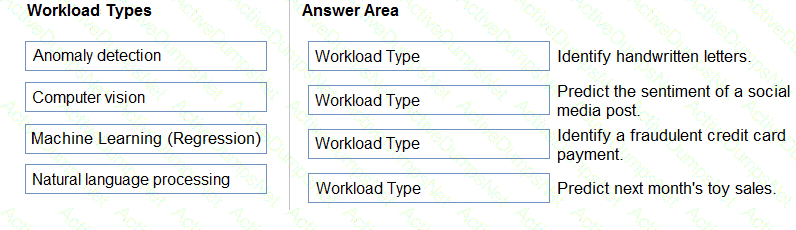
Options:
Answer:
Explanation:
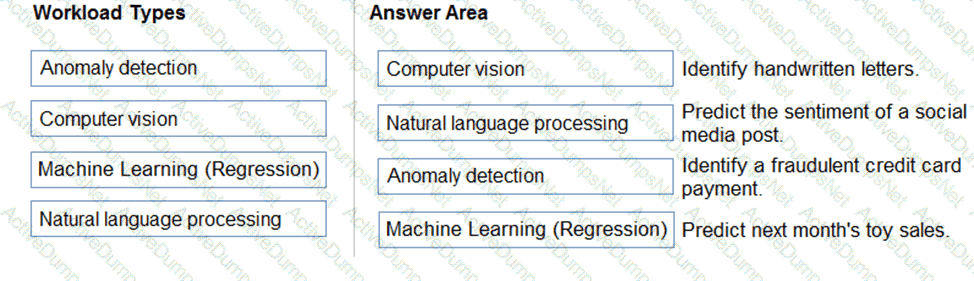
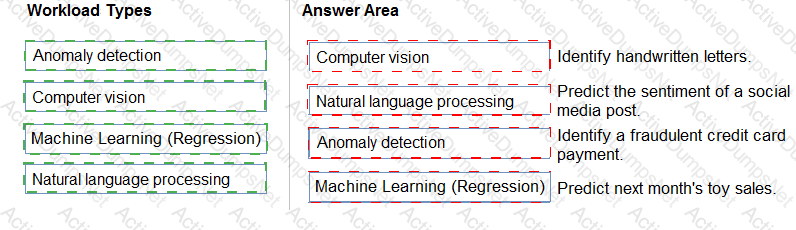
This question tests understanding of AI workload types, a fundamental topic in the Microsoft Azure AI Fundamentals (AI-900) curriculum. Each workload type—Computer Vision, Natural Language Processing, Machine Learning (Regression), and Anomaly Detection—serves a specific function within the AI landscape, as explained in Microsoft Learn’s module “Describe features of common AI workloads.”
Computer Vision enables computers to “see” and interpret visual information such as images or videos. Identifying handwritten letters requires analyzing image patterns, shapes, and strokes, which is a classic image recognition task. Azure’s Computer Vision API and Custom Vision services are specifically designed for such tasks.
Natural Language Processing (NLP) involves interpreting human language, both written and spoken. Determining the sentiment of a social media post (positive, negative, or neutral) is a typical text analytics use case within NLP, often implemented using Azure’s Text Analytics for Sentiment Analysis.
Anomaly Detection focuses on identifying data points that deviate from normal patterns. Detecting fraudulent credit card payments requires finding transactions that are unusual compared to historical spending behavior. Azure’s Anomaly Detector API applies machine learning to identify such irregularities.
Machine Learning (Regression) is used for predicting continuous numerical outcomes based on historical data. Estimating next month’s toy sales is a regression problem—an example of supervised learning where the model predicts future sales values from past sales data.
Thus, based on Microsoft’s official AI-900 learning objectives, the correct mapping of workloads to scenarios is:
Computer Vision → Identify handwritten letters
NLP → Predict sentiment
Anomaly Detection → Fraud detection
Machine Learning (Regression) → Predict toy sales
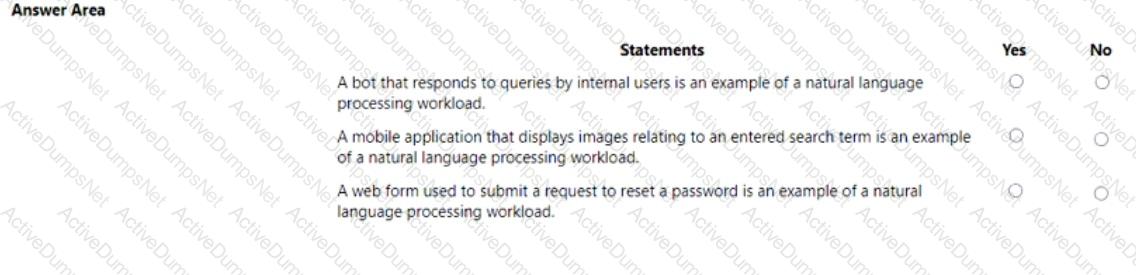
For each of the following statements, select Yes if the statement is true. Otherwise, select No. NOTE: Each correct selection is worth one point.
Options:
Answer:
Explanation:
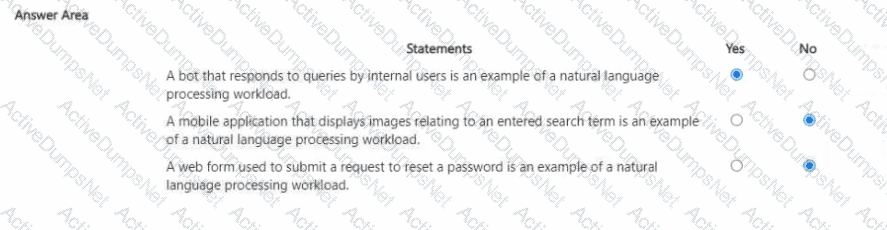
This question is based on identifying Natural Language Processing (NLP) workloads, which is a fundamental topic in the Microsoft Azure AI Fundamentals (AI-900) certification. According to the official Microsoft Learn module “Describe features of natural language processing (NLP) workloads on Azure”, NLP enables computers to understand, interpret, and generate human language — both written and spoken.
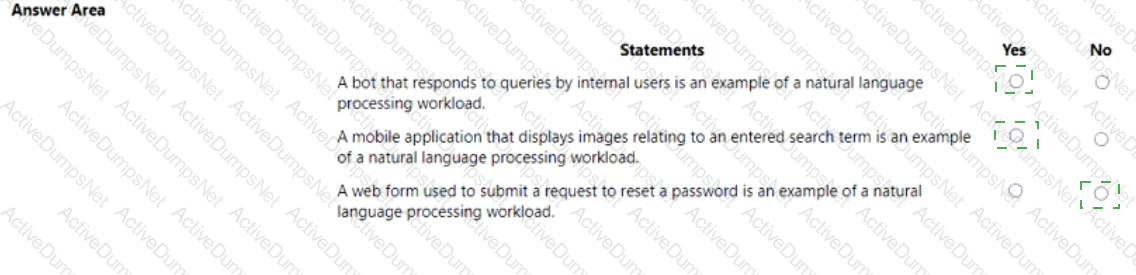
A bot that responds to queries by internal users – YesThis is an example of a natural language processing workload because it involves understanding and generating human language. A chatbot interprets user input (queries written or spoken) using language understanding and text analytics, and then produces appropriate responses. On Azure, this can be implemented using Azure AI Language (LUIS) and the Azure Bot Service, both core NLP technologies.
A mobile application that displays images relating to an entered search term – NoThis application involves searching for or displaying images, which falls under the computer vision workload, not NLP. Computer vision focuses on analyzing and interpreting visual data like photos or videos, while NLP deals with language and text processing.
A web form used to submit a request to reset a password – NoA password reset form involves structured input fields and user authentication, not natural language understanding or generation. It’s part of standard web development and identity management, not an NLP-related process.
Therefore, based on Microsoft’s AI-900 curriculum definitions:
✅ The only true NLP example is the bot responding to user queries, since it processes and understands natural language input to generate conversational output.
You are authoring a Language Understanding (LUIS) application to support a music festival.
You want users to be able to ask questions about scheduled shows, such as: “Which act is playing on the main stage?”
The question “Which act is playing on the main stage?” is an example of which type of element?
Options:
an intent
an utterance
a domain
an entity
Answer:
BExplanation:
In a Language Understanding (LUIS) application, an utterance represents an example of what a user might say to the bot. According to Microsoft Learn – “Build a Language Understanding app”, an utterance is a sample phrase that helps train the LUIS model to recognize user intent.
In the given example — “Which act is playing on the main stage?” — the statement is an utterance that a user might say to find out about show schedules. LUIS uses utterances like this to identify the intent (the user’s goal, e.g., GetShowInfo) and to extract any entities (e.g., main stage) that provide additional details for fulfilling the request.
To clarify the other elements:
Intent: The overall purpose or action (e.g., “FindShowDetails”).
Entity: Specific information in the utterance (e.g., “main stage”).
Domain: A general subject area (e.g., entertainment, events).
Thus, “Which act is playing on the main stage?” is an utterance used to train the LUIS model to understand natural language input.
Select the answer that correctly completes the sentence.

Options:
Answer:

Explanation:

The correct answer is Azure AI Language, which includes the Question Answering capability (previously known as QnA Maker). According to the Microsoft Azure AI Fundamentals (AI-900) study guide and Microsoft Learn documentation, the Azure AI Language service can be used to create a knowledge base from frequently asked questions (FAQ) and other structured or semi-structured text sources.
This service allows developers to build intelligent applications that can understand and respond to user questions in natural language by referencing prebuilt or custom knowledge bases. The Question Answering feature extracts pairs of questions and answers from documents, websites, or manually entered data and uses them to construct a searchable knowledge base. This knowledge base can then be integrated with Azure Bot Service or other conversational platforms to create interactive, self-service chatbots.
Here’s how it works:
Developers upload FAQ documents, URLs, or structured content.
Azure AI Language processes the content and identifies logical question-answer pairs.
The model stores these pairs in a knowledge base that can be queried by user input.
When users ask questions, the model finds the best matching answer using natural language understanding techniques.
In contrast:
Azure AI Document Intelligence (Form Recognizer) is used to extract structured data from forms and documents, not to create FAQ knowledge bases.
Azure AI Bot Service is for managing and deploying conversational bots but does not generate knowledge bases.
Microsoft Bot Framework SDK provides tools for building conversational logic but still requires a knowledge source like Question Answering from Azure AI Language.
Therefore, the service that can create a knowledge base from FAQ content is Azure AI Language.
Select the .

Options:
Answer:

Explanation:

The correct completion of the sentence is:
“You can use the Custom Vision service to train an object detection model by using your own images.”
According to the Microsoft Azure AI Fundamentals (AI-900) official study guide and Microsoft Learn module “Identify features of computer vision workloads,” the Azure Custom Vision service is a specialized component of Azure Cognitive Services for Vision that enables developers to train custom image classification or object detection models using their own labeled image datasets.
The Custom Vision service differs from the Computer Vision service in that it allows full customization — meaning you can upload your own images, tag them manually, and train the model to recognize objects specific to your use case (for example, detecting your company’s products, tools, or vehicles). Once trained, the model can identify and localize these objects in new images by returning bounding boxes and confidence scores, which is precisely what defines an object detection workload.
Microsoft’s AI-900 materials describe object detection as the process of identifying objects in an image and determining their position, typically represented by bounding boxes. Custom Vision supports two main project types:
Image Classification: Determines what is present in the image (e.g., “dog,” “cat,” “car”).
Object Detection: Identifies what is present and where it is located in the image.
In contrast:
Computer Vision provides prebuilt models for general image analysis but doesn’t allow custom model training.
Form Recognizer is used for extracting text and data from structured or semi-structured documents.
Azure Video Analyzer for Media focuses on video content analysis, not custom object detection.
Therefore, based on the official Microsoft AI-900 study guide and Microsoft Learn content, the verified and correct answer is Custom Vision, as it specifically allows training of a custom object detection model using your own images.
To complete the sentence, select the appropriate option in the answer area.

Options:
Answer:

Explanation:

According to the Microsoft Azure AI Fundamentals (AI-900) official study guide and Microsoft Learn module “Explore fundamental principles of machine learning”, regression models are used to predict numerical or continuous values based on patterns found in historical data. When the goal is to forecast or estimate a real-valued outcome—such as price, temperature, sales, or age—the appropriate model type is regression.
In this question, the task is to predict the sale price of auctioned items. Since price is a continuous numeric value that can vary within a range (for example, $100.50, $105.75, $120.00, etc.), it fits perfectly into a regression problem. Microsoft Learn defines regression as “a supervised machine learning technique that predicts a numeric value based on relationships found in input features.” Common regression algorithms include linear regression, decision tree regression, and neural network regression.
By contrast:
Classification is used when the output variable represents categories or classes, such as predicting whether an email is spam or not spam, or whether a transaction is fraudulent or legitimate. Classification predicts discrete labels, not continuous values.
Clustering, on the other hand, is an unsupervised learning method used to group similar data points together without predefined labels. Examples include grouping customers by purchasing behavior or grouping images by visual similarity.
In a predictive business scenario, like estimating the price of an auctioned item based on features such as age, condition, and demand, regression models are most appropriate. Azure Machine Learning supports regression experiments using built-in algorithms and AutoML to automatically choose the best-performing model for continuous output prediction.
You are developing a model to predict events by using classification.
You have a confusion matrix for the model scored on test data as shown in the following exhibit.
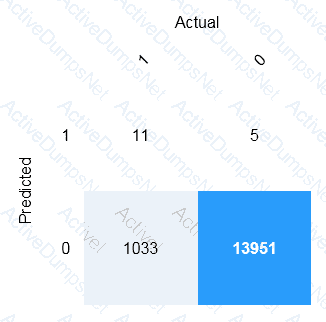
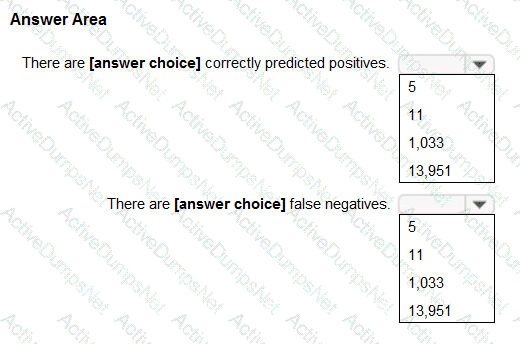
Use the drop-down menus to select the answer choice that completes each statement based on the information presented in the graphic.
NOTE: Each correct selection is worth one point.
Options:
Answer:
Explanation:
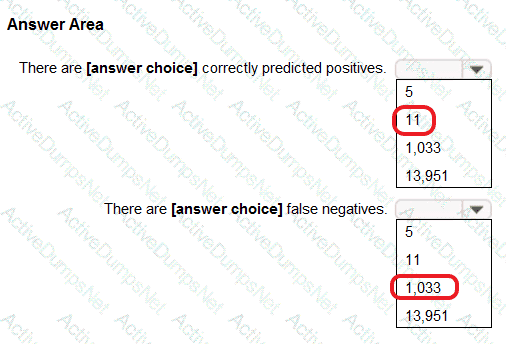
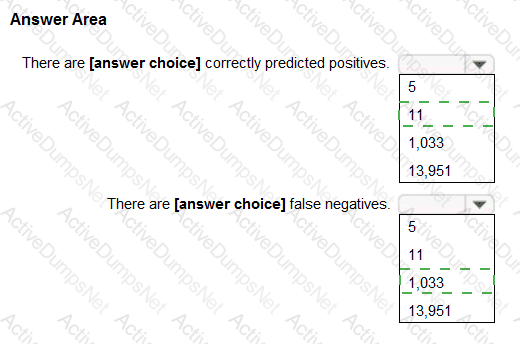
Box 1: 11
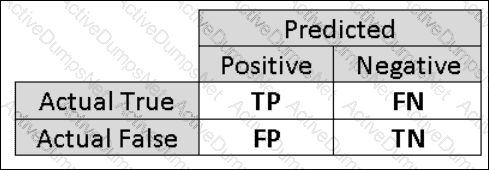
TP = True Positive.
The class labels in the training set can take on only two possible values, which we usually refer to as positive or negative. The positive and negative instances that a classifier predicts correctly are called true positives (TP) and true negatives (TN), respectively. Similarly, the incorrectly classified instances are called false positives (FP) and false negatives (FN).
Box 2: 1,033
FN = False Negative
Select the answer that correctly completes the sentence.

Options:
Answer:

Explanation:

In Azure OpenAI Service, the temperature parameter directly controls the creativity and determinism of responses generated by models such as GPT-3.5. According to the Microsoft Learn documentation for Azure OpenAI models, temperature is a numeric value (typically between 0.0 and 2.0) that determines how “random” or “deterministic” the output should be.
A lower temperature value (for example, 0 or 0.2) makes the model’s responses more deterministic, meaning the same prompt consistently produces nearly identical outputs.
A higher temperature value (for example, 0.8 or 1.0) encourages creativity and variety, causing the model to generate different phrasing or interpretations each time it responds.
When a question specifies the need for more deterministic responses, Microsoft’s guidance is to decrease the temperature parameter. This adjustment makes the model focus on the most probable tokens (words) rather than exploring less likely options, improving reliability and consistency—ideal for business or technical applications where consistent answers are essential.
The other parameters serve different purposes:
Frequency penalty reduces repetition of the same phrases but does not control randomness.
Max response (max tokens) limits the maximum length of the generated output.
Stop sequence defines specific tokens that tell the model when to stop generating text.
Thus, the correct and Microsoft-verified completion is:
“You can modify the Temperature parameter to produce more deterministic responses from a chat solution that uses the Azure OpenAI GPT-3.5 model.”
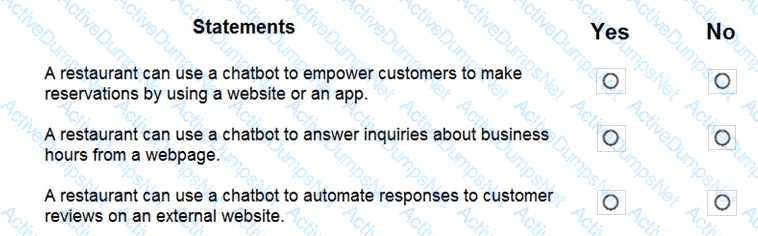
For each of the following statements, select Yes if the statement is true. Otherwise, select No.
NOTE: Each correct selection is worth one point.
Options:
Answer:
Explanation:
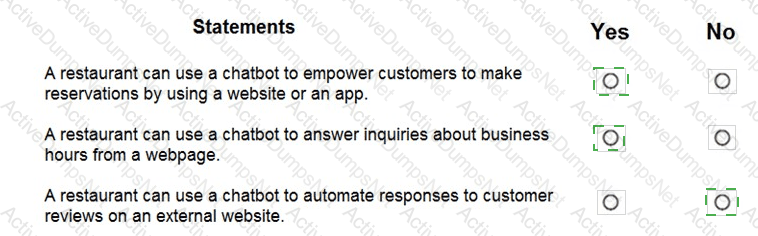
Yes, Yes, and No.
According to the Microsoft Azure AI Fundamentals (AI-900) official study guide and Microsoft Learn modules under the topic “Describe features of common AI workloads”, conversational AI solutions like chatbots are used to automate and enhance customer interactions. A chatbot is an AI service capable of understanding user inputs (text or voice) and providing appropriate responses, often integrated into websites, mobile apps, or messaging platforms.
A restaurant can use a chatbot to empower customers to make reservations using a website or an app – Yes.This statement is true because conversational AI is designed to handle structured tasks such as booking, scheduling, and information retrieval. Chatbots built with Azure Bot Service can connect to backend systems (like a reservation database) to let customers make or modify reservations through a chat interface. The AI-900 study guide explicitly notes that chatbots can help businesses “automate processes such as booking or reservations” to improve efficiency and customer experience.
A restaurant can use a chatbot to answer inquiries about business hours from a webpage – Yes.This is also true. Chatbots can be trained using QnA Maker (now integrated into Azure AI Language) or Azure Cognitive Services for Language to answer common customer questions. FAQs such as opening hours, menu details, and directions are ideal for chatbot automation, as outlined in the AI-900 modules discussing customer support automation.
A restaurant can use a chatbot to automate responses to customer reviews on an external website – No.This is not a typical chatbot use case taught in AI-900. Chatbots are meant for direct interactions within controlled channels, such as a company’s own website or messaging app. Managing and posting responses to reviews on external platforms (like Yelp or Google Reviews) would involve policy restrictions, authentication issues, and reputational risk. The AI-900 course specifies that responsible AI usage requires maintaining human oversight in public-facing communications that influence brand image.
For each of the following statements, select Yes if the statement is true. Otherwise, select No. NOTE: Each correct selection is worth one point.

Options:
Answer:

Explanation:

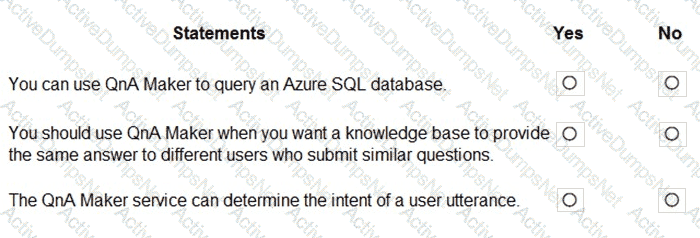
According to the Microsoft Azure AI Fundamentals (AI-900) official study guide and Microsoft Learn module “Identify features of Natural Language Processing (NLP) workloads and services,” the Azure Cognitive Service for Language – Question Answering capability is designed to allow applications to respond to user questions using information from a prebuilt or custom knowledge base. It relies on Natural Language Processing (NLP) to match user queries to the most relevant answers but does not directly execute queries against databases or infer user intent.
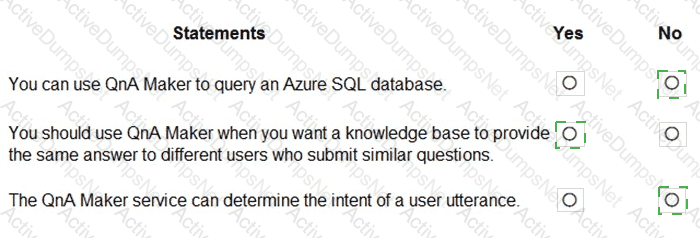
“You can use Language Service’s question answering to query an Azure SQL database.” → NOThe Question Answering feature does not connect directly to or query structured databases such as Azure SQL. Instead, it retrieves answers from unstructured or semi-structured content (FAQs, manuals, documents). Querying SQL databases would require traditional database access, not a cognitive service.
“You should use Language Service’s question answering when you want a knowledge base to provide the same answer to different users who submit similar questions.” → YESThis statement is correct and aligns exactly with Microsoft’s official documentation. Question Answering enables organizations to create a knowledge base that can automatically answer repeated or similar customer queries using natural language understanding. For instance, two users asking “How do I reset my password?” and “Can you help me change my password?” would receive the same predefined response.
“Language Service’s question answering can determine the intent of a user utterance.” → NODetermining user intent is handled by Language Understanding (LUIS) or Conversational Language Understanding, not by Question Answering. While both belong to the Language Service, Question Answering focuses on retrieving relevant answers, whereas LUIS focuses on intent detection and entity extraction.
For each of the following statements, select Yes if the statement is true. Otherwise, select No.
NOTE: Each correct selection is worth one point.

Options:
Answer:
Explanation:
Statements
Yes
No
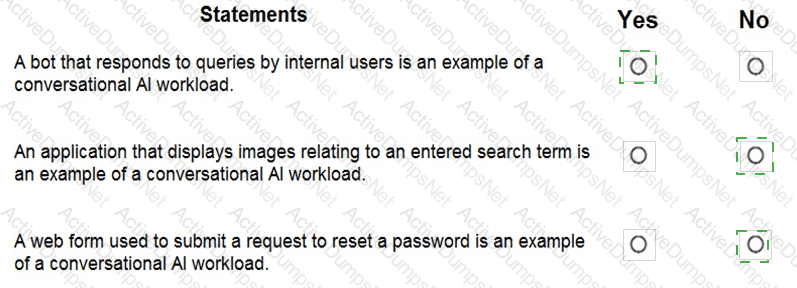
A bot that responds to queries by internal users is an example of a conversational AI workload.
✅ Yes
An application that displays images relating to an entered search term is an example of a conversational AI workload.
✅ No
A web form used to submit a request to reset a password is an example of a conversational AI workload.
✅ No
According to the Microsoft Azure AI Fundamentals (AI-900) official study materials, conversational AI workloads are those that enable interaction between humans and AI systems through natural language conversation, either by text or speech. These workloads are typically implemented using Azure Bot Service, Azure Cognitive Services for Language, and Azure OpenAI Service. The key characteristic of a conversational AI workload is the presence of dialogue—the AI interprets user intent and provides a meaningful, contextual response in a conversation-like manner.
“A bot that responds to queries by internal users is an example of a conversational AI workload.” → YESThis fits the definition perfectly. A chatbot that helps employees (internal users) by answering questions about policies, IT issues, or HR procedures is a typical example of conversational AI. It uses natural language understanding to interpret questions and provide automated responses. Microsoft Learn explicitly identifies chatbots as conversational AI solutions designed for both internal and external interactions.
“An application that displays images relating to an entered search term is an example of a conversational AI workload.” → NOThis is not conversational AI because there is no dialogue or language understanding involved. It is an example of information retrieval or computer vision if it uses image recognition, but not conversation.
“A web form used to submit a request to reset a password is an example of a conversational AI workload.” → NOA password reset form is a simple UI-driven process that doesn’t require AI or conversational logic. It performs a fixed function based on user input but does not understand or respond to natural language.
Therefore, based on the AI-900 study guide, only the first statement is an example of a conversational AI workload, while the second and third statements are not.
You need to make the press releases of your company available in a range of languages.
Which service should you use?
Options:
Translator Text
Text Analytics
Speech
Language Understanding (LUIS)
Answer:
AExplanation:
The Translator Text service (part of Azure Cognitive Services) provides real-time text translation across multiple languages. According to Microsoft Learn’s AI-900 module on “Identify features of Natural Language Processing (NLP) workloads”, translation is one of the four main NLP tasks, alongside key phrase extraction, sentiment analysis, and language understanding.
In this scenario, the company wants to make press releases available in a range of languages, which requires converting text from one language to another while preserving meaning and tone. The Translator Text API supports more than 100 languages and can be integrated into web apps, chatbots, or content management systems for automatic multilingual publishing.
The other options perform different functions:
Text Analytics (B) extracts insights such as key phrases or sentiment but does not translate.
Speech (C) focuses on converting between speech and text, not text translation.
Language Understanding (LUIS) (D) identifies user intent but does not perform translation.
Therefore, to provide multilingual press releases, the appropriate service is A. Translator Text, which ensures accurate, fast, and scalable translation across global audiences.
Match the types of computer vision workloads to the appropriate scenarios.
To answer, drag the appropriate workload type from the column on the left to its scenario on the right. Each workload type may be used once more than once, or not at all.
NOTE: Each correct match is worth one point.

Options:
Answer:

Explanation:

In the Microsoft Azure AI Fundamentals (AI-900) curriculum, computer vision workloads are grouped into distinct types, each serving a specific purpose. The three major workloads illustrated here are image classification, object detection, and optical character recognition (OCR). Understanding their use cases is essential for correctly mapping them to real-world scenarios.
Generate captions for images → Image classificationThe image classification workload is used to identify the main subject or context of an image and assign descriptive labels. In Microsoft Learn’s “Describe features of computer vision workloads,” image classification models are trained to recognize content (e.g., a cat, a beach, or a city). Caption generation expands on classification results by describing the image’s contents in human-readable language—based on what the model identifies as key visual features.
Extract movie title names from movie poster images → Optical character recognition (OCR)OCR is a vision workload that detects and extracts text from images. Azure AI Vision’s Read API or Document Intelligence OCR models can identify printed or handwritten text within posters, signs, or documents. In this case, the movie title text from a poster is best extracted using OCR.
Locate vehicles in images → Object detectionThe object detection workload identifies multiple objects within an image and provides their locations using bounding boxes. It’s ideal for tasks like counting cars in a parking lot or tracking objects in traffic images.
Select the answer that correctly completes the sentence

Options:
Answer:

Explanation:

According to the Microsoft Azure AI Fundamentals (AI-900) official study guide and Microsoft Learn module “Identify features of Computer Vision workloads on Azure”, Object Detection is a specific computer vision capability used to identify and locate multiple types of objects within a single image. Unlike image classification, which assigns one label to an entire image, object detection identifies individual objects, their categories, and their positions using bounding boxes or polygons.
In practical terms, Object Detection combines two key outputs:
Classification – recognizing what the object is (for example, “car”, “person”, “dog”).
Localization – determining where the object appears in the image by drawing bounding boxes around it.
This technology is commonly used in scenarios such as traffic monitoring (detecting vehicles and pedestrians), retail shelf analysis (detecting products and inventory levels), and manufacturing quality control (identifying defective parts).
Microsoft’s Azure Cognitive Services – Custom Vision includes a dedicated Object Detection domain, which allows developers to train custom models to recognize multiple object types within a single image. The service uses deep learning techniques, particularly convolutional neural networks (CNNs), to process pixel patterns and spatial relationships for accurate detection.
For contrast:
Image Classification identifies only the overall category of an image (e.g., “This is a cat”).
Image Description generates captions summarizing the visual content (e.g., “A cat sitting on a couch”).
Optical Character Recognition (OCR) detects and extracts text from images, not physical objects.
Therefore, per the official AI-900 learning content and Azure documentation, when the goal is to identify multiple types of items within a single image, the correct AI workload is Object Detection.
You are building an AI-based app.
You need to ensure that the app uses the principles for responsible AI.
Which two principles should you follow? Each correct answer presents part of the solution.
NOTE: Each correct selection is worth one point.
Options:
Implement an Agile software development methodology
Implement a process of Al model validation as part of the software review process
Establish a risk governance committee that includes members of the legal team, members of the risk management team, and a privacy officer
Prevent the disclosure of the use of Al-based algorithms for automated decision making
Answer:
B, CExplanation:
The correct answers are B. Implement a process of AI model validation as part of the software review process and C. Establish a risk governance committee that includes members of the legal team, members of the risk management team, and a privacy officer.
According to the Microsoft Azure AI Fundamentals (AI-900) Official Study Guide and the Microsoft Responsible AI principles, responsible AI emphasizes six key principles: fairness, reliability and safety, privacy and security, inclusiveness, transparency, and accountability. These principles ensure that AI systems are trustworthy, ethical, and safe for users and society.
Option B aligns with the reliability and safety principle. Model validation ensures that AI models behave as expected, perform accurately across different data conditions, and produce consistent results. Microsoft teaches that AI models should be validated, tested, and monitored regularly to avoid unintended outcomes, bias, or failures. Validation processes help ensure that the AI behaves responsibly before deployment and continues to perform reliably over time.
Option C aligns with the accountability and governance principle. Establishing a risk governance committee that includes legal, privacy, and risk management experts ensures that AI development and deployment are overseen responsibly. This committee is responsible for reviewing compliance with data protection laws, ensuring ethical practices, and managing risks associated with AI-driven decisions. Microsoft emphasizes that accountability requires human oversight and governance structures to ensure ethical alignment throughout the AI system’s lifecycle.
The incorrect options are:
A. Implement an Agile software development methodology: Agile is a software project management approach, not a Responsible AI principle.
D. Prevent the disclosure of the use of AI-based algorithms: This violates the transparency principle, which requires organizations to disclose when and how AI is used.
Therefore, following the official Responsible AI framework taught in AI-900, the correct and verified answers are B and C, as they directly promote reliability, safety, accountability, and governance in AI systems.
For each of the following statements, select Yes if the statement is true. Otherwise, select No.
NOTE: Each correct selection is worth one point.
Options:
Answer:
Explanation:
For each of the following statements, select Yes if the statement is true. Otherwise, select No.
NOTE: Each correct selection is worth one point.
Options:
Answer:
Explanation:
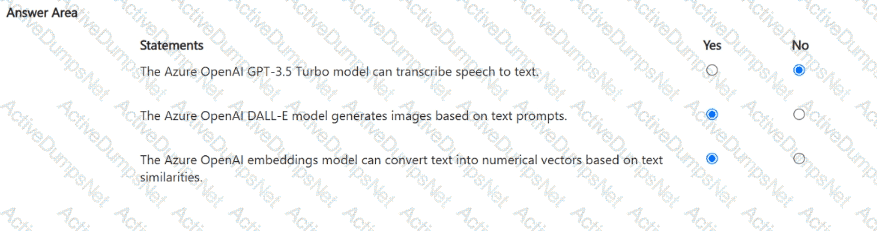
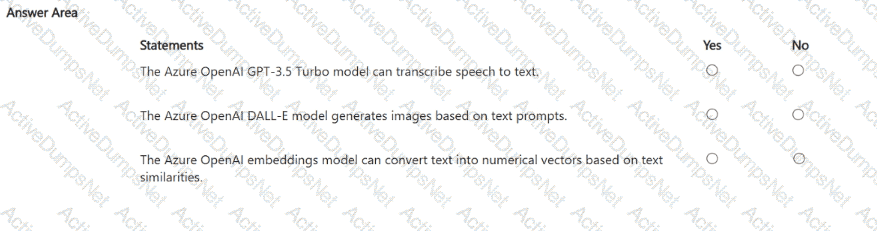
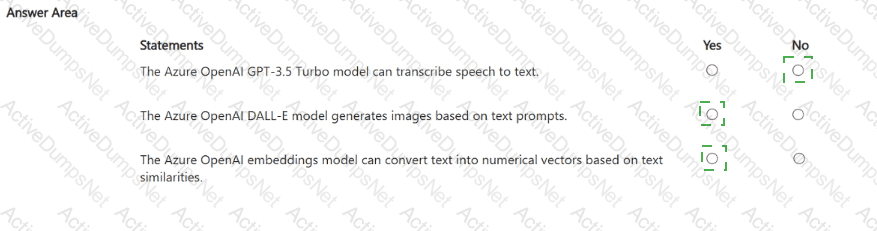
“The Azure OpenAI GPT-3.5 Turbo model can transcribe speech to text.” — NOThis statement is false. The GPT-3.5 Turbo model is a text-based large language model (LLM) designed for natural language understanding and generation, such as answering questions, summarizing text, or writing content. It does not process or transcribe audio input. Speech-to-text capabilities belong to Azure AI Speech Services, specifically the Speech-to-Text API, not Azure OpenAI.
“The Azure OpenAI DALL-E model generates images based on text prompts.” — YESThis statement is true. The DALL-E model, available within Azure OpenAI Service, is a generative AI model that creates original images from natural language descriptions (text prompts). For example, given a prompt like “a futuristic city at sunset,” DALL-E generates a unique, high-quality image representing that concept. This aligns with generative AI workloads in the AI-900 study guide, where DALL-E is specifically mentioned as an image-generation model.
“The Azure OpenAI embeddings model can convert text into numerical vectors based on text similarities.” — YESThis statement is also true. The embeddings model in Azure OpenAI converts text into multi-dimensional numeric vectors that represent semantic meaning. These embeddings enable tasks such as semantic search, recommendations, and text clustering by comparing similarity scores between vectors. Words or phrases with similar meanings have vectors close together in the embedding space.
In summary:
GPT-3.5 Turbo → Text generation (not speech-to-text)
DALL-E → Image generation from text prompts
Embeddings → Convert text into numerical semantic representations
Correct selections: No, Yes, Yes.
For each of the following statements, select Yes if the statement is true. Otherwise, select No.
NOTE: Each correct selection is worth one point.
Options:
Answer:
Explanation:
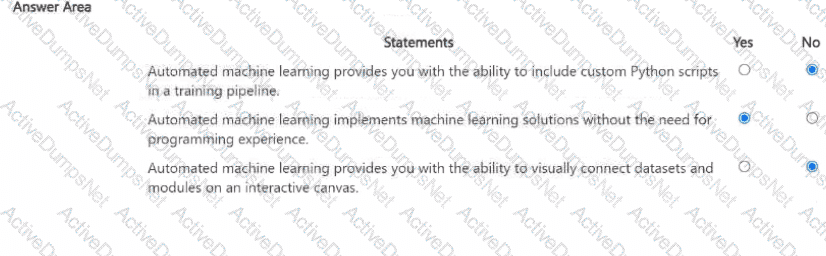
According to the Microsoft Azure AI Fundamentals (AI-900) study guide and Azure Machine Learning documentation, Automated Machine Learning (AutoML) is a feature designed to help users build, train, and tune machine learning models automatically without requiring deep knowledge of programming or data science.
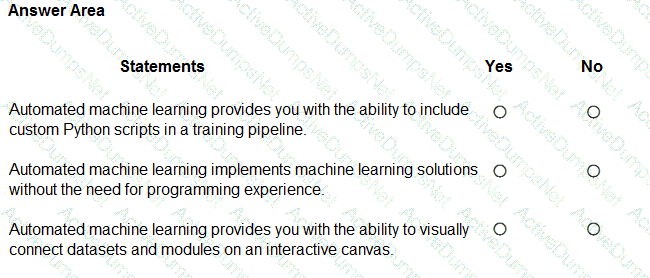
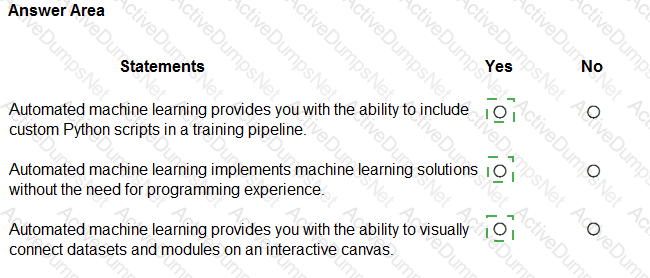
First Statement: “Automated machine learning provides you with the ability to include custom Python scripts in a training pipeline.”This is False (No). AutoML automates the model selection and tuning process but does not allow the inclusion of custom Python scripts within its workflow. Custom Python integration is supported in Azure Machine Learning designer pipelines or SDK-based training, not in AutoML.
Second Statement: “Automated machine learning implements machine learning solutions without the need for programming experience.”This is True (Yes). One of AutoML’s core benefits is that it enables non-programmers to train and evaluate models by simply selecting data, choosing a target column, and letting Azure automatically test algorithms and hyperparameters. This aligns with Microsoft’s AI-900 objective to democratize AI development.
Third Statement: “Automated machine learning provides you with the ability to visually connect datasets and modules on an interactive canvas.”This is False (No). That feature belongs to Azure Machine Learning Designer, not AutoML. The designer offers a drag-and-drop visual interface for connecting datasets and modules, whereas AutoML provides a wizard-driven approach focused on automation.
For each of the following statements, select Yes if the statement is true. Otherwise, select No.
NOTE Each correct selection is worth one point
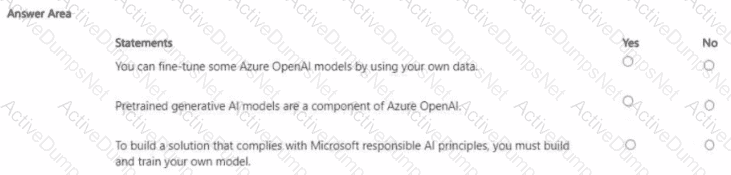
Options:
Answer:
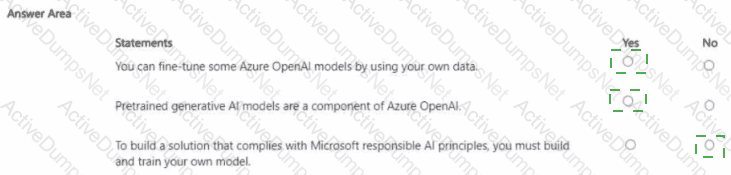
Explanation:
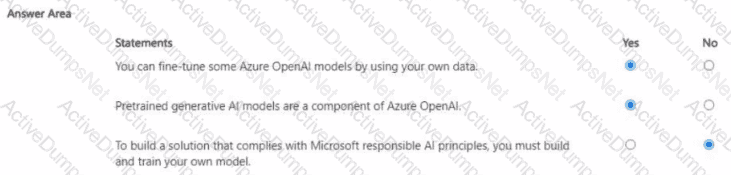
Full Detailed Explanation (250–300 words):
“You can fine-tune some Azure OpenAI models by using your own data.” – YESThis statement is true. Azure OpenAI allows customers to fine-tune certain models like GPT-3, GPT-3.5, and some embedding models with their own data. Fine-tuning customizes a model to perform better on specific tasks or match a company’s domain terminology, tone, or context. According to Microsoft Learn’s AI-900 and Azure OpenAI documentation, fine-tuning is supported for approved use cases while maintaining Microsoft’s Responsible AI oversight and compliance process.
“Pretrained generative AI models are a component of Azure OpenAI.” – YESThis statement is also true. Azure OpenAI provides access to pretrained large language and generative AI models such as GPT-3.5, GPT-4, Codex, and DALL·E. These models are pretrained on vast datasets and made available via APIs, allowing developers to generate text, code, and images without needing to train their own models. This is a core feature of Azure OpenAI’s service offering.
“To build a solution that complies with Microsoft responsible AI principles, you must build and train your own model.” – NOThis statement is false. Compliance with Microsoft Responsible AI principles (Fairness, Reliability & Safety, Privacy & Security, Inclusiveness, Transparency, Accountability) does not require building custom models. Prebuilt Azure AI and OpenAI services already align with Responsible AI standards. Developers simply need to use these services responsibly, applying governance and ethical design practices.
You have 100 instructional videos that do NOT contain any audio. Each instructional video has a script. You need to generate a narration audio file for each video based on the script. Which type of workload should you use?
Options:
speech recognition
language modeling
speech synthesis
translation
Answer:
CExplanation:
Speech synthesis, also known as text-to-speech (TTS), is the AI workload that converts written text into spoken words. In this case, the task is to generate narration audio from provided scripts for silent instructional videos.
Speech recognition performs the opposite function — it converts speech into text. Language modeling is for text understanding and prediction (e.g., GPT). Translation converts text between languages, not from text to audio.
Therefore, the most appropriate workload, according to Microsoft’s AI-900 study material under the “Speech AI capabilities” section, is speech synthesis, which enables natural voice narration generation.
Match the types of AI workloads to the appropriate scenarios.
To answer, drag the appropriate workload type from the column on the left to its scenario on the right. Each workload type may be used once, more than once, or not at all.
NOTE: Each correct selection is worth one point.
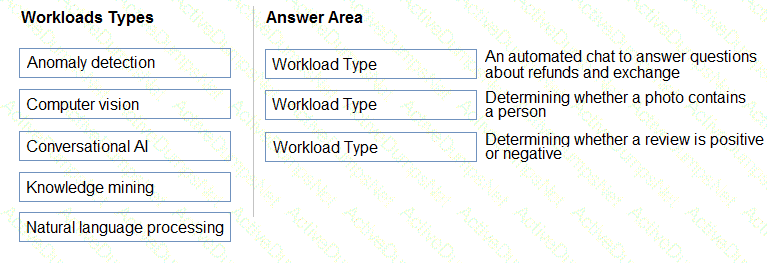
Options:
Answer:

Explanation:
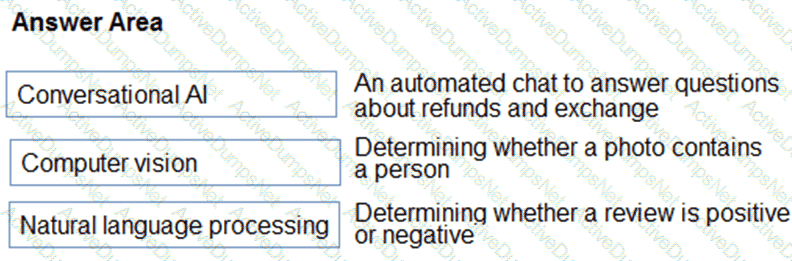
Box 3: Natural language processing
Natural language processing (NLP) is used for tasks such as sentiment analysis, topic detection, language detection, key phrase extraction, and document categorization.
What are two tasks that can be performed by using computer vision? Each correct answer presents a complete solution.
NOTE: Each correct selection is worth one point.
Options:
Predict stock prices.
Detect brands in an image.
Detect the color scheme in an image
Translate text between languages.
Extract key phrases.
Answer:
B, CExplanation:
According to the Microsoft Azure AI Fundamentals study guide and Microsoft Learn module “Identify features of computer vision workloads”, computer vision is an AI workload that allows systems to interpret and understand visual information from the world, such as images and videos.
Computer vision tasks typically include:
Object detection and image classification (e.g., detecting brands, logos, or items in images)
Image analysis (e.g., identifying colors, patterns, or visual features)
Face detection and recognition
Optical Character Recognition (OCR) for reading text in images
Therefore, both detecting brands and detecting color schemes in an image are clear examples of computer vision tasks because they involve analyzing visual content.
In contrast:
A. Predict stock prices → Regression task, not vision-based.
D. Translate text between languages → Natural language processing (NLP).
E. Extract key phrases → NLP as well.
Thus, the correct computer vision tasks are B and C.
In which scenario should you use key phrase extraction?
Options:
translating a set of documents from English to German
generating captions for a video based on the audio track
identifying whether reviews of a restaurant are positive or negative
identifying which documents provide information about the same topics
Answer:
DExplanation:
According to the Microsoft Azure AI Fundamentals (AI-900) official study guide and Microsoft Learn module “Extract insights from text with the Text Analytics service”, key phrase extraction is a feature of the Text Analytics service that identifies the most important words or phrases in a given document. It helps summarize the main ideas by isolating significant concepts or terms that describe what the text is about.
In this scenario, the goal is to determine which documents share similar topics or themes. By extracting key phrases from each document (for example, “policy renewal,” “coverage limits,” “claim process”), you can compare and categorize documents based on overlapping keywords. This is exactly how key phrase extraction is used—to summarize and group text content by topic relevance.
The other options do not fit this use case:
A. Translation uses the Translator service, not key phrase extraction.
B. Generating video captions involves speech recognition and computer vision.
C. Identifying sentiment relates to sentiment analysis, not key phrase extraction.
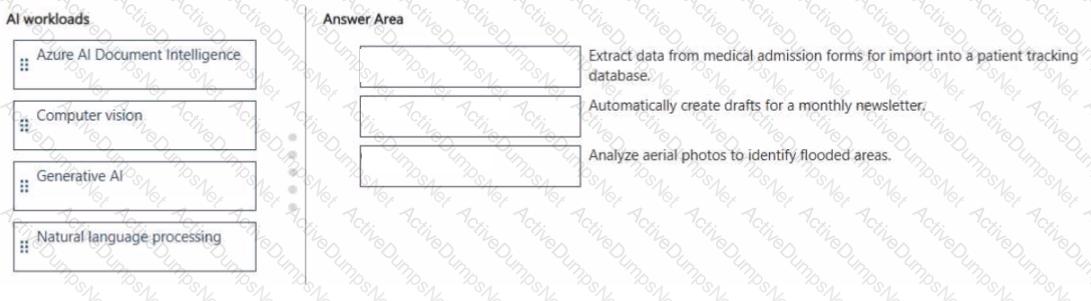
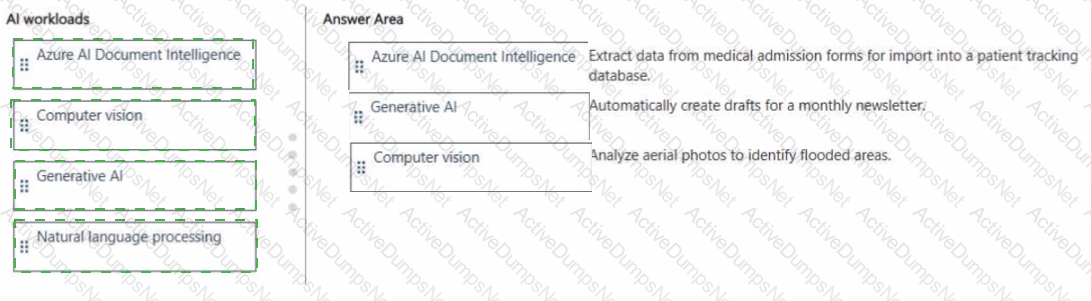
Match the Al workload to the appropriate task.
To answer, drag the appropriate Al workload from the column on the left to its task on the right. Each workload may be used once, more than once, or not at all
NOTE: Each correct match is worth one point.
Options:
Answer:
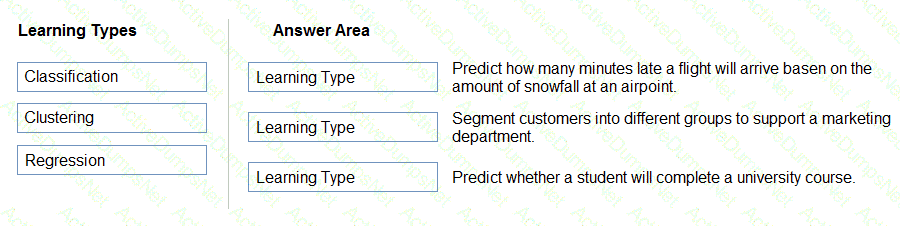
Match the types of machine learning to the appropriate scenarios.
To answer, drag the appropriate machine learning type from the column on the left to its scenario on the right. Each machine learning type may be used once, more than once, or not at all.
NOTE: Each correct selection is worth one point.
Options:
Answer:
Explanation:
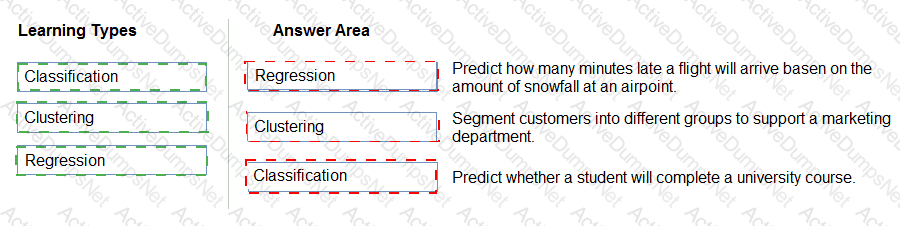
According to the Microsoft Azure AI Fundamentals (AI-900) official study guide and Microsoft Learn module “Describe features of common AI workloads”, there are three primary supervised and unsupervised machine learning types: Regression, Classification, and Clustering. Each type of learning addresses a different kind of problem depending on the data and desired prediction output.
Regression – Regression models are used to predict numeric, continuous values. The study guide specifies that “regression predicts a number.” In the scenario “Predict how many minutes late a flight will arrive based on the amount of snowfall,” the output (minutes late) is a continuous numeric value. Therefore, this is a regression problem. Regression algorithms like linear regression or decision tree regression estimate relationships between variables and predict measurable quantities.
Clustering – Clustering falls under unsupervised learning, where the model identifies natural groupings or patterns in unlabeled data. The official AI-900 training material states that “clustering is used to find groups or segments of data that share similar characteristics.” The scenario “Segment customers into different groups to support a marketing department” fits this description because the goal is to group customers based on behavior or demographics without predefined labels. Thus, it is a clustering problem.
Classification – Classification is a supervised learning method used to predict discrete categories or labels. The AI-900 content defines classification as “predicting which category an item belongs to.” The scenario “Predict whether a student will complete a university course” requires a yes/no (binary) outcome, which is a classic classification problem. Examples include logistic regression, decision trees, or neural networks trained for categorical prediction.
In summary:
Regression → Predicts continuous numeric outcomes.
Clustering → Groups data by similarities without predefined labels.
Classification → Predicts discrete or categorical outcomes.
Hence, the correct and verified mappings based on the official AI-900 study material are:
Regression → Flight delay prediction
Clustering → Customer segmentation
Classification → Course completion prediction
Select the answer that correctly completes the sentence.
Options:
Answer:
Explanation:

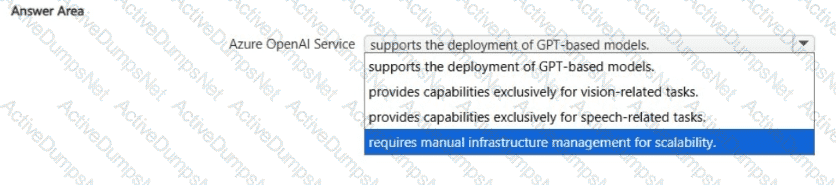
The Azure OpenAI Service provides access to advanced Generative Pre-trained Transformer (GPT) models developed by OpenAI, such as GPT-3, GPT-3.5, and GPT-4. These models are capable of performing a wide range of natural language processing (NLP) and generative AI tasks — including text completion, summarization, translation, question answering, content creation, and code generation.
According to the Microsoft Azure AI Fundamentals (AI-900) study guide and Microsoft Learn documentation for Azure OpenAI, this managed service allows developers to deploy and integrate GPT-based models within their own applications using REST APIs or the Azure SDK. The service handles scalability, performance, and infrastructure automatically, meaning users do not need to manage servers or computational resources manually.
Option review:
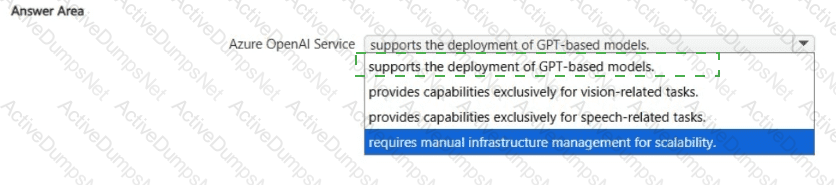
Supports the deployment of GPT-based models — ✅ Correct. Azure OpenAI is specifically designed for deploying and operationalizing GPT models and similar transformer-based architectures.
Provides capabilities exclusively for vision-related tasks — ❌ Incorrect. Vision tasks (like image classification or object detection) are part of Azure AI Vision.
Provides capabilities exclusively for speech-related tasks — ❌ Incorrect. Speech processing (speech-to-text, text-to-speech, translation) belongs to Azure AI Speech Services, not Azure OpenAI.
Requires manual infrastructure management for scalability — ❌ Incorrect. Azure OpenAI is a fully managed service; scalability and performance are handled automatically by Azure.
Therefore, the correct completion of the sentence is:
“Azure OpenAI Service supports the deployment of GPT-based models.”
Select the answer that correctly completes the sentence.

Options:
Answer:

Explanation:

According to the Microsoft Azure AI Fundamentals (AI-900) Official Study Guide and the Microsoft Learn module “Explore fundamental principles of machine learning,” regression is a supervised machine learning technique used to predict continuous numeric values based on input data.
In this scenario, the goal is to predict how many hours of overtime a delivery person will work depending on the number of orders received. The output — the number of overtime hours — is a continuous variable (for example, 1.5 hours, 3.2 hours, etc.), not a category. This makes it a regression problem, where the model learns patterns from historical data and uses those patterns to estimate a continuous numeric outcome.
Why Regression Applies Here:
Regression models work by finding the mathematical relationship between input features (independent variables) and output values (dependent variables). In this case:
Input (feature): Number of orders received
Output (label): Predicted overtime hours
Azure Machine Learning supports several regression algorithms, including Linear Regression, Decision Tree Regression, and Neural Network Regression, all of which can handle scenarios where a numeric prediction is required.
Why Not the Other Options:
Classification: Used for predicting discrete categories or labels (e.g., “on-time” vs. “late”). It does not output continuous numbers.
Clustering: An unsupervised learning technique used to group data points with similar characteristics, not to make numeric predictions.
Thus, when the output variable is a numeric prediction (such as hours, prices, quantities, or time), the correct machine learning task is Regression.
For each of the following statements, select Yes if the statement is true. Otherwise, select No.
NOTE: Each correct selection is worth one point.
Options:
Answer:
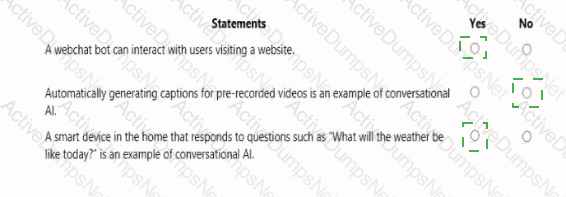
Explanation:
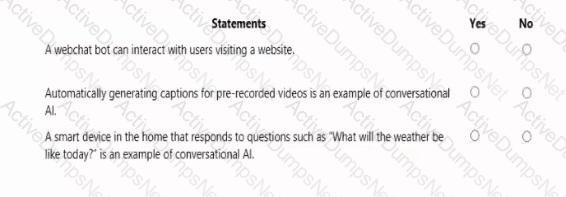
< A webchat bot can interact with users visiting a website → Yes
Automatically generating captions for pre-recorded videos is an example of conversational AI → No
A smart device in the home that responds to questions such as “What will the weather be like today?” is an example of conversational AI → Yes
\ These answers are based on the Microsoft Azure AI Fundamentals (AI-900) Official Study Guide and the Microsoft Learn module “Explore conversational AI in Microsoft Azure.”
1. A webchat bot can interact with users visiting a website → Yes
This statement is true. A webchat bot is a key example of conversational AI, which allows users to communicate with an intelligent system through natural language. The Azure Bot Service supports a webchat channel, enabling website visitors to ask questions or get assistance directly through a chat interface embedded on a webpage. This allows businesses to provide 24/7 automated support and interactive engagement without human intervention.
2. Automatically generating captions for pre-recorded videos is an example of conversational AI → No
This is incorrect because automatically generating captions involves speech-to-text transcription, which falls under speech recognition and not conversational AI. While it uses AI to convert audio into text, it does not involve interactive communication or natural language dialogue. This task would be handled by Azure AI’s Speech service, not the conversational AI framework.
3. A smart device in the home that responds to questions such as “What will the weather be like today?” is an example of conversational AI → Yes
This is true. Smart assistants like those found in home devices (e.g., voice-activated systems) use conversational AI technologies to process spoken language (using natural language processing and speech recognition) and generate appropriate responses. This interaction represents a classic example of conversational AI, as it allows human-like dialogue between a user and an AI system.
✅ Final Answers:
Webchat bot interacting with users → Yes
Auto-captioning videos → No
Smart home device answering questions → Yes
During the process of Machine Learning, when should you review evaluation metrics?
Options:
After you clean the data.
Before you train a model.
Before you choose the type of model.
After you test a model on the validation data.
Answer:
DExplanation:
According to the Microsoft Azure AI Fundamentals (AI-900) official study materials and the Microsoft Learn module “Identify features of common machine learning types,” the evaluation phase occurs after training and testing a machine learning model. Evaluation metrics are used to measure how well the model performs when applied to data it has not seen before (the validation data).
The machine learning workflow includes the following key steps:
Data Preparation – Importing, cleaning, and transforming data.
Splitting the Data – Dividing it into training and validation (or test) sets.
Model Training – Using the training data to teach the model patterns or relationships.
Model Evaluation – Assessing the trained model using the validation data and evaluation metrics such as accuracy, precision, recall, F1 score, and root mean square error (RMSE).
As stated in the AI-900 content, evaluation metrics are crucial after testing, as they help determine if the model is accurate enough or if it requires retraining with different parameters or algorithms.
A. After you clean the data → incorrect, as metrics cannot be reviewed before training.
B. Before you train a model → incorrect, since the model has not yet learned patterns.
C. Before you choose the type of model → incorrect, as metrics depend on the model’s output.
Therefore, the verified answer is D. After you test a model on the validation data, which is when you review evaluation metrics to determine model performance and readiness for deployment.
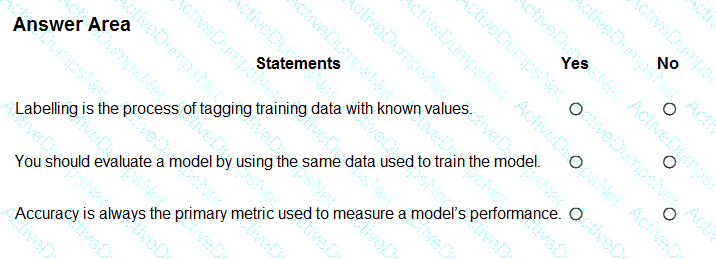
For each of the following statements, select Yes if the statement is true. Otherwise, select No.
NOTE: Each correct selection is worth one point.
Options:
Answer:
Explanation:
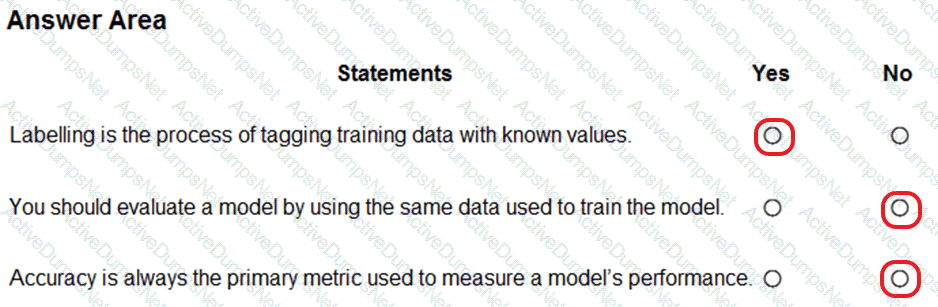
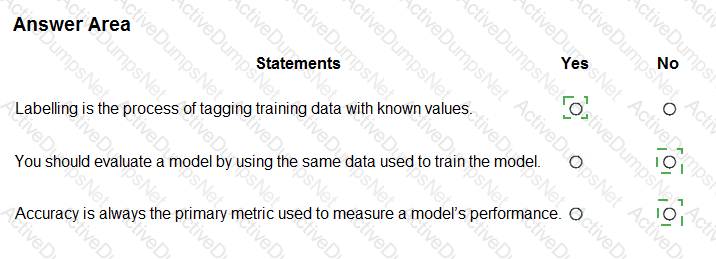
This question evaluates understanding of fundamental machine learning concepts as covered in the Microsoft Azure AI Fundamentals (AI-900) official study guide and Microsoft Learn module “Explore the machine learning process.” These statements relate to data labeling, model evaluation practices, and performance metrics—three essential parts of building and assessing a machine learning model.
Labelling is the process of tagging training data with known values → YesAccording to Microsoft Learn, “Labeling is the process of tagging data with the correct output value so the model can learn relationships between inputs and outputs.” This is essential for supervised learning, where models require historical data with known outcomes. For example, if training a model to recognize fruit images, each image is labeled as “apple,” “banana,” or “orange.” Hence, this statement is true.
You should evaluate a model by using the same data used to train the model → NoThe AI-900 guide stresses that using the same data for both training and evaluation can cause overfitting, where the model performs well on training data but poorly on unseen data. Instead, the dataset is split into training and testing (or validation) subsets. Evaluation must use test data that the model has never seen before to ensure an unbiased measure of performance. Therefore, this statement is false.
Accuracy is always the primary metric used to measure a model’s performance → NoMicrosoft Learn emphasizes that accuracy is only one metric and not always the best choice. Depending on the problem type, other metrics such as precision, recall, F1-score, or AUC (Area Under the Curve) may be more appropriate—especially in cases with imbalanced datasets. For example, in fraud detection, recall may be more important than accuracy. Thus, this statement is false.
Select the answer that correctly completes the sentence.

Options:
Answer:

Explanation:
When building a K-means clustering model, all features (variables) used in the model must be numeric in nature. According to the Microsoft Azure AI Fundamentals (AI-900) study materials and standard machine learning theory, K-means clustering is an unsupervised learning algorithm that groups data points into clusters based on their similarity — specifically by minimizing the Euclidean distance between data points and their assigned cluster centroids.
Because the K-means algorithm depends on distance calculations, it requires numeric data types. The Euclidean distance (or similar measures) can only be computed between numerical values. Therefore, all categorical or text data must first be converted into numeric form through feature engineering techniques such as one-hot encoding, label encoding, or embedding vectors, depending on the nature of the data.
Here’s how K-means works in summary:
The algorithm initializes a predefined number of centroids (K).
Each data point is assigned to the nearest centroid based on numeric distance.
The centroids are recalculated as the mean of the points in each cluster.
The process repeats until convergence.
If non-numeric data (e.g., text or Boolean) were provided, the model would not be able to calculate distances accurately, leading to computational errors.
Other options are incorrect:
Boolean and integer types can represent numeric values but are considered special cases; the algorithm requires general numeric representation (e.g., continuous values).
Text cannot be processed directly without conversion.
Thus, according to Azure Machine Learning and AI-900 official concepts, all features in a K-means clustering model must be numeric to ensure valid mathematical operations and clustering accuracy.

Which parameter should you configure to produce more verbose responses from a chat solution that uses the Azure OpenAI GPT-3.5 model?
Options:
Presence penalty
Temperature
Stop sequence
Max responseB
Answer:
BExplanation:
In a chat solution using the Azure OpenAI GPT-3.5 model, the temperature parameter controls the creativity and variability of generated responses. According to the Microsoft Learn documentation for Azure OpenAI Service, temperature is a float value typically between 0 and 2, determining how deterministic or random the model’s output is. A lower temperature (e.g., 0–0.3) makes responses more focused and deterministic, while a higher temperature (e.g., 0.8–1.2) produces more verbose, creative, and diverse responses.
When you want the chat model to generate more detailed or expressive output, increasing the temperature encourages the model to explore a broader range of possible continuations, leading to longer and more varied text. This parameter directly affects how “verbose” or elaborate the model’s responses can be, which is why it is the correct answer.
The other options are not appropriate for this scenario:
A. Presence penalty reduces repetition by discouraging reuse of the same phrases but does not control verbosity.
C. Stop sequence defines tokens where generation should stop, limiting rather than extending response length.
D. Max response (max tokens) controls the maximum length of the response but does not inherently make answers more verbose or expressive.
Thus, to encourage more elaborate and detailed output from the Azure OpenAI GPT-3.5 model, the correct configuration parameter to adjust is Temperature (B).
Which two scenarios are examples of a conversational AI workload? Each correct answer presents a complete solution.
NOTE: Each correct selection is worth one point.
Options:
a smart device in the home that responds to questions such as “What will the weather be like today?”
a website that uses a knowledge base to interactively respond to users’ questions
assembly line machinery that autonomously inserts headlamps into cars
monitoring the temperature of machinery to turn on a fan when the temperature reaches a specificThreshold
Answer:
A, BExplanation:
Conversational AI workloads involve human-like dialogue with AI systems.
A: A smart assistant (e.g., smart speaker) uses voice-based conversational AI.
B: A knowledge-based chatbot interacts with users via natural language.Options C and D describe automation/IoT workloads, not conversational AI.
✅ Final Answer (Q110): A and B
You need to reduce the load on telephone operators by implementing a chatbot to answer simple questions with predefined answers.
Which two AI service should you use to achieve the goal? Each correct answer presents part of the solution.
NOTE: Each correct selection is worth one point.
Options:
Text Analytics
QnA Maker
Azure Bot Service
Translator Text
Answer:
B, CExplanation:
To reduce operator load with a chatbot for predefined answers:
QnA Maker provides the knowledge base for answering questions automatically.
Azure Bot Service hosts and manages the chatbot interface to interact with users.Text Analytics and Translator Text are not required for basic Q & A chatbots.
Select the answer that correctly completes the sentence.

Options:
Answer:

Explanation:

“Optical Character Recognition (OCR) extracts text from handwritten documents.”
According to the Microsoft Azure AI Fundamentals (AI-900) official study guide and Microsoft Learn module “Identify features of computer vision workloads,” Optical Character Recognition (OCR) is a computer vision capability that enables AI systems to detect and extract printed or handwritten text from images, scanned documents, and photographs.
Microsoft Learn explains that OCR uses machine learning algorithms to analyze visual data, locate regions containing text, and then convert that text into machine-readable digital format. This capability is essential for automating processes such as document digitization, form processing, and data extraction.
OCR technology is provided through services such as the Azure Cognitive Services Computer Vision API and Azure Form Recognizer. The Computer Vision API’s OCR feature can extract text from both typed and handwritten sources, including receipts, invoices, letters, and forms. Once extracted, this text can be processed, searched, or stored electronically, enabling automation and efficiency in document management systems.
Let’s review the incorrect options:
Object detection identifies and locates objects in an image by drawing bounding boxes (e.g., detecting vehicles or people).
Facial recognition identifies or verifies individuals by comparing facial features.
Image classification assigns an image to one or more predefined categories (e.g., “dog,” “car,” “tree”).
None of these perform the task of extracting textual content from images — that is uniquely handled by Optical Character Recognition (OCR).
Therefore, based on the AI-900 official study content, the verified and correct answer is Optical Character Recognition (OCR), as it specifically extracts text (printed or handwritten) from image-based documents.
For each of the following statements, select Yes if the statement is true. Otherwise, select No.
NOTE; Each correct selection is worth one point.
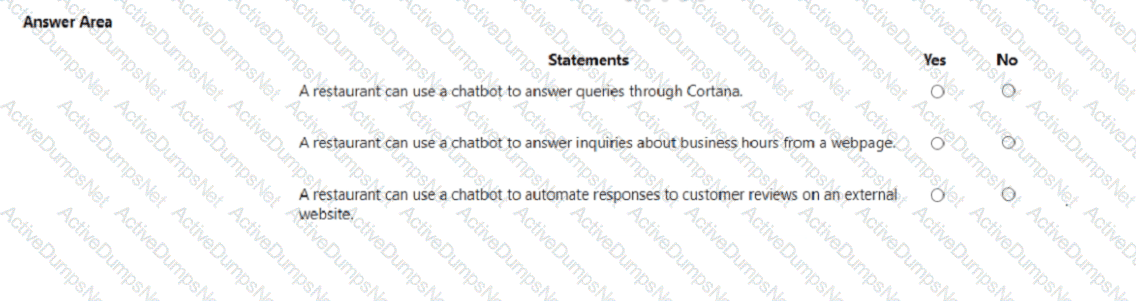
Options:
Answer:
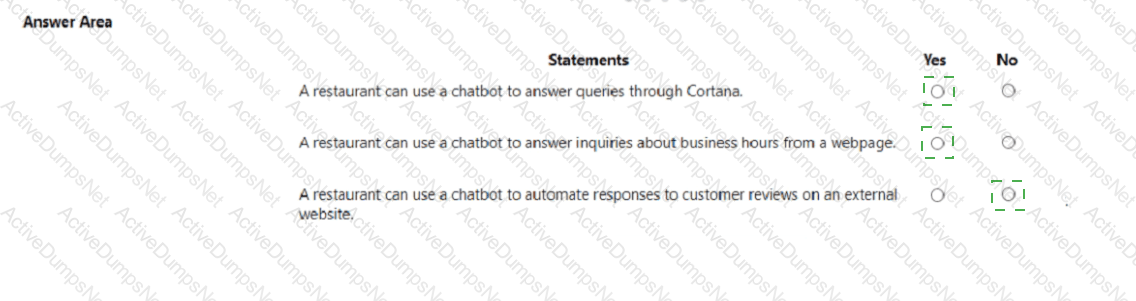
Explanation:
Yes, Yes, No.
According to the Microsoft Azure AI Fundamentals (AI-900) study materials, conversational AI enables applications, websites, and digital assistants to interact with users via natural language. A chatbot is a key conversational AI workload and can be integrated into multiple channels such as web pages, Microsoft Teams, Facebook Messenger, and Cortana using Azure Bot Service and Bot Framework.
“A restaurant can use a chatbot to answer queries through Cortana” — Yes.Azure Bot Service supports multi-channel deployment, which includes Cortana integration. This means the same bot can respond to voice or text input via Cortana, making it a valid use case for a restaurant to provide menu details, reservations, or order tracking through voice-based AI assistants.
“A restaurant can use a chatbot to answer inquiries about business hours from a webpage” — Yes.This is a standard scenario for chatbots embedded on a company website. As per Microsoft Learn’s Describe features of conversational AI module, a chatbot can be added to a website to handle FAQs such as business hours, location, or menu details, thereby improving response time and reducing repetitive human workload.
“A restaurant can use a chatbot to automate responses to customer reviews on an external website” — No.Azure bots and other conversational AI tools cannot automatically interact with or post on external third-party platforms where the business does not control the data or API integration. Automated posting or replying to reviews on external review sites (e.g., Yelp or Google Reviews) would violate both ethical and technical boundaries of responsible AI usage outlined by Microsoft.
You have the Predicted vs. True chart shown in the following exhibit.
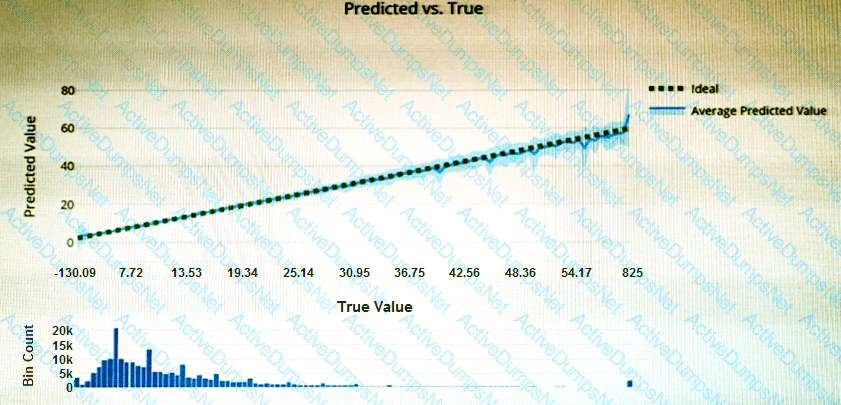
Which type of model is the chart used to evaluate?
Options:
classification
regression
clustering
Answer:
BExplanation:
What is a Predicted vs. True chart?
Predicted vs. True shows the relationship between a predicted value and its correlating true value for a regression problem. This graph can be used to measure performance of a model as the closer to the y=x line the predicted values are, the better the accuracy of a predictive model.
You plan to build a conversational Al solution that can be surfaced in Microsoft Teams. Microsoft Cortana, and Amazon Alexa. Which service should you use?
Options:
Azure Bot Service
Azure Cognitive Search
Language service
Speech
Answer:
AExplanation:
According to the Microsoft Azure AI Fundamentals (AI-900) official study guide and Microsoft Learn module “Describe features of conversational AI workloads on Azure,” the Azure Bot Service is the dedicated Azure service for building, connecting, deploying, and managing conversational AI experiences across multiple channels — such as Microsoft Teams, Cortana, and Amazon Alexa.
The Azure Bot Service integrates with the Bot Framework SDK to design intelligent chatbots that can communicate with users in natural language. It also connects seamlessly with other Azure Cognitive Services, such as Language Service (LUIS) for intent understanding and Speech Service for voice input/output.
The question specifies that the conversational AI must be accessible through multiple platforms, including Microsoft Teams, Cortana, and Alexa. Azure Bot Service supports this multi-channel communication model out of the box, allowing developers to configure a single bot that interacts through many endpoints simultaneously.
Other options:
B. Azure Cognitive Search: Used for information retrieval and knowledge mining, not conversational AI.
C. Language Service: Provides natural language understanding, key phrase extraction, sentiment analysis, etc., but doesn’t handle multi-channel communication.
D. Speech: Provides speech-to-text and text-to-speech conversion but is not a chatbot platform.
Therefore, the best solution for building and deploying a multi-channel conversational AI system is Azure Bot Service, as clearly defined in Microsoft’s AI-900 learning content.
For each of the following statements, select Yes if the statement is true. Otherwise, select No.
NOTE: Each correct selection is worth one point.
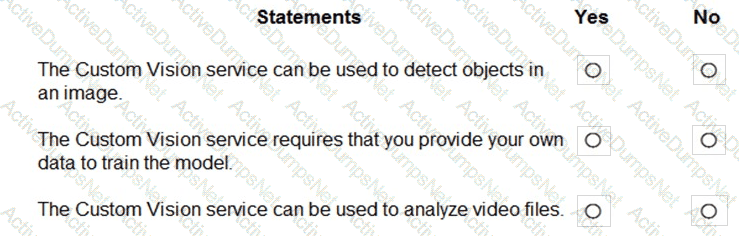
Options:
Answer:
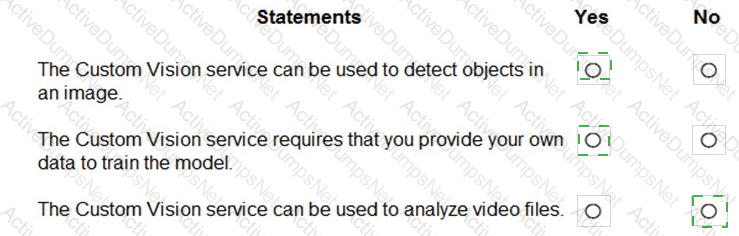
Explanation:
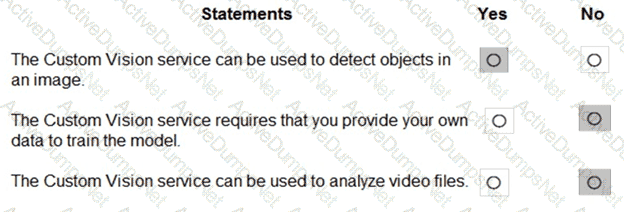
According to the Microsoft Azure AI Fundamentals (AI-900) study guide and Azure Cognitive Services documentation, the Custom Vision service is a specialized computer vision tool that allows users to build, train, and deploy custom image classification and object detection models. It is part of the Azure Cognitive Services suite, designed for scenarios where pre-built Computer Vision models do not meet specific business requirements.
“The Custom Vision service can be used to detect objects in an image.” → YesThis statement is true. The Custom Vision service supports object detection, enabling the model to identify and locate multiple objects within a single image using bounding boxes. For example, it can locate cars, products, or animals in photos.
“The Custom Vision service requires that you provide your own data to train the model.” → YesThis statement is true. Unlike pre-trained models such as the standard Computer Vision API, the Custom Vision service requires users to upload and label their own images. The system uses this labeled dataset to train a model specific to the user’s scenario, improving accuracy for custom use cases.
“The Custom Vision service can be used to analyze video files.” → NoThis statement is false. The Custom Vision service works only with static images, not videos. To analyze video files, Azure provides Video Indexer and Azure Media Services, which are designed for extracting insights from moving visual content.
What is an advantage of using a custom model in Form Recognizer?
Options:
Only a custom model can be deployed on-premises.
A custom model can be trained to recognize a variety of form types.
A custom model is less expensive than a prebuilt model.
A custom model always provides higher accuracy.
Answer:
BExplanation:
Azure AI Form Recognizer extracts information from structured and semi-structured documents. A custom model in Form Recognizer allows an organization to train the system on its specific document layouts and data fields.
As per the AI-900 study guide, a key advantage of a custom model is its flexibility. It can be trained with a set of labeled examples (e.g., invoices, purchase orders, receipts) that match the company’s format. Once trained, the model learns where to locate and extract fields such as invoice numbers, dates, or totals—regardless of layout differences between form types.
Option B is correct because a custom model can be trained to recognize a variety of form types, making it adaptable for diverse business processes.
Options A, C, and D are incorrect:
A: Both prebuilt and custom models are cloud-based; on-premises deployment is not an exclusive feature.
C: Custom models are not cheaper; they may involve additional training costs.
D: Custom models do not always guarantee higher accuracy—accuracy depends on the training data quality.
To complete the sentence, select the appropriate option in the answer area.
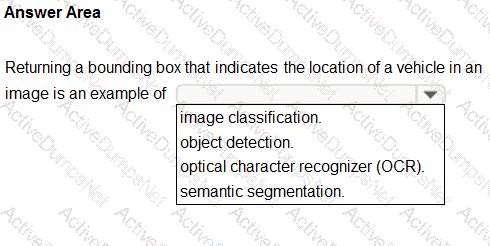
Options:
Answer:
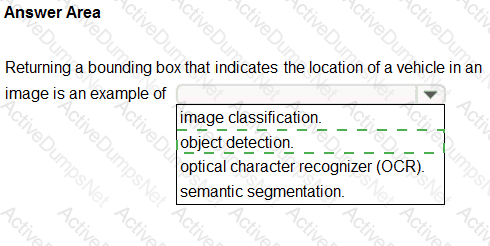
Explanation:
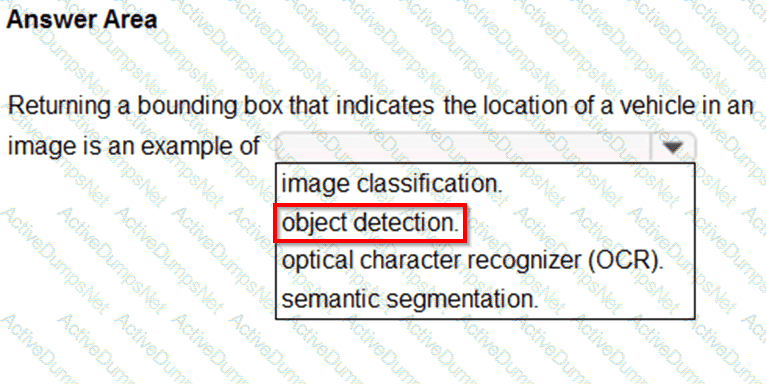
The correct answer is object detection. According to the Microsoft Azure AI Fundamentals (AI-900) official study materials and Microsoft Learn module “Explore computer vision”, object detection is the process of identifying and locating objects within an image or video. The primary characteristic of object detection, as emphasized in the study guide, is its ability to return a bounding box around each detected object along with a corresponding label or class.
In this question, the task involves returning a bounding box that indicates the location of a vehicle in an image. This is the exact definition of object detection — identifying that the object exists (a vehicle) and determining its position within the frame. Microsoft Learn clearly differentiates this from other computer vision tasks. Image classification, for example, only determines what an image contains as a whole (for instance, “this image contains a vehicle”), but it does not indicate where in the image the object is located. Optical character recognition (OCR) is specifically used for extracting printed or handwritten text from images, and semantic segmentation involves classifying every pixel in an image to understand boundaries in greater detail, often used in autonomous driving or medical imaging.
The official AI-900 guide highlights object detection as one of the key computer vision workloads supported by Azure Computer Vision, Custom Vision, and Azure Cognitive Services. These services are designed to detect multiple instances of various object types in a single image, outputting bounding boxes and confidence scores for each.
Therefore, based on the AI-900 official curriculum and Microsoft Learn concepts, returning a bounding box that shows the location of a vehicle is a textbook example of object detection, as it involves both recognition and localization of the object within the image frame.
For each of the following statements, select Yes if the statement is true. Otherwise, select No.
NOTE: Each correct selection is worth one point.
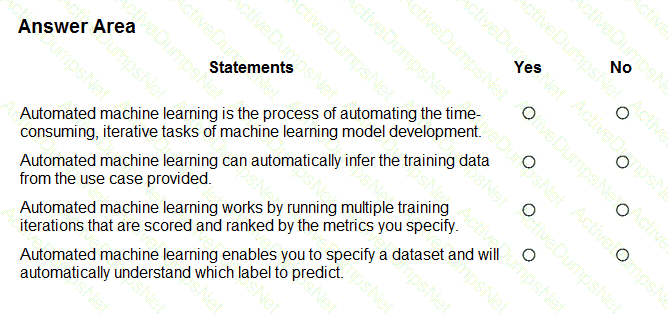
Options:
Answer:
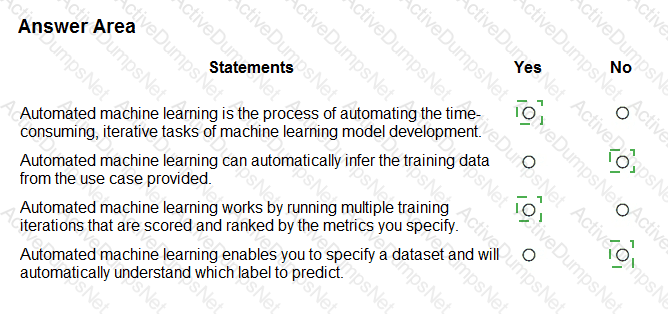
Explanation:
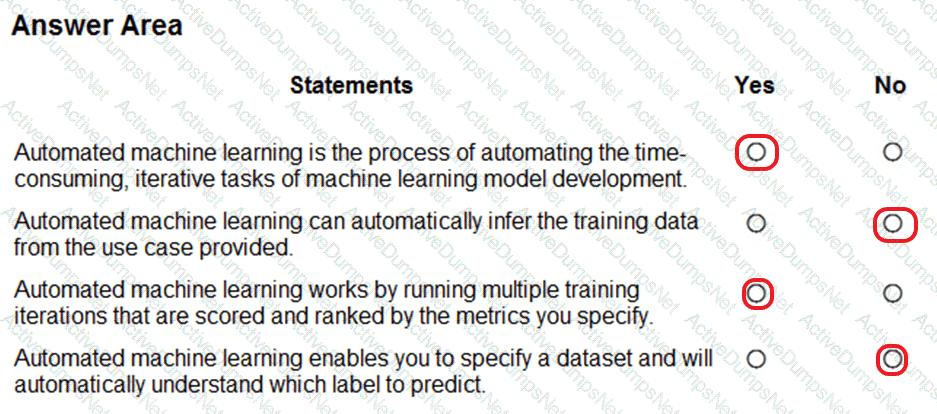
Box 1: Yes
Automated machine learning, also referred to as automated ML or AutoML, is the process of automating the time consuming, iterative tasks of machine learning model development. It allows data scientists, analysts, and developers to build ML models with high scale, efficiency, and productivity all while sustaining model quality.
Box 2: No
Box 3: Yes
During training, Azure Machine Learning creates a number of pipelines in parallel that try different algorithms and parameters for you. The service iterates through ML algorithms paired with feature selections, where each iteration produces a model with a training score. The higher the score, the better the model is considered to " fit " your data. It will stop once it hits the exit criteria defined in the experiment.
Box 4: No
Apply automated ML when you want Azure Machine Learning to train and tune a model for you using the target metric you specify.
The label is the column you want to predict.
You need to identify groups of rows with similar numeric values in a dataset. Which type of machine learning should you use?
Options:
clustering
regression
classification
Answer:
AExplanation:
When you need to identify groups of rows with similar numeric values in a dataset, the correct machine learning approach is clustering. This method belongs to unsupervised learning, where the model groups data points based on similarity without using pre-labeled training data.
In Azure AI-900 study modules, clustering is introduced as a technique for discovering natural groupings in data. For instance, clustering could be used to group customers with similar purchase histories or to find products with similar features. The algorithm—such as K-means or hierarchical clustering—calculates distances between data points and organizes them into clusters based on how close they are numerically or statistically.
The other options are incorrect:
B. Regression predicts continuous numeric values (e.g., predicting sales or prices).
C. Classification assigns data to predefined categories (e.g., spam or not spam).
Select the answer that correctly completes the sentence.

Options:
Answer:

Explanation:

During model training, a portion of the dataset (commonly 70–80%) is used to teach the machine learning algorithm to identify patterns and relationships between input features and the output label. The remaining data (usually 20–30%) is held back to evaluate the model’s performance and verify its accuracy on unseen data. This ensures the model is not overfitted (too tightly fitted to training data) and can generalize well to new inputs.
Key steps highlighted in Microsoft Learn materials:
Model Training: Use the training data to fit the model — the algorithm learns relationships between input features and labels.
Model Evaluation: Use the test or validation data to assess the accuracy, precision, recall, or other metrics of the trained model.
Model Deployment: Once validated, the model is deployed to make real-world predictions.
Other options explained:
Feature engineering: Involves preparing and transforming input data, not splitting datasets for training and testing.
Time constraints: Not a machine learning process step.
Feature stripping: Not a recognized ML concept.
MLflow models: Refers to an open-source tool for tracking and managing models, not dataset splitting or training.
Thus, when you use a portion of the dataset to prepare and train a machine learning model, and retain the rest to verify results, the process is known as model training.
Select the answer that correctly completes the sentence.
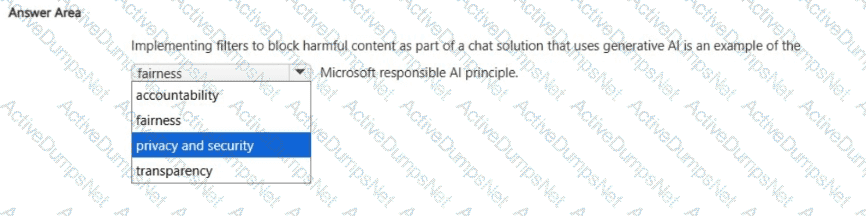
Options:
Answer:
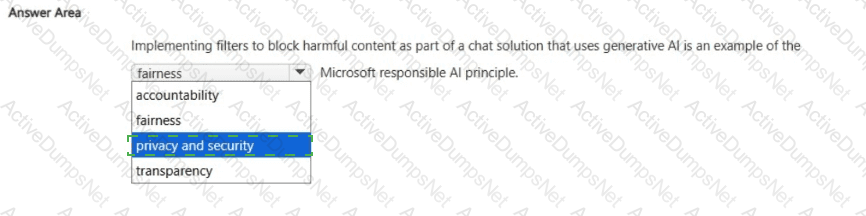
Explanation:
Privacy and security.
According to Microsoft’s Responsible AI Principles, implementing filters to block harmful or inappropriate content in a Generative AI chat solution demonstrates a commitment to the Privacy and Security principle. This principle ensures that AI systems are designed and operated in a way that protects users, their data, and society from harm.
When a chat system uses Generative AI models (like Azure OpenAI’s GPT-based services), there is a risk that the model might produce unsafe, offensive, or sensitive content. Microsoft addresses this through content filters and safety systems, which automatically detect and block violent, hate-based, or sexually explicit outputs. This is part of responsible deployment practices to ensure that user interactions remain safe, private, and compliant with ethical standards.
Implementing these filters aligns with the Privacy and Security principle because it:
Protects users from exposure to harmful or abusive content.
Ensures that conversations are safeguarded against malicious or unsafe use.
Upholds user trust by maintaining a safe digital environment for all participants.
Let’s briefly clarify why the other options are incorrect:
Fairness deals with ensuring unbiased treatment and equitable outcomes in AI decisions.
Transparency focuses on explaining how AI systems make decisions.
Accountability refers to human oversight and responsibility for AI actions.
Thus, content filtering mechanisms are explicitly an example of Privacy and Security, as they protect users and data from harm or misuse while maintaining ethical AI behavior.
Therefore, the verified correct answer is Privacy and security.
Select the answer that correctly completes the sentence.

Options:
Answer:

Explanation:

“When evaluating the performance of a model, the confusion matrix displays the predicted and actual positives and negatives by using a grid of 0 and 1 values.”
According to the Microsoft Azure AI Fundamentals (AI-900) official study materials and Microsoft Learn module “Identify features of common machine learning types”, a confusion matrix is a tool used to evaluate the performance of classification models. It visually summarizes how many predictions were correctly or incorrectly classified by comparing the predicted labels to the actual (true) labels.
A confusion matrix is a table, typically 2×2 for binary classification, with the following components:
True Positives (TP): The model correctly predicted the positive class.
True Negatives (TN): The model correctly predicted the negative class.
False Positives (FP): The model incorrectly predicted the positive class.
False Negatives (FN): The model incorrectly predicted the negative class.
The confusion matrix allows data scientists and analysts to derive important performance metrics such as accuracy, precision, recall, and F1-score, which together provide a more complete understanding of how well a model performs beyond a single number.
In Microsoft Learn’s AI-900 curriculum, the confusion matrix is highlighted as a key visualization tool that “compares actual values to predicted values to evaluate classification performance.” The grid format (using 0s and 1s for predicted classes) helps identify where misclassifications occur.
By contrast:
AUC metric (Area Under Curve) and ROC curve evaluate model discrimination ability.
Threshold defines decision cutoffs but doesn’t display classifications.
Therefore, based on the official Microsoft AI-900 study guide and Microsoft Learn resources, the correct answer is Confusion Matrix, as it provides a grid view comparing actual versus predicted values in classification models.
Select the answer that correctly completes the sentence.

Options:
Answer:

Explanation:

According to the Microsoft Azure AI Fundamentals (AI-900) official study materials and Microsoft Learn module “Describe features of common AI workloads,” an anomaly detection workload is designed to identify data points or patterns that deviate significantly from what is expected or normal. These anomalies often indicate irregularities, faults, or potential issues that require attention.
In this scenario, the AI system monitors temperature data from a large machine. Normally, the machine operates within a predictable temperature range. When the AI detects sudden or unexpected temperature spikes or drops — behavior that does not match the historical pattern — it flags these occurrences as anomalies. This type of workload is fundamental in predictive maintenance and industrial monitoring, where it helps detect equipment failures, safety hazards, or energy inefficiencies before they escalate.
Microsoft’s AI-900 curriculum emphasizes that anomaly detection workloads are often used in:
Industrial IoT systems (detecting abnormal sensor readings or machine behavior)
Finance (fraud detection or unusual transaction monitoring)
Cybersecurity (detecting irregular network traffic or access patterns)
Operations (identifying abnormal variations in production data)
The Azure service used for this purpose is Azure Anomaly Detector, part of Azure Cognitive Services, which uses advanced statistical and machine learning models to automatically detect outliers in time-series data such as temperature, pressure, or transaction logs.
By comparison:
Computer vision handles image or video analysis.
Knowledge mining extracts insights from large document collections.
Natural Language Processing (NLP) interprets human language.
Thus, based on the official Microsoft AI-900 study guide and Microsoft Learn, the correct and verified answer is An anomaly detection workload, since detecting unusual temperature fluctuations precisely fits this AI workload type.
You use natural language processing to process text from a Microsoft news story.
You receive the output shown in the following exhibit.
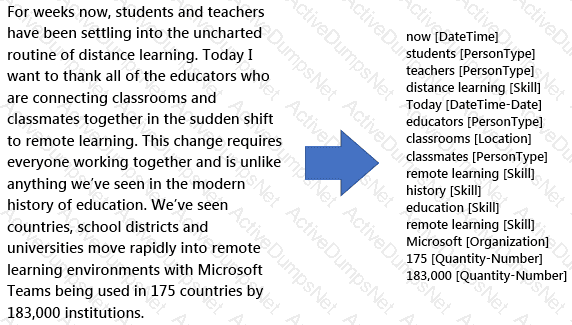
Which type of natural languages processing was performed?
Options:
entity recognition
key phrase extraction
sentiment analysis
translation
Answer:
AExplanation:
https://docs.microsoft.com/en-us/azure/cognitive-services/text-analytics/overview
You can provide the Text Analytics service with unstructured text and it will return a list of entities in the text that it recognizes. You can provide the Text Analytics service with unstructured text and it will return a list of entities in the text that it recognizes. The service can also provide links to more information about that entity on the web. An entity is essentially an item of a particular type or a category; and in some cases, subtype, such as those as shown in the following table.
https://docs.microsoft.com/en-us/learn/modules/analyze-text-with-text-analytics-service/2-get-started-azure
What should you use to identify similar faces in a set of images?
Options:
Azure Al Vision
Azure Al Custom Vision
Azure Al Language
Azure OpenAI Service
Answer:
AExplanation:
The correct service to identify similar faces in a set of images is Azure AI Vision, which includes the Face API capability. According to the Microsoft Learn module “Analyze images with Azure AI Vision”, this service provides prebuilt models for face detection, facial recognition, and similarity matching.
The Face API can detect individual faces in images and extract unique facial features to create a face embedding (a numerical representation of the face). It then compares these embeddings across multiple images to determine whether faces are similar or belong to the same person. This functionality is commonly used in identity verification, photo management systems, and security solutions.
The other options are incorrect:
B. Azure AI Custom Vision is used for custom image classification or object detection but does not provide face similarity or recognition features.
C. Azure AI Language processes text-based data (sentiment, entities, key phrases) — not visual content.
D. Azure OpenAI Service focuses on text generation, summarization, and conversation, not facial analysis.
Therefore, the Microsoft-verified service for identifying similar faces across images is A. Azure AI Vision.
An app that analyzes social media posts to identify their tone is an example of which type of natural language processing (NLP) workload?
Options:
sentiment analysis
key phrase extraction
entity recognition
speech recognition
Answer:
AExplanation:
According to the Microsoft Azure AI Fundamentals (AI-900) official study guide and Microsoft Learn module “Describe features of natural language processing (NLP) workloads on Azure,” sentiment analysis is an NLP workload that determines the emotional tone or opinion expressed in a piece of text. This could be positive, negative, or neutral sentiment.
When an app analyzes social media posts to identify their tone, it is performing sentiment analysis, since it aims to understand the emotional context behind user-generated text such as tweets, reviews, or comments. Azure provides this functionality through the Azure Cognitive Services – Text Analytics API, which evaluates text and returns sentiment scores.
Other options are not suitable:
Key phrase extraction identifies main ideas in text but not tone.
Entity recognition identifies names of people, organizations, or locations.
Speech recognition converts spoken words into text, not emotional analysis.
Therefore, analyzing social media tone is an example of sentiment analysis, a key NLP workload in Microsoft’s AI-900 syllabus.
You have a dataset that contains experimental data for fuel samples.
You need to predict the amount of energy that can be obtained from a sample based on its density.
Which type of Al workload should you use?
Options:
Classification
Clustering
Knowledge mining
Regression
Answer:
DExplanation:
As described in the AI-900 study guide under “Identify features of machine learning,” regression is a supervised learning technique used to predict continuous numerical values. In this scenario, the goal is to predict energy output (a continuous variable) based on density (a numeric input).
Regression models find relationships between variables by fitting a line or curve that best represents the trend of the data. In Azure Machine Learning, regression algorithms such as linear regression, decision tree regression, and boosted decision trees are commonly used for such predictions.
Classification (A) predicts discrete labels (e.g., “High” or “Low”), not numeric values.
Clustering (B) groups similar data points but does not perform prediction.
Knowledge mining (C) extracts insights from unstructured data using tools like Azure AI Search and Cognitive Skills.
Hence, based on AI-900 fundamentals, predicting energy based on density requires a regression workload.
Select the answer that correctly completes the sentence.
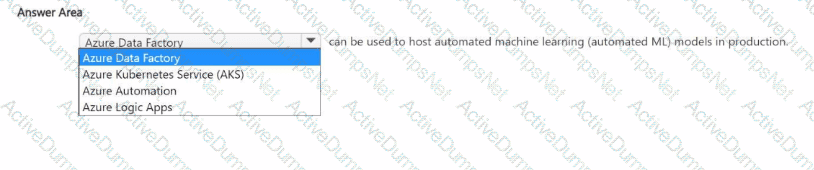
Options:
Answer:
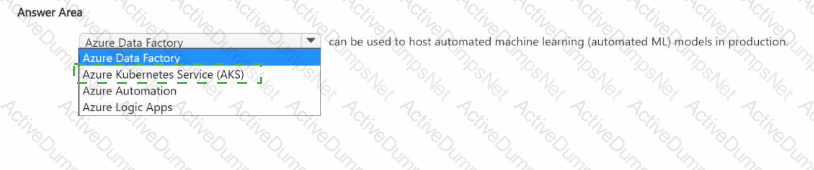
Explanation:
Azure Kubernetes Service (AKS).
According to the Microsoft Azure AI Fundamentals (AI-900) official study guide and Microsoft Learn documentation on Azure Machine Learning, the Azure Kubernetes Service is commonly used to host and deploy machine learning models, including Automated ML models, into production environments. Once a model is trained using Azure Machine Learning (Azure ML), it must be deployed as a web service endpoint so it can receive data and return predictions.
Azure ML offers two primary options for hosting and deploying models:
Azure Kubernetes Service (AKS) – for high-scale, production-grade deployments that require fast response times, high availability, and scalability.
Azure Container Instances (ACI) – for testing or low-scale workloads where cost and simplicity are more important than performance.
AKS provides a managed Kubernetes cluster that allows for automated container orchestration, load balancing, scaling, and monitoring of deployed machine learning models. When you use Automated ML in Azure ML Studio, the generated model can be containerized and deployed directly to AKS, making it accessible as a REST API endpoint. This enables applications, systems, or users to send data and receive predictions in real time.
The other options serve different purposes:
Azure Data Factory is used for data integration and pipeline orchestration, not model hosting.
Azure Automation focuses on automating administrative tasks and runbooks, not ML deployment.
Azure Logic Apps is used to automate workflows and integrate services, not to serve ML models.
Therefore, the correct service to host automated machine learning (AutoML) models in production is Azure Kubernetes Service (AKS), as it provides a reliable, scalable, and secure environment for real-time inference and enterprise AI workloads.
You use Azure Machine Learning designer to build a model pipeline. What should you create before you can run the pipeline?
Options:
a Jupyter notebook
a registered model
a compute resource
Answer:
CExplanation:
Before running a pipeline in Azure Machine Learning Designer, you must have an available compute resource (such as a compute instance or compute cluster). Compute provides the processing power required to train, evaluate, and execute the pipeline’s modules.
Other options:
A. Jupyter notebook – Used for code-first development, not required for Designer pipelines.
B. Registered model – Created after running a pipeline, not before.
Which feature of the Azure Al Language service should you use to automate the masking of names and phone numbers in text data?
Options:
Personally Identifiable Information (Pll) detection
entity linking
custom text classification
custom named entity recognition (NER)
Answer:
AExplanation:
The correct answer is A. Personally Identifiable Information (PII) detection.
In the Azure AI Language service, PII detection is a built-in feature designed to automatically identify and redact sensitive or confidential information from text data. According to the Microsoft Learn module “Identify capabilities of Azure AI Language” and the AI-900 study guide, this capability can detect personal data such as names, phone numbers, email addresses, credit card numbers, and other identifiers.
When applied, the service scans input text and either masks or removes these PII elements based on configurable parameters, ensuring compliance with data privacy regulations like GDPR or HIPAA.
For example, if a document contains “John Doe’s phone number is 555-123-4567,” PII detection can return “******’s phone number is ***********,” thereby preventing exposure of sensitive personal details.
Option analysis:
A. Personally Identifiable Information (PII) detection: ✅ Correct. It identifies and masks sensitive data in text.
B. Entity linking: Connects recognized entities to known data sources like Wikipedia; not used for redaction.
C. Custom text classification: Classifies text into predefined categories; not designed for masking personal data.
D. Custom named entity recognition (NER): Detects domain-specific entities you define but doesn’t automatically mask them.
Therefore, to automate masking of names and phone numbers, the appropriate Azure AI Language feature is PII detection.
You have a dataset that contains information about taxi journeys that occurred during a given period.
You need to train a model to predict the fare of a taxi journey.
What should you use as a feature?
Options:
the number of taxi journeys in the dataset
the trip distance of individual taxi journeys
the fare of individual taxi journeys
the trip ID of individual taxi journeys
Answer:
BExplanation:
The label is the column you want to predict. The identified Features are the inputs you give the model to predict the Label.
Example:
The provided data set contains the following columns:
vendor_id: The ID of the taxi vendor is a feature.
rate_code: The rate type of the taxi trip is a feature.
passenger_count: The number of passengers on the trip is a feature.
trip_time_in_secs: The amount of time the trip took. You want to predict the fare of the trip before the trip is completed. At that moment, you don ' t know how long the trip would take. Thus, the trip time is not a feature and you ' ll exclude this column from the model.
trip_distance: The distance of the trip is a feature.
payment_type: The payment method (cash or credit card) is a feature.
fare_amount: The total taxi fare paid is the label.
To complete the sentence, select the appropriate option in the answer area.

Options:
Answer:

Explanation:

According to the Microsoft Azure AI Fundamentals (AI-900) official study materials, object detection is a type of computer vision workload that not only identifies objects within an image but also determines their location by drawing bounding boxes around them. This functionality is clearly described in the Microsoft Learn module “Identify features of computer vision workloads.”
In this scenario, the AI system analyzes an image to find a vehicle and then returns a bounding box showing where that vehicle is located within the image frame. That ability — to detect, classify, and localize multiple objects — perfectly defines object detection.
Microsoft’s study content contrasts object detection with other computer vision workloads as follows:
Image classification: Determines what object or scene is present in an image as a whole but does not locate it (e.g., “this is a car”).
Object detection: Identifies what objects are present and where they are, usually returning coordinates for bounding boxes (e.g., “car detected at position X, Y”).
Optical Character Recognition (OCR): Extracts text content from images or scanned documents.
Facial detection: Specifically locates human faces within an image or video feed, often as part of face recognition systems.
In Azure, object detection capabilities are available through services such as Azure Computer Vision, Custom Vision, and Azure Cognitive Services for Vision, which can be trained to detect vehicles, products, or other objects in various image datasets.
Therefore, based on the AI-900 study guide and Microsoft Learn materials, the verified and correct answer is Object detection, as it accurately describes the process of returning a bounding box indicating an object’s position in an image.
To complete the sentence, select the appropriate option in the answer area.
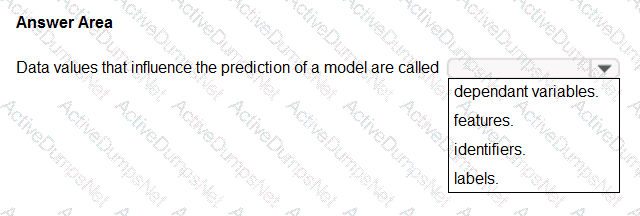
Options:
Answer:
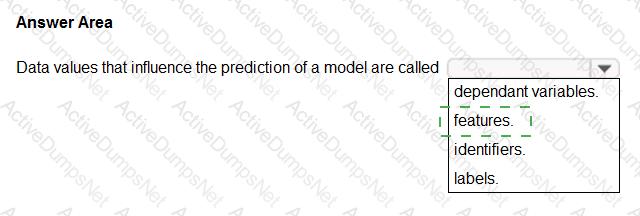
Explanation:
Features
According to the Microsoft Azure AI Fundamentals (AI-900) official study guide and the Microsoft Learn module “Explore fundamental principles of machine learning,” data values that influence the prediction of a model are called features. In the context of machine learning, a feature is an individual measurable property, attribute, or input variable used by the model to make predictions.
Features are the independent variables that describe the characteristics of the data. For example, in a housing price prediction model, features might include square footage, location, number of bedrooms, and year built. These inputs help the model understand relationships in the data so it can predict the target outcome (the house price).
Microsoft Learn explains that features are the input variables that the algorithm uses to identify patterns and relationships in the training data. During training, the model learns how changes in these features influence the label (also known as the dependent variable or target variable). The label is the value the model tries to predict—such as “price,” “category,” or “yes/no.”
Here’s how the other options differ:
Dependent variables (labels): These are the outcomes or target values the model predicts, not the inputs.
Identifiers: These are unique keys (like customer ID or transaction ID) used to distinguish records but not to influence predictions.
Labels: As mentioned, labels are the results the model tries to predict.
Therefore, based on the AI-900 learning objectives and Microsoft’s official explanation, the data values that influence the prediction of a model—that is, the input variables that guide the model’s learning—are called features. These features form the foundation of the model’s predictive capabilities and directly impact its accuracy and performance.
Match the Azure Al service to the appropriate actions.
To answer, drag the appropriate service from the column on the left to its action on the right Each service may be used once, more than once, or not at all.
NOTE: Each correct match is worth one point.
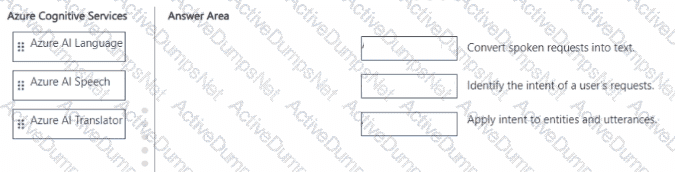
Options:
Answer:
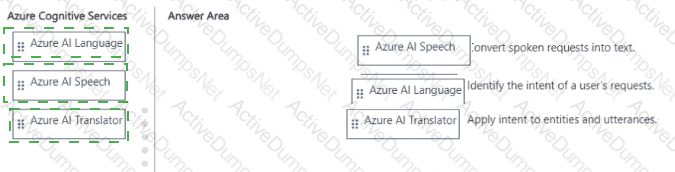
Explanation:
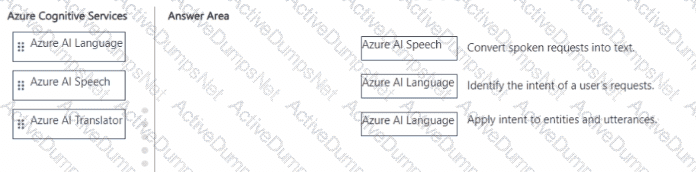
The correct mapping is based on how each Azure Cognitive Service functions within the Microsoft AI ecosystem, as detailed in the Microsoft Azure AI Fundamentals (AI-900) study guide and Microsoft Learn Cognitive Services documentation.
Convert spoken requests into text → Azure AI SpeechThe Azure AI Speech service provides speech-to-text (STT) capabilities, which enable an application to recognize spoken language and convert it into written text. This functionality is foundational in voice-enabled applications like digital assistants or transcription services. When a user speaks, this service captures the audio signal and produces an accurate textual representation that can then be processed by other AI services.
Identify the intent of a user’s requests → Azure AI LanguageThe Azure AI Language service (which includes Conversational Language Understanding, formerly LUIS) is designed to extract meaning from text. It identifies intents—the goals or actions a user wants to perform—and entities, which are key details within that request. For example, in the command “Book a flight to Paris,” the intent is “book a flight,” and the entity is “Paris.”
Apply intent to entities and utterances → Azure AI LanguageAgain, the Language service performs this deeper contextual analysis. It not only identifies what the user wants (intent) but also applies it to utterances (specific user expressions) and entities (data elements extracted from text). This helps conversational AI systems take meaningful actions, such as fulfilling user requests.
In summary, Azure AI Speech handles audio-to-text conversion, while Azure AI Language performs natural language understanding, mapping intents and entities—a workflow essential in intelligent conversational applications.
You are building an AI system.
Which task should you include to ensure that the service meets the Microsoft transparency principle for responsible AI?
Options:
Ensure that all visuals have an associated text that can be read by a screen reader.
Enable autoscaling to ensure that a service scales based on demand.
Provide documentation to help developers debug code.
Ensure that a training dataset is representative of the population.
Answer:
CExplanation:
According to the Microsoft Azure AI Fundamentals (AI-900) Official Study Guide and Microsoft Learn module “Describe principles of responsible AI”, the transparency principle ensures that AI systems are understandable, explainable, and well-documented so that users, developers, and stakeholders can know how the system operates and makes decisions. Transparency involves clear communication, documentation, and interpretability.
Microsoft defines transparency as the responsibility to make sure that people understand how AI systems function, their limitations, and how decisions are made. For developers, this means providing detailed documentation and model interpretability tools so others can inspect, debug, and understand the AI model’s behavior. For users, it means ensuring that the purpose, capabilities, and limitations of the AI system are clearly explained.
Providing documentation to help developers debug and understand how a service works directly aligns with this transparency principle. It ensures that the system’s logic and behavior are open to inspection and that any unintended consequences can be identified and corrected. Transparency also builds trust in AI solutions by enabling accountability and oversight.
Let’s analyze the other options:
A. Ensure that all visuals have an associated text that can be read by a screen reader – This supports inclusiveness, not transparency, as it focuses on accessibility for all users.
B. Enable autoscaling to ensure that a service scales based on demand – This is related to system performance and scalability, not responsible AI.
D. Ensure that a training dataset is representative of the population – This supports fairness, as it prevents bias and ensures equitable outcomes.
Therefore, based on the official AI-900 training content and Microsoft’s Responsible AI framework (which includes fairness, reliability, privacy, inclusiveness, transparency, and accountability), the correct answer is C. Provide documentation to help developers debug code, because this directly promotes transparency in how the AI system operates and communicates its inner workings
To complete the sentence, select the appropriate option in the answer area.

Options:
Answer:

Explanation:

Reliability and safety: To build trust, it ' s critical that AI systems operate reliably, safely, and consistently under normal circumstances and in unexpected conditions. These systems should be able to operate as they were originally designed, respond safely to unanticipated conditions, and resist harmful manipulation.
Which two tools can you use to call the Azure OpenAI service? Each correct answer presents a complete solution.
NOTE: Each correct answer is worth one point.
Options:
Azure Command-Line Interface (CLI)
Azure REST API
Azure SDK for Python
Azure SDK for JavaScript
Answer:
B, CExplanation:
The correct answers are B. Azure REST API and C. Azure SDK for Python.
The Azure OpenAI Service can be accessed using multiple development interfaces. According to Microsoft Learn documentation, developers can call the service via the Azure REST API, which provides direct HTTPS-based access to the model endpoints for tasks like completions, chat, embeddings, and image generation. This interface is platform-independent and supports integration with any system capable of making HTTP requests.
Additionally, Azure SDKs offer higher-level libraries for convenient integration into applications. The Azure SDK for Python and Azure SDK for JavaScript are both supported for Azure OpenAI interaction, allowing developers to authenticate with Azure credentials, send prompts, and receive model responses programmatically.
However, among the listed options, the REST API (B) and SDK for Python (C) are most explicitly referenced in the AI-900 learning modules and Microsoft documentation as standard tools to call Azure OpenAI services.
Option A (Azure CLI) is incorrect because the CLI is used primarily for provisioning and managing Azure resources, not for directly calling OpenAI model endpoints.
Therefore, based on the Azure AI-900 and OpenAI integration guidance, the correct answers are B. Azure REST API and C. Azure SDK for Python.
Which AI service can you use to interpret the meaning of a user input such as “Call me back later?”
Options:
Translator Text
Text Analytics
Speech
Language Understanding (LUIS)
Answer:
DExplanation:
According to the Microsoft Azure AI Fundamentals (AI-900) learning content, Language Understanding Intelligent Service (LUIS) is part of Azure Cognitive Services used to interpret the meaning or intent behind a user’s input in natural language. When a user says, “Call me back later,” the system must recognize that the user intends for a call to be scheduled or delayed—this is not just about translating or analyzing text but understanding intent and relevant entities.
LUIS allows developers to train models to identify intents (such as ScheduleCall, CancelMeeting, etc.) and extract key entities (like names, times, or actions) from text inputs. It is typically integrated with conversational agents such as Azure Bot Service, enabling more natural, human-like interactions.
Other options do not fit the scenario:
Translator Text (A) translates text between languages but does not interpret meaning.
Text Analytics (B) performs sentiment analysis, key phrase extraction, and named entity recognition, but it doesn’t identify intent.
Speech (C) converts spoken language to text or text to speech but doesn’t interpret what the words mean.
Therefore, for understanding user intent such as “Call me back later,” the correct AI service is D. Language Understanding (LUIS).
For each of the following statements, select Yes if the statement is true. Otherwise, select No.
NOTE; Each correct selection is worth one point.
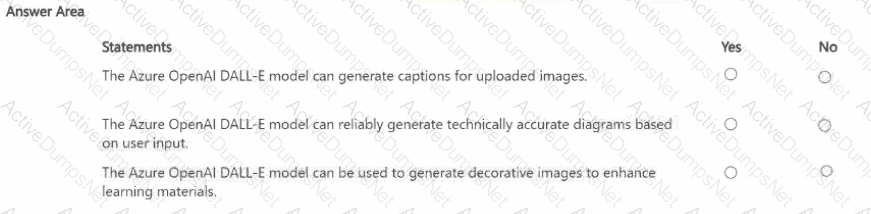
Options:
Answer:
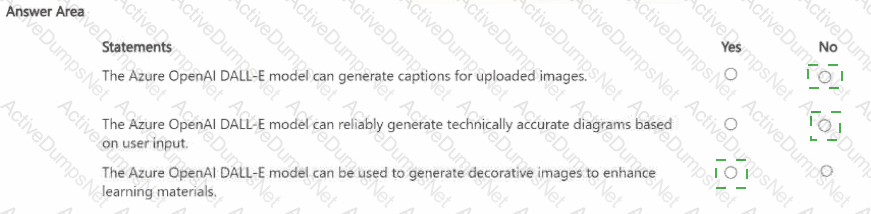
Explanation:
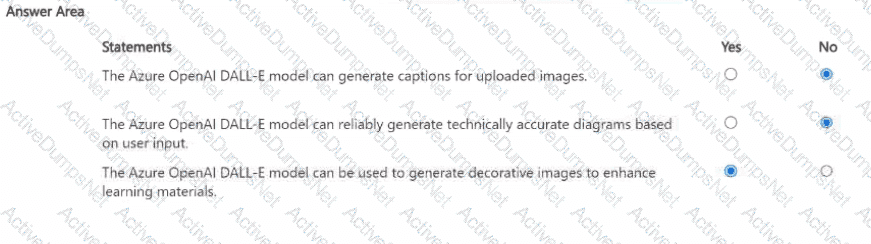
The Azure OpenAI DALL-E model is a generative image model designed to create original images from textual descriptions (prompts). According to the Microsoft Learn documentation and the AI-900 study guide, DALL-E’s primary function is text-to-image generation—it converts creative or descriptive text input into visually relevant imagery.
“Generate captions for uploaded images” → NoDALL-E cannot create image captions. Captioning an image (describing what’s in an uploaded image) is a vision analysis task, not an image generation task. That functionality belongs to Azure AI Vision, which can analyze and describe images, detect objects, and generate captions automatically.
“Reliably generate technically accurate diagrams” → NoWhile DALL-E can create visually appealing artwork or conceptual sketches, it is not designed for producing precise or technically correct diagrams, such as engineering schematics or architectural blueprints. The model’s generative process emphasizes creativity and visual diversity rather than factual or geometric accuracy. Thus, it cannot be relied upon for professional technical outputs.
“Generate decorative images to enhance learning materials” → YesThis is one of DALL-E’s strongest use cases. It can generate decorative, conceptual, or illustrative images to enhance presentations, educational materials, and marketing content. It enables educators and designers to quickly produce unique visuals aligned with specific themes or topics, enhancing engagement and creativity.
You are creating an app to help employees write emails and reports based on user prompts. What should you use?
Options:
Azure Al Speech
Azure OpenAI in Foundry Models
Azure Al Vision
Azure Machine Learning studio
Answer:
BExplanation:
For an app that helps employees write emails and reports based on user prompts, you need a text generation model capable of understanding natural language instructions and producing coherent, contextually appropriate output. Azure OpenAI GPT models—available through Azure AI Foundry (formerly Azure OpenAI Studio)—are specifically designed for such generative tasks.
By integrating GPT-3.5 or GPT-4, the app can analyze prompts like “Write a professional email to a client about project updates” and automatically generate polished text in seconds.
The other options do not fit:
A. Azure AI Speech: Converts spoken language to text or text to speech; not suitable for generating written content.
C. Azure AI Vision: Processes and analyzes images or video content.
D. Azure Machine Learning Studio: Used for training, testing, and deploying custom ML models, not directly for content generation.
Therefore, to create a writing-assistance app for emails and reports, the correct solution is B. Azure OpenAI in Foundry Models using GPT-based language generation.
You need to create a clustering model and evaluate the model by using Azure Machine Learning designer. What should you do?
Options:
Split the original dataset into a dataset for features and a dataset for labels. Use the features dataset for evaluation.
Split the original dataset into a dataset for training and a dataset for testing. Use the training dataset for evaluation.
Split the original dataset into a dataset for training and a dataset for testing. Use the testing dataset for evaluation.
Use the original dataset for training and evaluation.
Answer:
CExplanation:
According to the Microsoft Learn module “Explore fundamental principles of machine learning” and the AI-900 Official Study Guide, when building and evaluating a model (such as a clustering model) in Azure Machine Learning designer, data must be divided into two subsets:
Training dataset: Used to train the model so it can learn patterns and relationships in the data.
Testing dataset: Used to evaluate the model’s performance on unseen data, ensuring that it generalizes well and does not overfit.
In Azure ML Designer, this is typically done using the Split Data module, which separates the dataset into training and testing portions (for example, 70% training and 30% testing). After training, you connect the testing dataset to an Evaluate Model module to assess metrics such as accuracy, precision, or silhouette score (for clustering).
Other options are incorrect:
A. Split into features and labels: Clustering is an unsupervised learning technique, so it doesn’t use labeled data.
B. Use training dataset for evaluation: This would cause overfitting, as the model is being tested on the same data it learned from.
D. Use the original dataset for training and evaluation: Also causes overfitting, offering no measure of generalization.
Which type of natural language processing (NLP) entity is used to identify a phone number?
Options:
regular expression
machine-learned
list
Pattern-any
Answer:
AExplanation:
In Natural Language Processing (NLP), entities are pieces of information extracted from text, such as names, locations, or phone numbers. According to the Microsoft Learn module “Explore natural language processing in Azure,” Azure’s Language Understanding (LUIS) supports several entity types:
Machine-learned entities – Automatically learned based on context in training data.
List entities – Used for predefined, limited sets of values (e.g., colors or product names).
Pattern.any entities – Capture flexible, unstructured phrases in user input.
Regular expression entities – Use regex patterns to match specific data formats such as phone numbers, postal codes, or dates.
A regular expression is ideal for recognizing phone numbers because phone numbers follow specific numeric or symbol-based patterns (e.g., (555)-123-4567 or +1 212 555 0199). By defining a regex pattern, the AI model can accurately extract phone numbers regardless of text context.
You build a QnA Maker bot by using a frequently asked questions (FAQ) page.
You need to add professional greetings and other responses to make the bot more user friendly.
What should you do?
Options:
Increase the confidence threshold of responses
Enable active learning
Create multi-turn questions
Add chit-chat
Answer:
DExplanation:
According to the Microsoft Learn module “Build a QnA Maker knowledge base”, QnA Maker allows developers to create bots that answer user queries based on documents like FAQs or manuals. To make a bot more natural and conversational, Microsoft provides a “chit-chat” feature — a prebuilt, professionally written set of responses to common conversational phrases such as greetings (“Hello”), small talk (“How are you?”), and polite phrases (“Thank you”).
Adding chit-chat improves user experience by making the bot sound friendlier and more human-like. It doesn’t alter the main Q & A logic but enhances the bot’s tone and responsiveness.
The other options are not correct:
A. Increase the confidence threshold makes the bot more selective in responses but doesn’t add new conversational features.
B. Enable active learning improves knowledge base accuracy over time through user feedback.
C. Create multi-turn questions adds conversational flow for related topics but doesn’t add greetings or casual dialogue.
Thus, to make the bot more personable, the correct action is to Add chit-chat.
Select the answer that correctly completes the sentence.

Options:
Answer:

Explanation:
“features.”
According to the Microsoft Azure AI Fundamentals (AI-900) official study guide and Microsoft Learn module “Describe fundamental principles of machine learning on Azure,” in a machine learning model, the data used as inputs are known as features, while the data that represents the output or target prediction is known as the label.
Features are measurable attributes or properties of the data used by a model to learn patterns and make predictions. They are also referred to as independent variables because they influence the result that the model tries to predict. For example, in a machine learning model that predicts house prices:
Features might include square footage, location, and number of bedrooms, while
The label would be the house price (the value being predicted).
In the context of Azure Machine Learning, during model training, features are passed into the algorithm as input variables (X-values), and the label is the corresponding output (Y-value). The model then learns the relationship between the features and the label.
Let’s review the incorrect options:
Functions: These are mathematical operations or relationships used inside algorithms, not the input data itself.
Labels: These are the outputs or results that the model predicts, not the inputs.
Instances: These refer to individual data records or rows in the dataset, not the input fields themselves.
Hence, in any supervised or unsupervised learning process, the input data (independent variables) are called features, and the model uses them to predict labels (dependent variables).
You need to provide content for a business chatbot that will help answer simple user queries.
What are three ways to create question and answer text by using QnA Maker? Each correct answer presents a complete solution.
NOTE: Each correct selection is worth one point.
Options:
Generate the questions and answers from an existing webpage.
Use automated machine learning to train a model based on a file that contains the questions.
Manually enter the questions and answers.
Connect the bot to the Cortana channel and ask questions by using Cortana.
Import chit-chat content from a predefined data source.
Answer:
A, C, EExplanation:
According to the Microsoft Azure AI Fundamentals (AI-900) Official Study Guide and the Microsoft Learn module “Explore conversational AI in Microsoft Azure,” the QnA Maker (now integrated into the Azure AI Language Service as Custom Question Answering) is used to create, train, and publish a knowledge base of question-and-answer pairs that can power a chatbot.
There are three primary methods to create Q & A content:
Generate questions and answers from an existing webpage (Option A):QnA Maker can automatically extract question–answer pairs from structured or semi-structured data sources like FAQs, product manuals, or support webpages.
Manually enter questions and answers (Option C):Users can create Q & A pairs directly in the QnA Maker portal or Azure Language Studio, enabling custom answers to be crafted manually.
Import chit-chat content from a predefined data source (Option E):QnA Maker provides predefined “chit-chat” datasets that let a bot handle casual conversation (e.g., greetings or small talk) naturally.
The other options are incorrect:
B. Use automated machine learning – AutoML is for predictive modeling, not knowledge extraction.
D. Connect the bot to Cortana – This is a channel integration, not a method of content creation.
You have a webchat bot that provides responses from a QnA Maker knowledge base.
You need to ensure that the bot uses user feedback to improve the relevance of the responses over time.
What should you use?
Options:
key phrase extraction
sentiment analysis
business logic
active learning
Answer:
DExplanation:
According to the Microsoft Azure AI Fundamentals (AI-900) study guide and the official Microsoft Learn module “Describe features of common AI workloads”, QnA Maker (now part of Azure AI Language services) allows developers to build, train, and publish a knowledge base that provides natural-language answers to user queries. A key capability of this service is active learning, which enables the knowledge base to automatically suggest improvements by analyzing user feedback and usage patterns.
Active learning is an iterative process in which the service observes real user interactions and identifies ambiguous questions or pairs of similar questions that produce uncertain or multiple answers. The system then recommends updates or refinements to the knowledge base to improve the accuracy and relevance of responses. This feedback loop helps ensure that over time, the chatbot’s responses align more closely with actual user expectations and language variations.
In contrast:
A. Key phrase extraction identifies main ideas in text and is used in content summarization, not in response optimization.
B. Sentiment analysis detects emotional tone (positive, negative, neutral), but it doesn’t refine QnA responses.
C. Business logic defines operational rules in an application, not machine learning-driven feedback.
The AI-900 guide specifically emphasizes that QnA Maker supports active learning to improve the quality of answers based on end-user feedback, making this the verified and official Microsoft answer.
Reference (from Microsoft Learn AI-900 content):
“Active learning uses feedback from end users to automatically suggest improvements to a knowledge base, helping improve the accuracy of answers over time.”
What can be used to analyze scanned invoices and extract data, such as billing addresses and the total amount due?
Options:
Azure Al Search
Azure Al Document intelligence
Azure Al Custom Vision
Azure OpenAI
Answer:
BExplanation:
The correct answer is B. Azure AI Document Intelligence (formerly Form Recognizer).
This Azure service uses AI and OCR technologies to analyze and extract structured data from documents such as invoices, receipts, and purchase orders. It identifies key fields like billing address, invoice number, total amount due, and line items. The service supports prebuilt models for common document types and custom models for specialized layouts.
Option review:
A. Azure AI Search: Used for knowledge mining and semantic search, not document data extraction.
B. Azure AI Document Intelligence — ✅ Correct. Designed for form and invoice extraction.
C. Azure AI Custom Vision: Used for image classification and object detection, not text extraction.
D. Azure OpenAI: Generates or processes language but not structured document data.
Therefore, Azure AI Document Intelligence is the right service to extract data from scanned invoices.
Which three actions improve the quality of responses returned by a generative Al solution that uses GPT-3.5? Each correct answer presents a complete solution.
NOTE: Each correct answer is worth one point.
Options:
Add grounding data to prompts.
Provide additional examples to prompts.
Modify tokenization.
Add training data to prompts.
Modify system messages.
Answer:
A, B, EExplanation:
To improve the quality and relevance of responses generated by a generative AI solution using GPT-3.5, the following three actions are emphasized in the Microsoft Learn: Azure OpenAI Service best practices and AI-900/AI-102 training materials:
(A) Add grounding data to prompts: Grounding ensures that the model’s output is based on factual, domain-specific information. By adding context or external knowledge sources, responses become more accurate and aligned with the organization’s data rather than relying on the model’s general training corpus.
(B) Provide additional examples to prompts: Also known as few-shot prompting, this method demonstrates desired response patterns by including examples in the prompt. This significantly improves output quality, consistency, and adherence to desired formats.
(E) Modify system messages: In Azure OpenAI chat completions, system messages define the model’s behavior, style, and tone. Adjusting system messages allows fine-tuning of the model’s response quality, ensuring it follows context or persona guidelines.
The remaining options are incorrect:
(C) Modify tokenization is a low-level text-processing technique not used to improve model response quality directly.
(D) Add training data to prompts is not possible at runtime since GPT-3.5 models are pre-trained; only prompt engineering can influence output behavior.
Therefore, based on Azure OpenAI and AI-900 guidance, the three best ways to enhance generative
For each of the following statements, select Yes if the statement is true. Otherwise, select No.
NOTE: Each correct selection is worth one point.
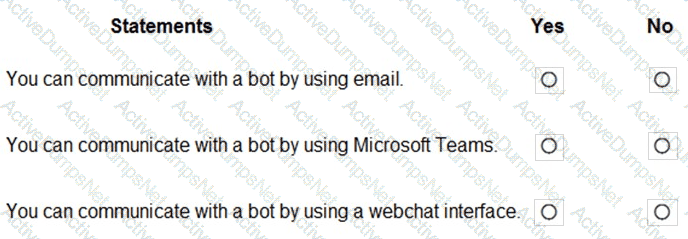
Options:
Answer:
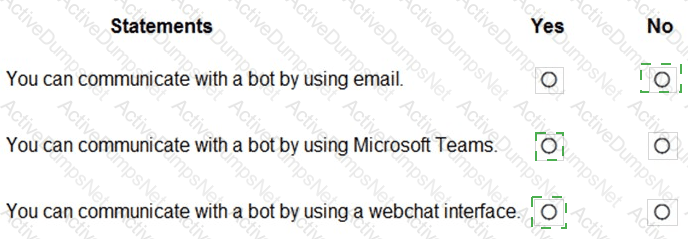
Explanation:
You can communicate with a bot by using email → No
You can communicate with a bot by using Microsoft Teams → Yes
You can communicate with a bot by using a webchat interface → Yes
These answers are based on the Microsoft Azure AI Fundamentals (AI-900) Official Study Guide and the Microsoft Learn module “Explore conversational AI in Microsoft Azure.”
The Azure Bot Service allows developers to build, test, deploy, and manage intelligent chatbots that can interact with users through various channels. Channels are communication platforms or interfaces that connect users to bots. Once a bot is built and published through the Azure Bot Service, it can be connected to multiple channels such as Microsoft Teams, webchat, Skype, Facebook Messenger, Direct Line, Slack, and others.
Let’s evaluate each statement:
You can communicate with a bot by using email → NoAzure Bot Service does not support direct interaction via email as a channel. Bots are designed for real-time or conversational interactions through messaging or voice-based platforms, not asynchronous email communication.
You can communicate with a bot by using Microsoft Teams → YesMicrosoft Teams is one of the primary channels supported by Azure Bot Service. Bots can be integrated directly into Teams to handle chat-based conversations, provide information, automate workflows, or assist users interactively within Teams.
You can communicate with a bot by using a webchat interface → YesThe Web Chat channel is another core feature of Azure Bot Service. It allows embedding the bot into a website or web application using the Web Chat control or the Direct Line API, enabling users to chat directly from a browser interface.
In summary, Azure Bot Service supports real-time conversational interfaces like Teams and webchat, but not email.
Which two scenarios are examples of a natural language processing workload? Each correct answer presents a complete solution.
NOTE; Each correct selection is worth one point.
Options:
assembly line machinery that autonomously inserts headlamps into cars
a smart device in the home that responds to questions such as, " What will the weather be like today?
monitoring the temperature of machinery to turn on a fan when the temperature reaches a specific threshold
a website that uses a knowledge base to interactively respond to users ' questions
Answer:
B, DExplanation:
The correct answers are B. a smart device in the home that responds to questions such as, " What will the weather be like today? " and D. a website that uses a knowledge base to interactively respond to users ' questions.
According to the Microsoft Azure AI Fundamentals (AI-900) official study guide and Microsoft Learn module “Identify features of Natural Language Processing (NLP) workloads on Azure”, Natural Language Processing (NLP) is a branch of artificial intelligence that enables computers to understand, interpret, and generate human language in a meaningful way. NLP bridges the gap between human communication and machine understanding, allowing systems to process both spoken and written language.
Option B – A smart device in the home that responds to questions such as “What will the weather be like today?”This is an example of an NLP workload because the device must process spoken language (speech-to-text), interpret the user’s intent (language understanding), and generate a relevant spoken response (text-to-speech). This workflow involves several Azure Cognitive Services, such as Speech Service for recognizing and synthesizing speech, and Language Understanding (LUIS) for interpreting intent. This aligns with conversational AI and NLP tasks in the AI-900 syllabus.
Option D – A website that uses a knowledge base to interactively respond to users’ questions.This is also an NLP workload because the system interprets text input from users and retrieves appropriate answers from a knowledge base. Microsoft’s QnA Maker (now part of the Azure AI Language service) and Azure Bot Service enable such behavior. The model uses NLP to understand the user’s question, find the most relevant response, and generate an appropriate reply — key characteristics of natural language processing.
Incorrect options:
A (assembly line machinery) represents automation or robotics, not NLP.
C (monitoring temperature to activate a fan) is an example of an IoT (Internet of Things) or rule-based system, not related to language processing.
Select the answer that correctly completes the sentence.

Options:
Answer:

Explanation:

According to the Microsoft Azure AI Fundamentals (AI-900) Official Study Guide and the Microsoft Learn module “Explore computer vision in Microsoft Azure,” computer vision is a field of artificial intelligence that enables computers to interpret and understand visual information from the world — such as images or videos.
In this scenario, the task is to count the number of animals in an area based on a video feed. This requires the system to:
Detect the presence of animals in each frame of the video (object detection).
Track and count them across multiple frames as they move.
These are classic computer vision tasks, as they involve analyzing visual inputs (video or image data) and identifying objects (in this case, animals). Azure provides services such as Azure Computer Vision, Custom Vision, and Video Indexer, which can perform object detection, counting, and activity recognition using AI models trained on visual datasets.
Why the other options are incorrect:
Forecasting: Involves predicting future values based on historical data (e.g., predicting sales or weather), not analyzing video feeds.
Knowledge mining: Focuses on extracting insights from large text-based document repositories, not images or videos.
Anomaly detection: Identifies unusual patterns in numeric or time-series data, not visual objects.
Therefore, identifying and counting animals in video footage falls under computer vision, since it uses AI to visually detect, classify, and quantify objects in real-time or recorded feeds.
When training a model, why should you randomly split the rows into separate subsets?
Options:
to train the model twice to attain better accuracy
to train multiple models simultaneously to attain better performance
to test the model by using data that was not used to train the model
Answer:
CExplanation:
When training a machine learning model, it is standard practice to randomly split the dataset into training and testing subsets. The purpose of this is to evaluate how well the model generalizes to unseen data. According to the AI-900 study guide and Microsoft Learn module “Split data for training and evaluation”, this ensures that the model is trained on one portion of the data (training set) and evaluated on another (test or validation set).
The correct answer is C. to test the model by using data that was not used to train the model.
Random splitting prevents data leakage and overfitting, which occur when a model memorizes patterns from the training data instead of learning generalizable relationships. By testing on unseen data, developers can assess true performance, ensuring that predictions will be accurate on future, real-world data.
Options A and B are incorrect because:
A. Train the model twice does not improve accuracy; model accuracy depends on data quality, feature engineering, and algorithm choice.
B. Train multiple models simultaneously refers to model comparison, not the purpose of splitting data.
Thus, the correct reasoning is that random splitting provides a reliable estimate of the model’s predictive power on new data.
What should you use to extract details from scanned images of contracts?
Options:
Azure Al Document Intelligence
Azure Al Immersive Reader
Azure OpenAI
Azure Al Search
Answer:
AExplanation:
The correct answer is A. Azure AI Document Intelligence (previously known as Form Recognizer). This Azure Cognitive Service is specifically designed to extract structured data and key information from scanned documents, forms, and contracts using advanced Optical Character Recognition (OCR) combined with machine learning models.
According to the Microsoft Learn module “Extract data from documents with Azure AI Document Intelligence”, this service enables automated data extraction from unstructured or semi-structured documents such as contracts, invoices, receipts, and purchase orders. It identifies key-value pairs, tables, and fields such as names, dates, amounts, and signatures. This makes it ideal for digitizing legal and business documents like contracts into structured formats that can be easily searched or stored in databases.
Azure AI Document Intelligence offers several model types:
Prebuilt models for common documents (invoices, receipts, business cards, etc.).
Custom models trained on your specific contract layouts.
Layout model for extracting raw text, tables, and structures.
The other options are incorrect:
B. Azure AI Immersive Reader enhances reading comprehension and accessibility but does not extract data from documents.
C. Azure OpenAI provides natural language generation and understanding but is not used for scanning or data extraction.
D. Azure AI Search indexes and searches textual or document content but relies on other services (like Document Intelligence) to extract the data first.
Therefore, to automatically extract details such as contract terms, names, dates, and signatures from scanned contract images, the best Microsoft AI service is A. Azure AI Document Intelligence
To complete the sentence, select the appropriate option in the answer area.
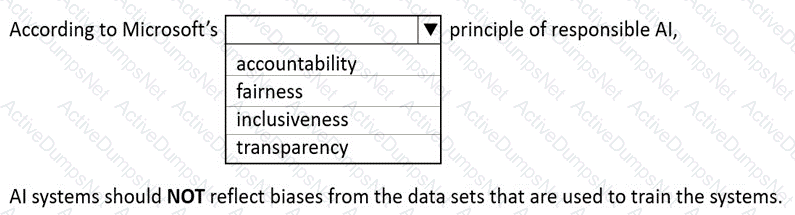
Options:
Answer:
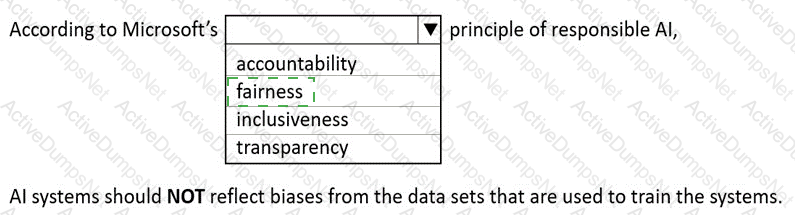
Explanation:
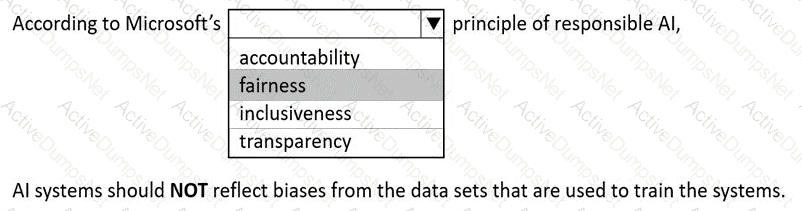
According to Microsoft’s Responsible AI principles, one of the six core principles is fairness, which ensures that AI systems treat all individuals equitably and that their outcomes are not influenced by biases present in the training data or algorithms. The official Microsoft Learn module “Identify the guiding principles for responsible AI” clearly defines fairness as the requirement that AI systems should not amplify or perpetuate existing societal biases.
In this scenario, the statement emphasizes that AI systems should NOT reflect biases from the datasets used to train them, which directly aligns with the fairness principle. Bias in AI models can arise when the data used for training is unbalanced or not representative of the real-world population. For instance, if a facial recognition model is trained mostly on images of one demographic group, it may perform poorly on others—an example of unfair bias. Microsoft advocates building and testing AI systems with diverse, high-quality datasets to ensure fair performance across all groups.
The other principles listed—accountability, inclusiveness, and transparency—are also important but do not directly address bias mitigation:
Accountability ensures that people remain responsible for AI systems and their decisions.
Inclusiveness promotes accessibility and usability for all people, including those with disabilities.
Transparency focuses on explaining how AI systems make decisions.
However, Fairness explicitly deals with avoiding discrimination and bias in AI outcomes and training data.
Thus, in Microsoft’s Responsible AI framework, ensuring that systems do not reflect biases from datasets is part of the Fairness principle, which promotes equitable and unbiased treatment for all individuals in AI-driven decisions.
Stating the source of the data used to train a model is an example of which responsible Al principle?
Options:
fairness
transparency
reliability and safety
privacy and security
Answer:
BExplanation:
According to Microsoft’s Responsible AI Principles, Transparency means that AI systems should clearly communicate how they operate, including data sources, limitations, and decision-making processes. Stating the source of data used to train a model helps users understand where the model’s knowledge comes from, enabling informed trust and accountability.
Transparency ensures that organizations disclose relevant details about data collection and model design, especially for compliance, fairness, and reproducibility.
Other options are incorrect:
A. Fairness: Focuses on avoiding bias and ensuring equitable outcomes.
C. Reliability and safety: Ensures AI performs consistently and safely.
D. Privacy and security: Protects user data and maintains confidentiality.
Thus, the principle illustrated by disclosing training data sources is Transparency.
In which two scenarios can you use speech recognition? Each correct answer presents a complete solution.
NOTE: Each correct selection is worth one point.
Options:
an in-car system that reads text messages aloud
providing closed captions for recorded or live videos
creating an automated public address system for a train station
creating a transcript of a telephone call or meeting
Answer:
B, DExplanation:
The correct answers are B and D.
Speech recognition, part of Azure’s Speech service, converts spoken audio into written text. It is a core feature of Azure Cognitive Services for speech-to-text scenarios.
Providing closed captions for recorded or live videos (B) – This is a typical application of speech recognition. The AI system listens to audio content from a video and generates real-time or post-event captions. Azure’s Speech-to-Text API is frequently used in broadcasting and video platforms to improve accessibility and searchability.
Creating a transcript of a telephone call or meeting (D) – Another common use case is automated transcription. The Speech service can process real-time audio streams (such as meetings or calls) and produce accurate text transcripts. This is widely used in customer service, call analytics, and meeting documentation.
The incorrect options are:
A. an in-car system that reads text messages aloud – This uses Text-to-Speech, not speech recognition.
C. creating an automated public address system for a train station – This also uses Text-to-Speech, since it generates spoken output from text.
Therefore, scenarios that convert spoken words into text correctly represent speech recognition, making B and D the right answers.
You are developing a conversational AI solution that will communicate with users through multiple channels including email, Microsoft Teams, and webchat.
Which service should you use?
Options:
Text Analytics
Azure Bot Service
Translator
Form Recognizer
Answer:
BExplanation:
According to the Microsoft Azure AI Fundamentals official study guide and Microsoft Learn module “Describe features of conversational AI workloads on Azure”, Azure Bot Service is the core Azure platform for building, testing, deploying, and managing conversational agents or chatbots. These bots can communicate with users across multiple channels, including email, Microsoft Teams, Slack, Facebook Messenger, and webchat.
Azure Bot Service integrates deeply with the Bot Framework SDK and Azure Cognitive Services such as Language Understanding (LUIS) or Azure AI Language, enabling natural language processing and multi-channel message delivery. The service abstracts away channel management, meaning that developers can build one bot logic that connects seamlessly to several communication platforms.
Option analysis:
A. Text Analytics is a Cognitive Service used for text mining tasks like key phrase extraction, language detection, and sentiment analysis — not for building chatbots.
C. Translator provides language translation but cannot manage conversations or multi-channel delivery.
D. Form Recognizer extracts structured information from documents and forms — unrelated to conversational interaction.
The AI-900 course explicitly defines Azure Bot Service as “a managed platform that enables intelligent, multi-channel conversational experiences between users and bots.” This service allows businesses to unify chat experiences across multiple digital communication channels.
Thus, based on the official Microsoft Learn content and AI-900 syllabus, the best and verified answer is B. Azure Bot Service, as it is the designated Azure solution for deploying a single conversational AI experience accessible from multiple platforms such as email, Teams, and webchat.
Select the answer that correctly completes the sentence.

Options:
Answer:

Explanation:

The correct completion of the sentence “_____ is an example of speech recognition.” is A voice-activated security key system.
According to the Microsoft Azure AI Fundamentals (AI-900) official study guide and Microsoft Learn module “Describe features of common AI workloads”, speech recognition refers to the ability of a system or application to convert spoken language into text or actionable commands. It allows computers to interpret and respond to human speech inputs, bridging human-computer interaction through natural language.
Microsoft Learn clearly explains that speech recognition is used in applications such as voice assistants, dictation software, and voice-activated security systems, where the spoken input from a user is captured, analyzed, and translated into commands or text. For example, when a user says “Unlock door” or “Open session,” the speech recognition system interprets that sound input, converts it into text or a command, and then performs the appropriate action. This is a direct implementation of speech-to-text processing combined with command execution logic.
Let’s analyze the other options:
Creating an audio commentary for a video recording is related to speech synthesis (text-to-speech), not recognition.
Creating captions for a video recording involves speech-to-text transcription, which is a subset of speech recognition, but the question emphasizes a system that responds to voice commands, making the first option more accurate.
Identifying key phrases in a video transcript involves natural language processing (NLP) techniques rather than speech recognition.
Therefore, the voice-activated security key system best represents the use of speech recognition technology because it interprets spoken commands and takes a corresponding action based on recognized speech patterns. This aligns directly with the AI-900 learning objectives where speech recognition is defined as a process that enables applications to interpret and respond to human voice input.
For each of the following statements, select Yes if the statement is true. Otherwise, select No.
NOTE: Each correct selection is worth one point.
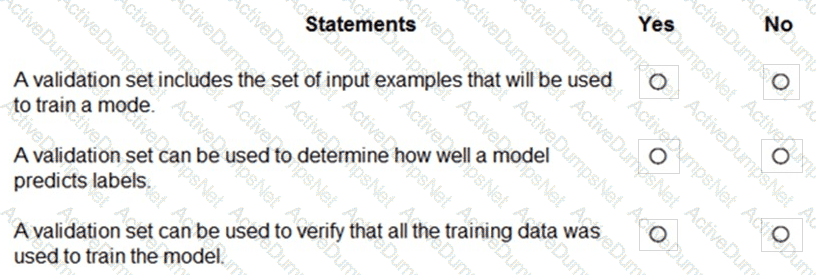
Options:
Answer:
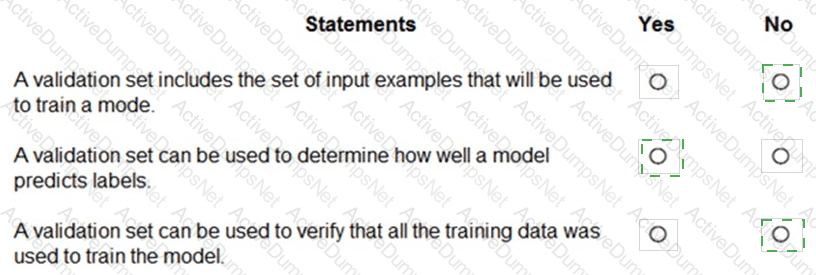
Explanation:
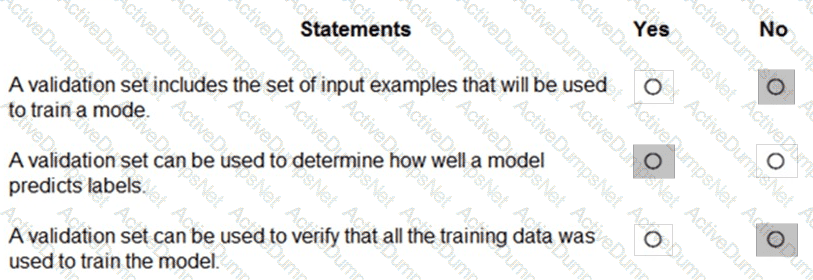
The correct answers are based on the Microsoft Azure AI Fundamentals (AI-900) Official Study Guide and the Microsoft Learn module “Explore fundamental principles of machine learning.”
In supervised machine learning, data is typically divided into three main subsets:
Training set – used to train the model, i.e., to teach the algorithm the patterns and relationships between input features and output labels.
Validation set – used to evaluate the model during training to tune hyperparameters and prevent overfitting.
Test set – used after training to assess the final model’s performance on unseen data.
Let’s analyze each statement in light of these definitions:
“A validation set includes the set of input examples that will be used to train a model.” → NoThis is incorrect because the training set, not the validation set, contains the input examples used for model training. The validation set is separate from the training data to ensure unbiased evaluation.
“A validation set can be used to determine how well a model predicts labels.” → YesThis is correct. The validation set helps assess how effectively the model generalizes during training. It measures performance and helps tune model parameters for optimal results.
“A validation set can be used to verify that all the training data was used to train the model.” → NoThis is false. The validation set is not used to verify the completeness of training data usage. It exists independently to evaluate the model’s performance during training cycles.
According to Microsoft Learn, using a validation set helps ensure that a model generalizes well and avoids overfitting to the training data. It plays a crucial role in refining and optimizing models before final testing.
Which type of machine learning should you use to predict the number of gift cards that will be sold next month?
Options:
classification
regression
clustering
Answer:
BExplanation:
According to the Microsoft Azure AI Fundamentals (AI-900) official study guide and Microsoft Learn module “Identify features of regression machine learning”, regression is the machine learning technique used when the goal is to predict a continuous numeric value based on historical data. In this question, predicting the number of gift cards that will be sold next month involves forecasting a quantity—a numeric outcome—which is the hallmark of a regression problem.
Regression models learn patterns from past data (for example, previous months’ gift card sales, seasonality, holidays, and marketing spend) and use that information to predict future sales. Common algorithms used for regression include linear regression, decision tree regression, and boosted regression trees. The output is a continuous value such as “2,450 gift cards expected next month.”
In contrast:
A. Classification is used when the output is categorical, such as predicting whether a transaction is “fraud” or “not fraud,” or whether a customer will “renew” or “cancel.” It answers questions with discrete classes rather than numeric values.
C. Clustering is an unsupervised learning technique used to group similar data points together based on their characteristics—for example, segmenting customers into behavior-based clusters. Clustering doesn’t predict future numeric outcomes.
The AI-900 curriculum explicitly explains that regression predicts numeric values, classification predicts categories, and clustering finds natural groupings in data.
Therefore, to predict the number of gift cards to be sold, the correct and verified machine learning type is Regression.
Final Answer: B. Regression
For each of the following statements, select Yes if the statement is true. Otherwise, select No.
NOTE: Each correct selection is worth one point.
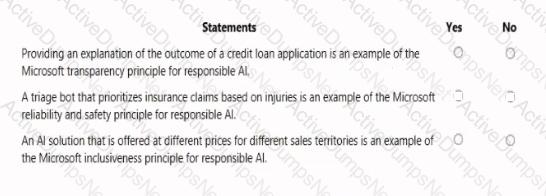
Options:
Answer:
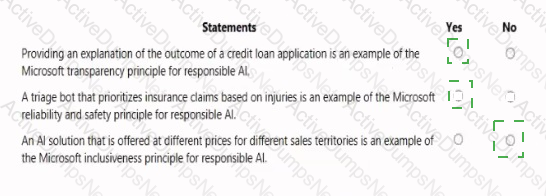
Explanation:
Statement
Yes / No
Providing an explanation of the outcome of a credit loan application is an example of the Microsoft transparency principle for responsible AI.
Yes
A triage bot that prioritizes insurance claims based on injuries is an example of the Microsoft reliability and safety principle for responsible AI.
Yes
An AI solution that is offered at different prices for different sales territories is an example of the Microsoft inclusiveness principle for responsible AI.
No
This question is based on the Responsible AI principles defined by Microsoft, which are part of the AI-900 Microsoft Azure AI Fundamentals curriculum. Microsoft’s Responsible AI framework consists of six key principles: Fairness, Reliability and Safety, Privacy and Security, Inclusiveness, Transparency, and Accountability. Each principle ensures that AI systems are developed and used in a way that benefits people and society responsibly.
Transparency Principle – YesProviding an explanation for a loan decision aligns with the Transparency principle. Microsoft defines transparency as helping users and stakeholders understand how AI systems make decisions. For example, when a credit scoring AI model approves or denies a loan, explaining the factors that influenced that outcome (such as credit history or income level) ensures that customers understand the reasoning process. This builds trust and supports responsible deployment.
Reliability and Safety Principle – YesA triage bot that prioritizes insurance claims based on injury severity relates directly to Reliability and Safety. This principle ensures AI systems operate consistently, perform accurately, and produce dependable outcomes. In the case of the triage bot, it must reliably assess the input data (injury descriptions) and rank claims appropriately to avoid harm or misjudgment, aligning with Microsoft’s emphasis on designing AI systems that are safe and robust.
Inclusiveness Principle – NoAn AI solution priced differently across sales territories is not related to Inclusiveness. Inclusiveness focuses on ensuring accessibility and eliminating bias or exclusion for all users—especially those with disabilities or underrepresented groups. Pricing strategy is a business decision, not an inclusiveness issue. Therefore, this statement is No.
In summary, based on the AI-900 Responsible AI principles, the correct selections are:
Match the tasks to the appropriate machine learning models.
To answer, drag the appropriate model from the column on the left to its scenario on the right. Each model may be used once, more than once, or not at all.
NOTE: Each correct selection is worth one point.
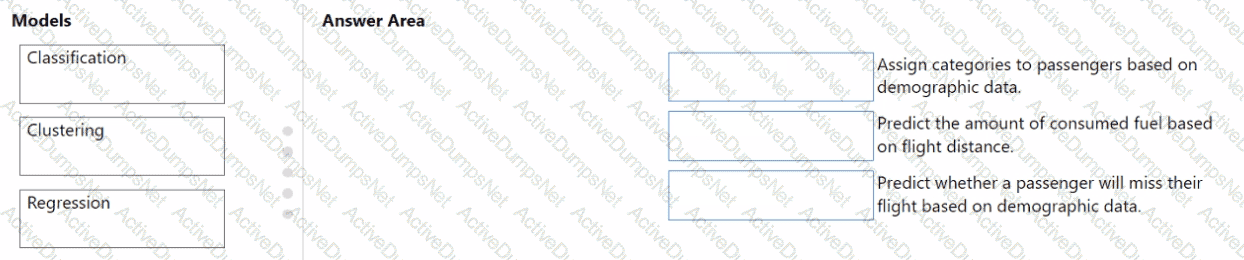
Options:
Answer:
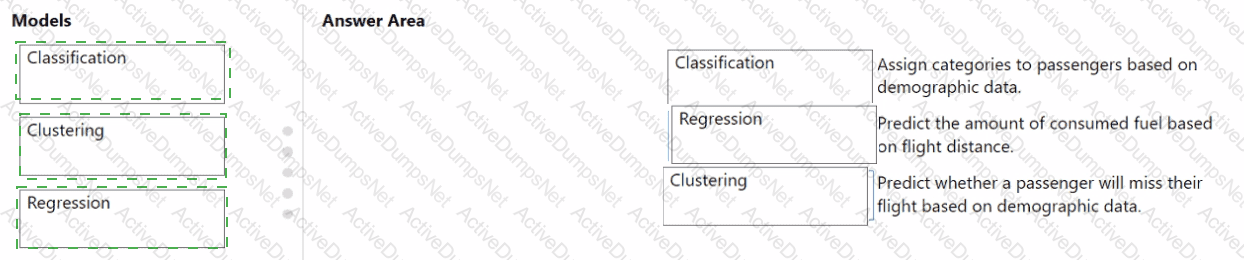
Explanation:
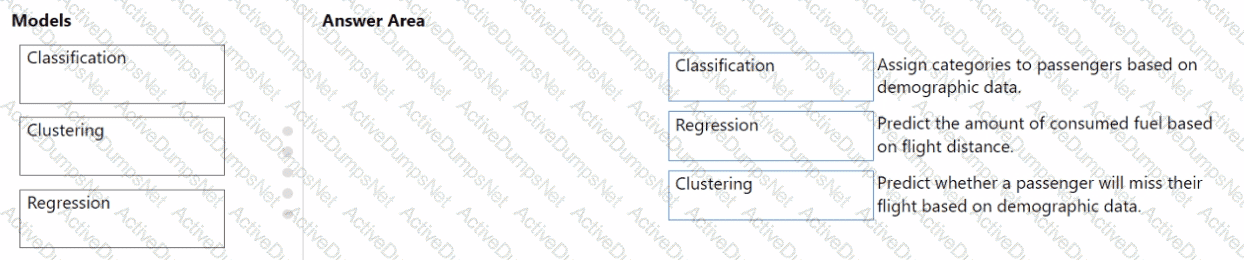
According to the Microsoft Azure AI Fundamentals (AI-900) study guide, the three main types of supervised and unsupervised machine learning models—classification, clustering, and regression—are used for distinct problem types depending on the structure of the data and the prediction goal.
Clustering is an unsupervised learning technique used when the goal is to group items with similar characteristics without predefined labels. In this scenario, “Assign categories to passengers based on demographic data” implies automatically grouping passengers based on patterns such as age, income, or travel frequency, without any prior labeling. This directly maps to clustering, which discovers hidden groupings (for example, segmenting customers into categories like business travelers or vacationers).
Regression is a supervised learning method used to predict continuous numerical values. The scenario “Predict the amount of consumed fuel based on flight distance” is a classic regression problem because the output (fuel consumption) is a continuous variable dependent on another continuous variable (distance). Regression models, such as linear regression, are trained to estimate numeric outputs.
Classification is also a supervised learning approach, but it predicts discrete categories or outcomes. The scenario “Predict whether a passenger will miss their flight based on demographic data” involves a binary decision (missed or not missed), which is typical of classification tasks. These models learn from labeled examples to assign new instances to specific categories.
In summary, Clustering groups similar passengers, Regression predicts continuous numerical outcomes, and Classification determines categorical outcomes. This alignment precisely matches the definitions in Microsoft’s AI-900 learning objectives under “Describe common machine learning types and scenarios.”
You have a natural language processing (NIP) model that was created by using data obtained without permission.
Which Microsoft principle for responsible Al does this breach?
Options:
privacy and security
inclusiveness
transparency
reliability and safety
Answer:
AExplanation:
According to the Microsoft Azure AI Fundamentals (AI-900) official study materials and Microsoft’s Responsible AI Principles, one of the core principles is “Privacy and Security.” This principle ensures that AI systems protect personal and sensitive information, maintaining compliance with privacy laws, data protection regulations, and ethical data-handling practices.
If a Natural Language Processing (NLP) model is created using data obtained without permission, it directly violates this principle. Data collected without proper consent breaches user privacy and potentially violates regulations such as GDPR (General Data Protection Regulation) or other global privacy frameworks.
The Privacy and Security principle emphasizes the following:
AI systems must ensure data collection and usage transparency.
Data must be lawfully acquired and used with consent.
Systems should protect data against unauthorized access or misuse.
In contrast:
Inclusiveness promotes accessibility and fairness for all users.
Transparency focuses on explaining how AI systems make decisions.
Reliability and safety ensure systems function as intended and minimize harm.
Therefore, using unapproved data clearly breaches Privacy and Security, as it involves unethical data sourcing and endangers user trust.
You have an Internet of Things (loT) device that monitors engine temperature.
The device generates an alert if the engine temperature deviates from expected norms.
Which type of Al workload does the device represent?
Options:
natural language processing (NLP)
computer vision
anomaly detection
knowledge mining
Answer:
CExplanation:
According to the Microsoft Azure AI Fundamentals (AI-900) Official Study Guide and the Microsoft Learn module “Explore fundamental principles of machine learning,” anomaly detection is a machine learning workload used to identify data points or patterns that deviate significantly from expected behavior.
In this scenario, the IoT device monitors engine temperature and generates alerts when the readings deviate from normal operating ranges. This directly matches the definition of anomaly detection, where the AI system learns what “normal” looks like and identifies outliers or abnormal conditions that may indicate potential issues.
Common real-world uses of anomaly detection include:
Detecting equipment malfunctions or overheating in IoT systems.
Identifying fraudulent transactions in finance.
Detecting unusual spikes or drops in system metrics (e.g., temperature, traffic, or pressure).
Other options are incorrect:
A. NLP (Natural Language Processing): Focuses on understanding and interpreting human language, not sensor data.
B. Computer Vision: Involves analyzing images or videos, which is unrelated to temperature data.
D. Knowledge Mining: Refers to extracting information from large document stores, not identifying abnormal readings.
Unlock AI-900 Features
- AI-900 All Real Exam Questions
- AI-900 Exam easy to use and print PDF format
- Download Free AI-900 Demo (Try before Buy)
- Free Frequent Updates
- 100% Passing Guarantee by Activedumpsnet
Questions & Answers PDF Demo
- AI-900 All Real Exam Questions
- AI-900 Exam easy to use and print PDF format
- Download Free AI-900 Demo (Try before Buy)
- Free Frequent Updates
- 100% Passing Guarantee by Activedumpsnet