
IFPUG I40-420 Certified Function Point Specialist Exam Practice Test
Certified Function Point Specialist Questions and Answers
- The Foreign Exchange System (FXS) allows banking operations to monitor trades processed from different foreign exchange trading systems which are located in London, New York and Hong Kong.
- The Trade logical file is maintained using a series of batch jobs which copy each of the three foreign exchange data sets into FXS usable format. Once processed, the Add Trade batch function loads the data Into the Trade logical file and adds a date/time stamp.
- A Daily Trade Detail report is produced listing all trades monitored. This report is sorted by trading location.
- Two monthly reports are produced. A Monthly Summary Trade report is produced that contains summary trade numbers by trading location. A Monthly Trade Monitoring report is produced that lists all trades monitored, is sorted by trade date and contains a consolidated trade value.
From the Names of Possible Functions listed identify the base functional components for the FXS application. Select N/A if a Name of Possible Function Type does not apply.
Identify the functions used:


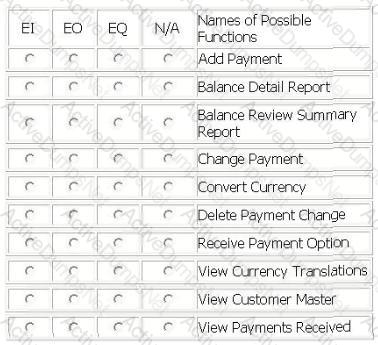
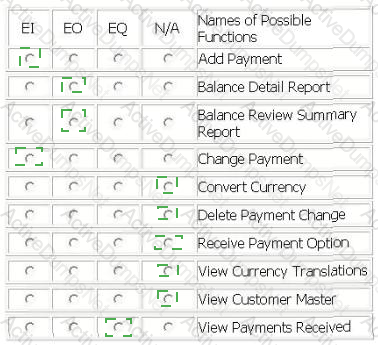
Several functions are outlined within the following scenario for the Accounts Receivable application:
- From the main menu, the user selects the receive payment option.
- The receive payment option opens a screen which allows the user to add or change payment information on the Payment Information logical file after performing an inquiry on payments received for the customer. The receive payment option updates the Customer Master logical file to store a current outstanding balance due. If there was no existing outstanding balance, the current balance is added to the Customer Master logical file.
- From the main menu, the user selects the balance review option.
- The balance review option accesses the Customer Master logical file and allows the user to create a summary report with customer balance totals.
- The balance review summary option accesses the Customer Master and Currency Translation logical files. A report is created that contains a comprehensive list of all past balance changes in both company standard currency and customer local currency.
From the Names of Possible Functions listed identify the transactional functions for the Accounts Receivable application. Select N/A if a Name of Possible Function does not apply.
Identify the functions used:
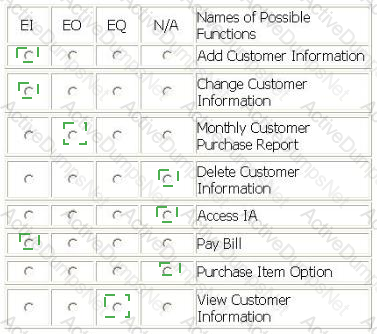
Several functions are outlined within the following scenario for the Internet Application (IA):
- From the company intranet the user selects the IA application.
- The purchase item option allows the user to pay their internet shopping bill, after performing inquiry selection of items for purchase. The pay bill option updates the Customer, Inventory and Purchase History logical files.
- If this is the user's first purchase, the Customer Information screen captures information about the customer and stores it on the Customer logical file. Once the customer information is saved and the customer chooses the next option, they are returned to the Pay Bill option.
- If the user is an existing customer, they may view their customer information. The customer has the option of changing their information, but cannot delete it.
- An itemized report totaling monthly customer purchases is created at the end of each month.
From the Names of Possible Functions listed identify the transactional functions for the IA application. Select N/A if a Name of Possible Function does not apply.
Identify the functions used:

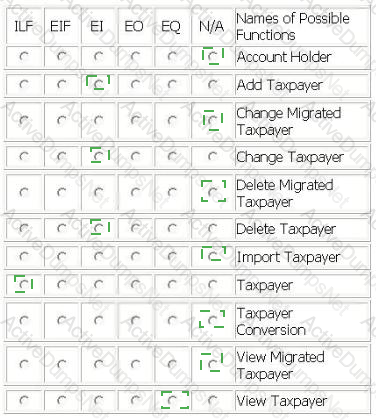
TAX APPLICATION
For the TAX application the user required the migration of existing taxpayer information (name, tax identification number, location name) to the TAX application. A conversion file with taxpayer data was created and imported into the Taxpayer logical file in the TAX application. The source of the data was the Account Holder logical file.
The user required the ability to Add, Change and Delete the taxpayer information in the Taxpayer logical file.
The user required the ability to View the taxpayer information prior to changing or deleting information.
From the Names of Possible Functions listed identify the base functional components for the TAX application baseline. Select N/A if a Name of Possible Functions does not apply.
Identify the functions used:

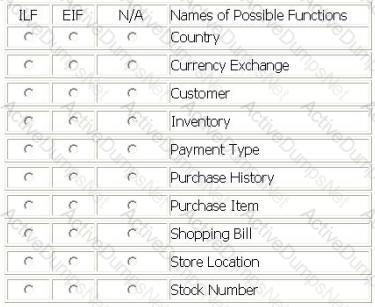
Several data functions are described in the scenario for the Internet Application (IA):
- The user may query store locations where an order can be picked up. The Store Location logical file is updated in the IA as new locations open
- The user may pay their internet shopping bill using the purchase item option. This option updates the Customer logical file with the date of purchase, the Inventory logical file with stock number and quantity, and Purchase History logical file with date, stock number, price and discounts applied.
- Prior to the completion of the purchase item option the purchase amount is converted from US dollars into the user' s local currency. The currency conversion requires reference data from the Currency Exchange logical file, which Is maintained through the Financial application. The Currency Exchange file is updated daily. The payment code is used to determine how the payment will be made.
- If this is the user's first purchase, customer Information is added to the Customer logical file. As part of adding customer information the Country file is referenced in order to store country code in the Customer logical file rather than country name.
From the Names of Possible Functions listed identify the data functions for the IA. Select N/A if a Name of Possible Function does not apply.
Identify the data functions used:

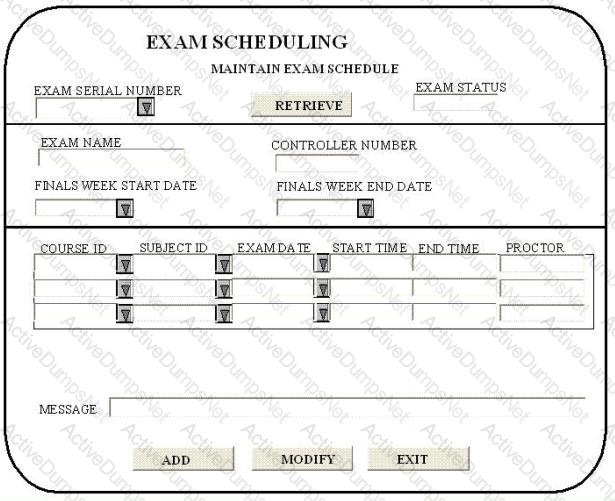
EXAM SCHEDULING APPLICATION (ESA) - EXAM SCHEDULING SCREEN
- The controller uses a screen to schedule exams for various courses and subjects. The exam serial number from the University Master logical file, maintained by the University Master Information application, is entered in the screen. On pressing the RETRIEVE key, the exam status, exam name, controller number, finals week start date and finals week end date are displayed.
- Detailed exam schedules stored within the Schedule logical file are also displayed on the screen as part of the RETRIEVE.
- By pressing the ADD key or MODIFY key, the user may add or update the course id, subject id, exam date, start time, end time, proctor and message using exam serial number as the key field. The data is saved in the Schedule logical file with the 'pending approval' in the exam status.
- Course id, subject id and exam date pick lists provide data from static tables.
- The exam date should be within the finals week start and end dates
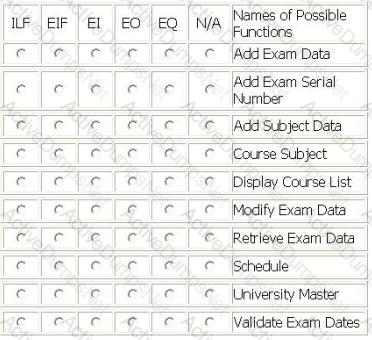
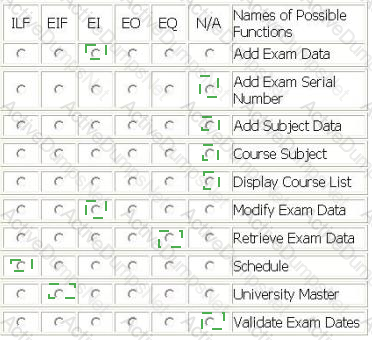
From the Names of Possible Functions listed identify the base functional components for the ESA application. Select N/A if a Name of Possible Function Type does not apply.
Identify the functions used:
The Robot Automation Program (RAP) is an application which allows factory technicians to create and edit the weld placement programs for various robots on the assembly line. Both transactions maintain the Weld Specification and Robot logical files.
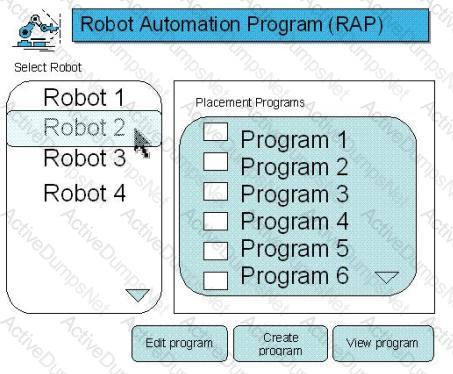
The use may select and view reboot details:
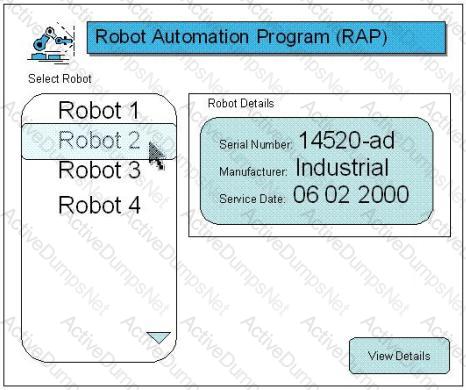
The user may print individual welding program details:

From the Names of Possible Functions listed identify the transactional functions for the RAP application. Select N/A if a Name of Possible Functions does not apply.
Identify the functions used:

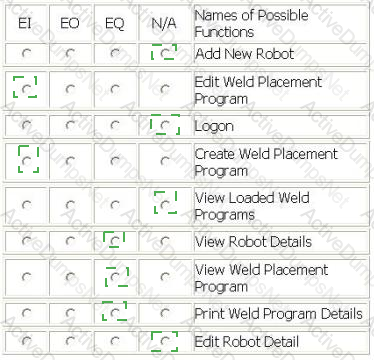
The Human Resources (HR) application includes functionality to maintain the Department logical file.
- The user enters a department number and presses the View button to display an existing department. An error message is displayed if the department does not exist.
- When the user adds or updates a department, the cost center is validated against the Cost Center logical file. The Cost Center logical file is maintained in the Payroll application.
- The user Adds a new department by entering department #, Name, phone #, mail stop, cost center and manager. The user completes the add by pressing the Add button. An error message displayed if the department # already exists.
- The user Updates information about the displayed department. Name, phone #, mail stop, cost center and manager may be changed. The user completes the update by pressing the Update button.
- The user Deletes the displayed department by pressing the Delete button.
- A manager must be selected using the Manager Drop Down list, which displays manager name and department number. The Employee logical file is maintained in the HR application and is the source for the Manager Drop Down list.
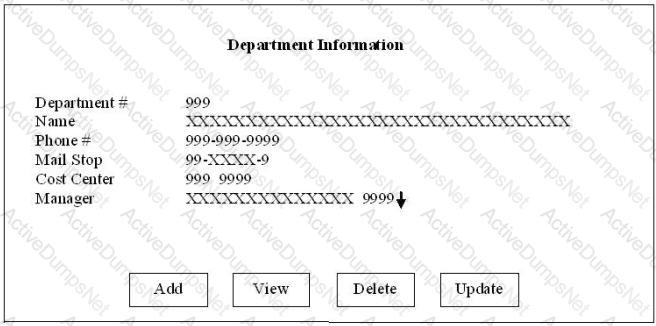
Determine the complexity for department transactions.
Select the complexity for each function.


LIBRARY INFORMATION SYSTEM (LIS) - REPORTS
LIS produces five reports:
• Text Out On Loan
- References Customer logical file
- References Text logical file
- Displays 8 fields
• Text Overdue
- References Customer logical file
- References Text logical file
- Displays 4 fields
• Text With Multiple Hold Requests
- References Text logical file
- References Publisher Guide logical file
- References Customer logical file
- Displays 25 fields
• Inventory List
- References Inventory logical file
- Displays 12 fields including 1 calculated field
• Text On Order
- References Order logical file
- References Publisher Guide logical file
- References Text logical file
- References Employee logical file
- Displays 15 fields including 2 calculated fields
Determine the complexity of the following functions.
Select the complexity for each function:


ITEM CHECK-OUT SCREEN
- Library employees use the Item Check-Out screen when a member is ready check out the book(s) and/or magazine(s) he wishes to borrow. The library employee enters the member id number, and when the employee exits the member id attribute, if the member id is valid, the member name is retrieved from the Member Information logical file and displayed in the member name attribute. The library employee enters the item type (b for book, m for magazine) and the item code; the item title is retrieved from the Book Information logical file and displayed in the item title attribute. The library employee then enters the lending date and the due date, and presses the Add button. The information is stored in the Check-Out logical file.
- Library employees use the Item Check-Out screen to update the due date of a book or magazine if a member requests additional lending time. The employee enters the member id number, and when the employee exits the member id attribute, if the member id is valid, the member name is retrieved from the Member Information logical file and displayed in the member name attribute, the library employee enters the item type (b for book, m for magazine) and the item code; the item title is retrieved from the Book Information logical file and displayed in the item title attribute and the lending date and due date are retrieved from the Check-Out logical file. The library employee then updates the due date, and presses the Update button. The new due date is stored in the Check-Out logical file.
- The head librarian receives two reports from the Library Check-Out application. The first report is the Overdue Report which is a list of overdue items categorized into < 30 days overdue, 30 - 90 days overdue and > 90 days overdue.
- The second report is the Low Usage Report that calculates which fiction books have not been checked out in the last 24 months and lists the title of those books. This report is run on demand. A High Usage Report with the number of times an item has been checked out has been put on hold and will not be released.
- A proposed Member Check-Out Report with a list of books checked-out and recommended titles will not be developed until privacy issues have been resolved.
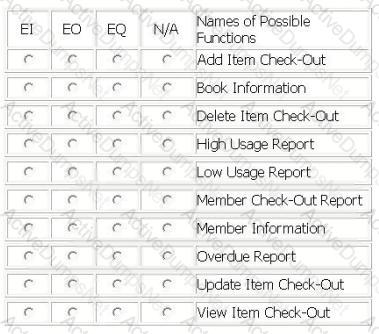
- From the Names of Possible Functions listed identify the transactional functions for the current Library Check-Out application. Select N/A if a Name of Possible Function does not apply.
Identify the functions used:

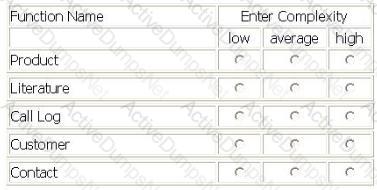
A Call Center (CC) application is being enhanced to track two new pieces of Information. The CC will reference the two new DETs in five modified data functions.
- Productlogical file prior to the enhancement had 2 RETs and 25 DETs, the CC application had previously referenced 12 of those DETs.
- Literaturelogical file previously referenced 5 RETs and 19 DETs. The two new DETs are being added to another RET NOT previously referenced.
- Call Log logical file prior to the enhancement had 2 RETs and 19 DETs, the CC previously referenced all the DETs.
- Customerlogical file prior to the enhancement had 1 RET and 36 DETs, the CC previously referenced only 25 of the DETs.
- Contactlogical file prior to the enhancement had 1 RET and 68 DETs, the CC previously referenced all DETs.
Determine the complexity of the following functions:
Select the complexity for each function:

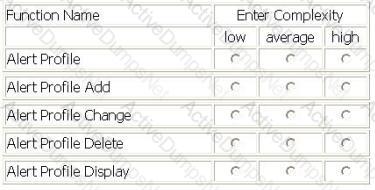
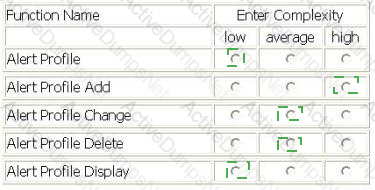
ALERT SYSTEM - ALERT NOTIFICATION
- Brokers use the Alert Profile screen to maintain the Alert Profile logical file. They can Add, Change, Delete and View alert information.
- Brokers also maintain a list of many securities to monitor. The securities information is considered to be part of the Alert Profile.
- The Alert Profile record is not considered complete until at least one security has been entered. The account number, alert contact name, alert phone number, and security id are required fields. The user is required to enter at least one of the remaining fields: low price threshold, high price threshold, and high volume threshold, they may enter values in all three.
- When an Alert Profile record is Added a validation is performed on the account number against the Account Master logical file and a validation on the securities against the Securities logical file.
- When Alert Profile records are Changed a validation is on the account number against the Account Master. All fields can be modified.
- No validations are performed for the Alert Profile View.
- When an Alert Profile record is Deleted the user must enter the account number, alert contact name, alert phone number. The account number is validated against the Account Master.
- Error messages are displayed whenever validations fail


Select the complexity of each function:
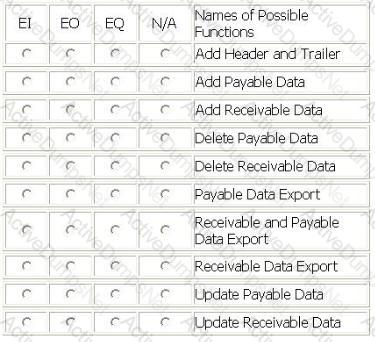
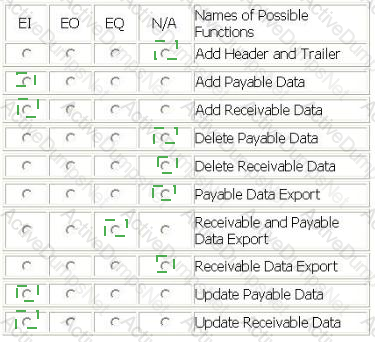
A Corporate Finance application is being developed.
The application adds or updates the Receivable logical file and the Payable logical file. The user requires that this information is sent to the Accounts application to keep accounting records consistent. The combined receivable and payable data is sent to the Accounts application daily at 8:00 PM.
When implementing a solution to send the receivable and payable information, it was decided to include a header and trailer record with the accounts information. These records are used by the Corporate Finance user to ensure that everything was technically correct when transmitting the file.
From the Names of Possible Functions listed identify the transactional functions for the Corporate Finance application. Select N/A if a Name of Possible Function does not apply.
Identify the functions used:
Which of the following statements is (are) true?
Which is the correct formula for calculating the AFP after an enhancement project?
Which is the primary difference between an 1LF and an EIF?
An application FP count is defined as:
"Requirements specifically requested by the user to complete an elementary process" defines which of the following terms?
Business data is defined as:
The functional complexity of an EO is based upon which of the following?
An FTR is be defined as a:
Data Element Type is defined as?
Control information is defined as data that:
The boundary for the function point count:
Which transactional function cannot alter the behavior of the application?
In the formula DFP = ADD + CFP, CFP denotes?
Within the Human Resources Application, information for an employee is added by entering general information. In addition to the general information, the employee is either a salaried employee or hourly employee. Each type of employee has unique attributes. Either type of employee can have information about dependents. How many RETs are described in this scenario?
The user requirements call for a model stock portfolio list to be created. The user will be able to enter selection criteria for the equities to be included in the model stock portfolio list. There is another requirement for the user to be able to save the selection criteria. How many elementary processes would be counted?
At the end of each month, Application A sends a transaction file to Application B. The transaction file contains a listing of item information including item number, item description and item price. All three attributes in the transaction file are contained in the Item ILF in Application A. For Application A, how would the elementary process be measured?
An enhancement project adds one new attribute to each of 10 ILFs. The 10 EIs that maintain these ILFs also include the new attribute. Before the enhancement, the ILFs each had 1 RET and 15 DETs, and the EIs each had 1 FTR and 15 DETs. What is the EFP for the enhancement project?
The CCY application maintains the Currency Exchange file. The Currency Exchange file is copied into the Customer application on a daily basis to improve timely access to the data. The Customer application references the Currency Exchange file for all its transactions. How would the Currency Exchange file be counted in the Customer application?

For the scenario above calculate the FP.
The Job Management application includes the following:
- Three files of business data: Employee, Job, and Invoice
- Job Rates file contains data that is stored in order to process the business rules against the business data.
- The Payment Type file is identified by the developer In response to the technical requirements of the users.
Which of these files are candidates for counting as logical files (ILF or EIF)?
An application retrieves records from a data store and displays the retrieved data on an HTML page. The HTML page contains a scroll bar to view all of the attributes. A user must scroll down through 4 screens of information to see all of the attributes contained on the HTML page. How is this counted?
Which can NOT be en EQ?
Which requirement(s) would be accounted for using only the GSCs?
Four different country managers require a report about the sales turnover for their respective countries. Country managers 1 and 2 require the data to be sorted in the ascending order of the sales, whereas country mangers 3 and 4 require the data to be sorted in the ascending order of sales and profit. How many elementary processes would be counted for the sales turnover report?