
- Home
- DELL EMC
- PowerFlex Design
- D-PWF-DS-23
- D-PWF-DS-23 - Dell PowerFlex Design 2023 Exam
DELL EMC D-PWF-DS-23 Dell PowerFlex Design 2023 Exam Exam Practice Test
Dell PowerFlex Design 2023 Exam Questions and Answers
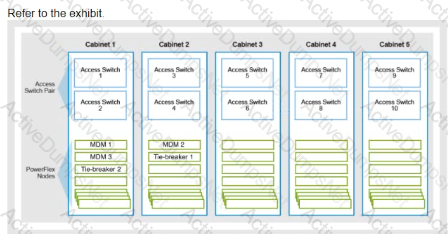
A customer recently expanded their PowerRex rack solution from two cabinets to five cabinets What should be done to optimize redundancy of the MDM roles?
Options:
Move MDM 3 Tie-breaker Land Tie-breaker 2 to separate cabinets
Add Standby MDMs to Cabinet 3 Cabinet 4 and Cabinet 5.
Change the MDM Cluster Mode from three-node to five-node
Consolidate MDM 2 and Tie-breaker 1 into Cabinet 1
Answer:
BExplanation:
When expanding a PowerFlex rack solution, optimizing the redundancy of the MDM roles is crucial to maintain system resilience and availability. The best practice in such a scenario is to distribute the MDM roles across the available cabinets to prevent a single point of failure. This can be achieved by adding Standby MDMs to the newly added cabinets1.
Here’s a step-by-step explanation:
- Assess the current MDM configuration: Understand the current setup of MDMs and Tie-breakers in the existing cabinets.
- Plan for distribution: Decide on how to distribute the MDM roles across the expanded infrastructure to enhance redundancy.
- Add Standby MDMs: Introduce Standby MDMs in the new cabinets (Cabinet 3, Cabinet 4, and Cabinet 5) to ensure that each cabinet has an MDM role, enhancing the fault tolerance of the system.
- Configure Standby MDMs: Properly configure the Standby MDMs to take over in case the Primary or Secondary MDMs fail.
- Test the configuration: After adding the Standby MDMs, test the system to ensure that the MDM roles can failover smoothly without impacting the system’s performance or availability.
By adding Standby MDMs to the new cabinets, you ensure that the MDM roles are not concentrated in a single cabinet, which could lead to a higher risk of system downtime if that particular cabinet encounters issues. This approach aligns with the best practices for designing resilient and high-availability systems1.
The other options do not provide the same level of redundancy optimization. For instance, moving MDM 3, Tie-breaker 1, and Tie-breaker 2 to separate cabinets (Option A) does not address the need for additional Standby MDMs in the new cabinets. Changing the MDM Cluster Mode from three-node to five-node (Option C) is not necessary for redundancy and may introduce unnecessary complexity. Consolidating MDM 2 and Tie-breaker 1 into Cabinet 1 (Option D) would reduce redundancy rather than optimize it.
Therefore, the correct answer is B. Add Standby MDMs to Cabinet 3, Cabinet 4, and Cabinet 5, as it provides a distributed and resilient MDM configuration suitable for an expanded PowerFlex rack solution.
Which policy determines the priority of reconstructing data after a failure?
Options:
Rebalance throttling
Rebuild throttling
Checksum Implementation
Checksum protection
Answer:
BExplanation:
The policy that determines the priority of reconstructing data after a failure in a PowerFlex system is the Rebuild throttling policy. This policy is designed to manage the speed and resources allocated to the rebuild process, which is critical for restoring data redundancy and integrity after a failure occurs1.
The rebuild process in PowerFlex is a high-priority operation that ensures data is reconstructed across the remaining nodes and drives in the storage pool to maintain the desired levels of protection. The Rebuild throttling policy allows administrators to configure the impact of rebuild operations on the overall performance of the system, ensuring that while data reconstruction is prioritized, it does not significantly degrade the performance of production workloads1.
Rebalance throttling (Option A) is related to the process of redistributing data across the storage pool to maintain balance but is not directly concerned with the immediate reconstruction of data after a failure. Checksum Implementation (Option C) and Checksum Protection (Option D) are related to data integrity verification methods but do not determine the priority of data reconstruction.
Therefore, the correct answer is B. Rebuild throttling, as it is the policy that specifically governs the prioritization and management of data reconstruction activities following a failure in the PowerFlex system.
Where must a customer go to generate a software troubleshooting bundle?
Options:
PowerFlex Manager Events and Alerts
PowerFlex Manager Serviceability
iDRAC Lrfecycle Controller
CloudLmk Center Console
Answer:
BExplanation:
To generate a software troubleshooting bundle for PowerFlex, a customer must navigate to the PowerFlex Manager Serviceability. The steps to generate the bundle are as follows1:
- Log in to PowerFlex Manager.
- Choose ‘Settings’ from the menu.
- Within the Settings menu, select ‘Virtual Appliance Management’.
- Choose ‘Generate Troubleshooting Bundle’.
- In the popup window, the customer has the option to either send the bundle to Configured Secure Remote Services (Secure Remote Services) or download it locally. If downloading locally, select the path for the downloads and enter the appropriate login information, then click ‘Generate’.
This process is part of the serviceability features of PowerFlex Manager, which provides tools for system maintenance and troubleshooting. It is important to follow these steps carefully to ensure that the troubleshooting bundle is generated correctly and contains all the necessary information for diagnosing issues within the PowerFlex system.
Which two aspects must be in place before adding a Fault Set? (Select 2)
Options:
Protection Domain
Storage Pools
Acceleration Pool
Resource Group
Answer:
A, BExplanation:
Before adding a Fault Set in PowerFlex, two critical aspects must be in place: a Protection Domain and Storage Pools.
- Protection Domain: This is a logical grouping of storage resources that share the same protection policy and fault tolerance settings. It defines the boundaries of failure domains and is essential for ensuring data availability and resilience1.
- Storage Pools: These are collections of storage media across multiple nodes within a Protection Domain. Storage Pools provide the physical storage where data is actually placed. They are necessary for the creation of volumes and for the distribution of data across the system1.
Fault Sets are used to group nodes that share a common risk of failure, such as being in the same rack or power circuit. When creating Fault Sets, it’s important that they are defined within an existing Protection Domain and utilize the storage resources allocated within Storage Pools. This ensures that data remains available and protected even if a Fault Set fails, as the system can rebuild the data using the remaining Fault Sets and Storage Pools1.
The information provided here is based on the best practices and design principles outlined in Dell PowerFlex documentation, which details the requirements for setting up and configuring various components of the PowerFlex system, including Fault Sets1.
For what reason would an administrator choose to set the Force Clean SDS option to YES when adding devices to an SDS In the PowerFlex system?
Options:
Ensure that the device Is error-free and compatible with PowerFlex
Bypass restrictions and proceed with adding The device
Perform a clean check on the device before adding II
Overwrite existing data on the device during the addition process
Answer:
DExplanation:
The “Force Clean” option in PowerFlex is used when adding devices to an SDS (Storage Data Server) to ensure that any existing data on the device is overwritten during the addition process. This is particularly important when repurposing storage devices that may have been previously used and contain old data or configurations that could interfere with the new PowerFlex deployment1.
Setting the Force Clean SDS option to YES will initiate a process that clears any residual data from the device, effectively returning it to a clean state before it is integrated into the PowerFlex system. This step is crucial for maintaining data integrity and preventing potential conflicts that could arise from leftover data on the devices1.
The other options, such as ensuring the device is error-free and compatible with PowerFlex (Option A), performing a clean check on the device before adding it (Option C), or bypassing restrictions to proceed with adding the device (Option B), are not directly related to the purpose of the Force Clean SDS option. While compatibility checks and clean checks are important, they do not involve actively overwriting data on the device.
Therefore, the correct answer is D. Overwrite existing data on the device during the addition process, as it accurately describes the action taken when the Force Clean SDS option is set to YES in the PowerFlex system.
An administrator is migrating a vTree for a snapshot to a different storage pool What is a restriction few the migration''
Options:
There are volumes that are involved in the replication process.
The volume is a source volume of a snapshot policy between storage pools with the same data layout
The vTree contains an auto-created snapshot
The migration is between storage pools with a different data layout with multiple volumes in the vTree
Answer:
DExplanation:
When migrating a vTree for a snapshot to a different storage pool in PowerFlex, one of the restrictions is that the migration cannot occur between storage pools with different data layouts if multiple volumes are involved in the vTree. This is because the data layout is fundamental to how data is organized and managed within the storage pool, and migrating multiple volumes with different data layouts could lead to inconsistencies and potential data integrity issues.
Here’s a more detailed explanation:
- Data Layout Compatibility: For a successful migration, the source and target storage pools should have compatible data layouts. Migrating vTrees that span multiple volumes between storage pools with different data layouts is restricted because it could disrupt the organization and accessibility of the data1.
- Single Volume Migration: While it is possible to migrate a single volume vTree between storage pools with different data layouts, doing so with multiple volumes in the vTree is not supported due to the complexity and risk involved1.
This restriction ensures that the integrity of the data is maintained during the migration process and that the storage system continues to operate reliably. It is important to consult the PowerFlex documentation, such as the “Configure and Customize Dell PowerFlex” guide, for detailed information on supported migration scenarios and restrictions1.
An administrator is using SCLI commands to monitor the cluster
On which MDM are the commands performed?
Options:
Tie-breaKer
Standby
Primary
Secondary
Answer:
CExplanation:
In a PowerFlex system, the SCLI (ScaleIO Command Line Interface) commands are typically performed on the Primary MDM (Metadata Manager). The Primary MDM is responsible for the overall management and operation of the cluster, including configuration changes and monitoring1. It is the authoritative source for metadata and cluster configuration, making it the primary point of interaction for administrative tasks.
The Tie-breaker and Standby MDMs serve as part of the high availability setup. The Tie-breaker MDM is used to avoid split-brain scenarios, and the Standby MDM is a backup that can take over the role of the Primary MDM if it fails. The Secondary MDM works in conjunction with the Primary MDM to manage the cluster but does not serve as the main point for executing SCLI commands.
Therefore, the correct answer is C. Primary, as it is the MDM where SCLI commands are executed for monitoring and managing the PowerFlex cluster.
An administrator is adding an NVMe device to an existing storage pool They provide the following details in the Add Storage Device to SDS dialog box
• Device Path /dev/disk/by-id'Dell_Express_Flash_NVMe_PM1725_V6TB_SFF_ _S2JPNA0J500141
• Device Name NVMe A. 1.6 TB
• Storage Pool SP-1
What is the result of this action'?
Options:
The device addition fails due to an invalid path
The device is named "NVMeAt 6 TB" and added to the Storage Pool "SP-1".
The device name is truncated to "NVMe" and added lo the Storage Pool "SP-t"
The device addition tails due to invalid characters in the name
Answer:
AExplanation:
When adding an NVMe device to an existing storage pool in PowerFlex, the details provided in the “Add Storage Device to SDS” dialog box must be accurate and follow the correct syntax. In the scenario provided, the device path contains an invalid character (an apostrophe) and an incorrect format, which would cause the device addition to fail.
Here’s a breakdown of the process and where the error occurs:
- Device Path: The device path should be a valid Linux device path, typically starting with /dev/disk/by-id/. The path provided contains an apostrophe (') which is not a valid character in Linux file paths and would result in an error1.
- Device Name: The device name should be a simple identifier without spaces or special characters. The name provided, “NVMe A. 1.6 TB”, contains spaces and periods, which are not typical for device names and could potentially lead to issues, although the primary cause of failure is the invalid device path1.
- Storage Pool: The storage pool name “SP-1” is a valid identifier, but it is contingent on the correct device path and name for the device to be added successfully.
The result of the action, given the invalid device path, would be that the device addition fails. It is crucial to ensure that all details entered in the dialog box adhere to the expected formats and do not contain invalid characters to avoid such failures.
This explanation is based on the standard practices for device path naming conventions in Linux systems and the configuration guidelines for PowerFlex systems as described in Dell’s official documentation1. Correcting the device path by removing the invalid character and ensuring the proper format would resolve the issue and allow the device to be added to the storage pool successfully.
A customer is adding more storage (o their system that requires compression Which two components are required? (Select 2)
Options:
At least two NVDIMMs in each server
Fine Granularity Storage Pool
Medium Granularity Storage Pool
At least two NVMe disks in each server
At least two SSD disks in each server
Answer:
A, BExplanation:
For a PowerFlex system that requires compression, the necessary components include NVDIMMs and a storage pool with fine granularity. Here’s why these two components are required:
- NVDIMMs: Non-Volatile Dual In-line Memory Modules (NVDIMMs) provide high-speed DRAM performance coupled with flash-backed persistent storage. They are used specifically for compression on PowerFlex storage-only nodes. At least two NVDIMMs per server are required if storage compression is active1.
- Fine Granularity Storage Pool: Inline compression in PowerFlex is enabled when using the fine-granularity data layout for storage pools. This granularity level allows for more efficient data compression and storage optimization2.
These components work together to enable compression in the PowerFlex system, ensuring efficient storage utilization and performance. The use of NVDIMMs for compression enhances the system’s ability to handle the additional workload associated with compressing data, while the fine granularity storage pool provides the necessary structure for data layout that supports compression12.
What is the maximum number of SDSs per protection domain of the PowerFlex rack?
Options:
256
128
64
Answer:
BExplanation:
The maximum number of Storage Data Servers (SDSs) per protection domain in a PowerFlex rack is 1283. This is specified in the PowerFlex specification sheet and ensures that each protection domain can provide data protection for a significant number of SDSs, allowing for scalability and resilience within the PowerFlex infrastructure.
What is the purpose of tree quotas in PowerFlex?
Options:
Limit the overall I/O to a specific directory on the file system
Limit the overall storage capacity of the file system
Limit the maximum size of a directory on the file system.
Answer:
CExplanation:
Tree quotas in PowerFlex are used to limit the maximum size of a directory on the file system. They are a way to manage and control the amount of disk space that can be used by a specific directory and its subdirectories. By setting tree quotas, administrators can ensure that no single directory consumes more space than intended, which helps in maintaining a balanced utilization of storage resources across the file system.
Here’s how tree quotas function:
- Setting Quotas: Administrators define tree quotas by specifying a maximum size limit for a directory.
- Enforcement: Once set, the system enforces these limits, ensuring that the total size of the directory does not exceed the specified quota.
- Monitoring: Tree quotas also allow for monitoring of storage usage, providing insights into how storage is being consumed by different directories.
The purpose of tree quotas is not to limit the overall I/O or the total storage capacity of the file system but to provide a mechanism for controlling and monitoring the storage usage at the directory level within the file system1.
This explanation aligns with the information provided in the Dell PowerFlex documentation, which details the configuration and management of storage resources, including the implementation and purpose of tree quotas1
A user leverages Postman lo send an API request What is the default format of the request1?
Options:
XML
JAVA
JSON
CSV
Answer:
CExplanation:
When using Postman to send an API request, the default format for the request body is JSON (JavaScript Object Notation). JSON is a lightweight data-interchange format that is easy for humans to read and write and easy for machines to parse and generate. It is commonly used in API communication because it is language-independent and can be used with most modern programming languages12.
Here’s why JSON is the default format:
- Human-readable: JSON structures are clear and understandable, making it easy for developers to work with.
- Widely supported: JSON is supported by a vast number of APIs and is often the preferred format for RESTful web services.
- Efficient: JSON’s lightweight nature makes it efficient for network transmission.
While Postman can handle other formats like XML (Option A) and CSV (Option D), and you can write scripts in languages like Java (Option B), JSON remains the default choice for structuring the body of an API request12.
Unlock D-PWF-DS-23 Features
- D-PWF-DS-23 All Real Exam Questions
- D-PWF-DS-23 Exam easy to use and print PDF format
- Download Free D-PWF-DS-23 Demo (Try before Buy)
- Free Frequent Updates
- 100% Passing Guarantee by Activedumpsnet
Questions & Answers PDF Demo
- D-PWF-DS-23 All Real Exam Questions
- D-PWF-DS-23 Exam easy to use and print PDF format
- Download Free D-PWF-DS-23 Demo (Try before Buy)
- Free Frequent Updates
- 100% Passing Guarantee by Activedumpsnet